
You sit in the exam room, and your oncologist asks, “So, how have you been feeling the last few weeks?” Suddenly, it’s hard to recall the specifics. Was the nausea worse in the morning? Did that headache last one day or three? Giving your care team a clear picture is crucial, but memory can be unreliable under stress. Using an app for managing chemotherapy side effects solves this problem. It helps you create a detailed, real-time log of your symptoms, mood, and medications. You walk into your appointments prepared with clear data, ready to have a productive conversation about your care.
View your personalized treatment plan in the Outcomes4Me app
Use your diagnosis to unlock personalized NCCN Guidelines®-aligned recommendations.
Key Takeaways
- Turn Your Daily Experiences into Better Care: By consistently tracking your physical and emotional symptoms, you provide your care team with the specific details they need to personalize your treatment and manage side effects more effectively.
- Let an App Handle the Details: Use a dedicated app to manage medication schedules, appointment notes, and questions for your doctor, which helps you stay organized and frees up mental energy when dealing with chemo brain.
- Combine Digital Tools with Human Support: While an app is a powerful starting point, integrate it with other resources like online patient communities, telehealth services, and mental health counseling to build a complete support network.
Why is it so important to track chemotherapy side effects?
When you’re going through chemotherapy, adding another task to your plate can feel like the last thing you need. But consistently tracking your side effects is one of the most empowering steps you can take in your treatment. Think of it as gathering essential information for your care team. When you can provide specific details—not just “I felt sick,” but “I was nauseous for two hours after my morning medication”—they can give you more targeted and effective advice to help you feel better.
Keeping a log of your chemotherapy side effects is also about being proactive. Some symptoms, like nausea, are much easier to prevent than to manage once they’ve already started. By noticing the early signs and patterns, you and your doctor can get ahead of them, which can make a huge difference in your daily quality of life. This detailed feedback allows your oncology team to truly personalize your care plan. Everyone reacts to treatment differently, and if severe fatigue or other issues are impacting you, your team needs to know. They might be able to adjust your schedule or prescribe supportive medications to help.
Finally, remember that tracking goes beyond the physical. The emotional and cognitive challenges of treatment are just as real and important. Many people experience anxiety, depression, or memory fogginess, often called “chemo brain.” Noting these changes gives you and your care team a complete picture of your health, ensuring every aspect of your well-being is seen and supported.
How an app can help you manage chemo side effects
When you’re going through chemotherapy, keeping track of everything can feel like a full-time job. Between appointments, medications, and new symptoms, it’s easy to feel overwhelmed. This is where a good app can become an indispensable tool, acting as a personal health assistant right in your pocket. Instead of juggling notebooks and sticky notes, you can centralize all your important information in one secure, accessible place.
One of the biggest challenges many people face is “chemo brain,” a common side effect that can cause memory fog and difficulty concentrating. An app can help you manage these cognitive side effects by providing a space to quickly jot down questions for your doctor, set reminders for medications, and keep track of your appointments. It takes the pressure off your memory so you can focus on your well-being.
Furthermore, apps provide a structured way to track your symptoms. When your oncologist asks how you’ve been feeling, having a detailed log of your side effects—what they were, when they occurred, and how severe they were—is incredibly valuable. This clear, consistent data helps your care team make informed decisions about your treatment plan and find better ways to manage your side effects. Many apps for cancer patients are designed specifically to help you organize this information, turning your personal experiences into powerful data for your care. Plus, features like medication reminders can be a game-changer, ensuring you stay on schedule with the treatments meant to ease your symptoms.
The 6 best apps for managing chemotherapy side effects
Going through chemotherapy is tough, and managing the side effects can feel like a full-time job. Thankfully, you don’t have to do it alone. There are some fantastic apps designed to help you track symptoms, remember medications, and find support when you need it most. Think of them as a digital toolkit to help you feel more in control of your health journey. We’ve gathered six of the best apps that can make a real difference in managing your day-to-day life during treatment.
Outcomes4Me
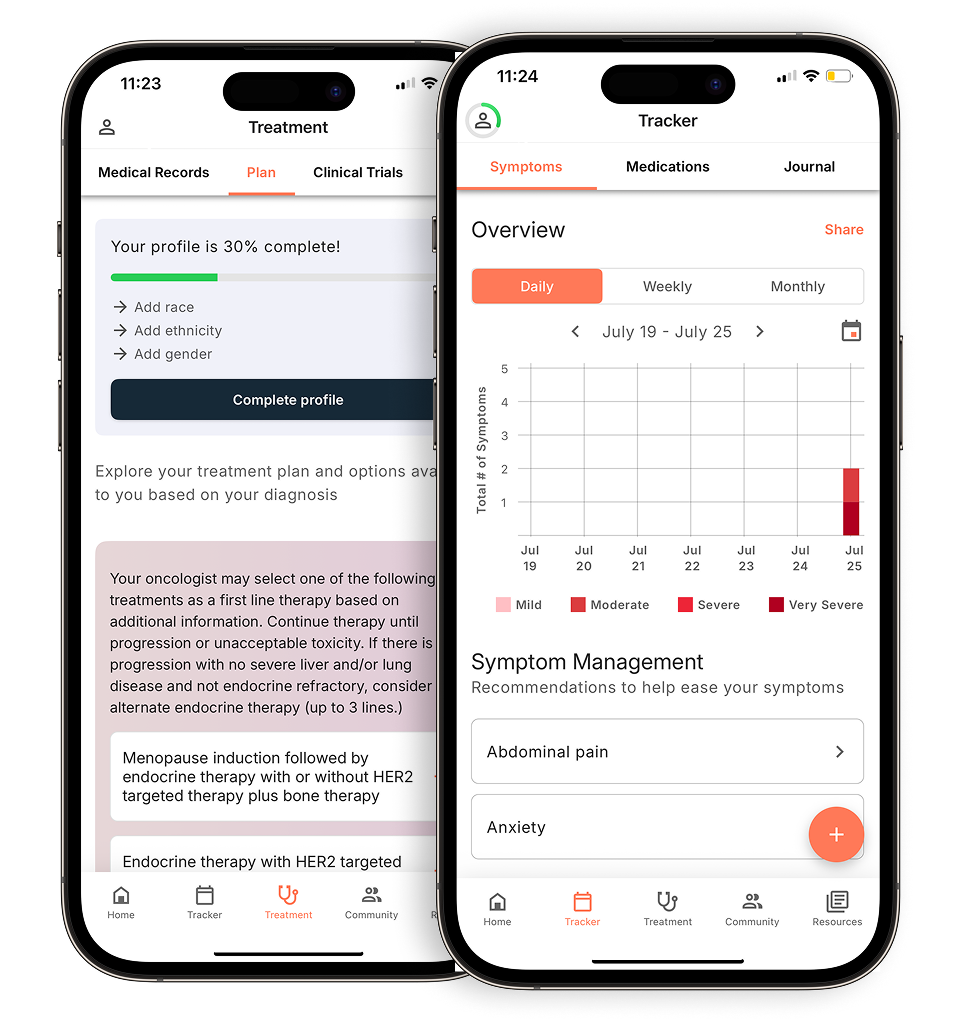
The Outcomes4Me app is a powerful tool designed to put evidence-based information directly into your hands. It’s the only app that integrates with the National Comprehensive Cancer Network (NCCN) Guidelines® and presents them in a way that’s easy to understand. After you securely provide your medical information, the app offers personalized guidance based on your specific diagnosis. This includes potential treatment options, information on relevant clinical trials, and symptom management tools. It helps you keep everything organized in one place, making it easier to have informed conversations with your oncology team and actively participate in your care decisions. It’s like having a personal navigator for your cancer journey, right on your phone.
Cancer.Net Mobile
Developed by the American Society of Clinical Oncology (ASCO), Cancer.Net Mobile is a trustworthy resource for information on more than 120 types of cancer. This app is great for helping you stay organized and informed. You can use it to track your symptoms and side effects over time, which can provide valuable insights for you and your doctor. It also has features to help you record questions for your care team, take notes during appointments, and log all your medications. You can even take pictures of your prescription bottles to keep a visual record. It’s a comprehensive tool for managing the practical aspects of your cancer care.
LivingWith: Cancer Support
Managing cancer is about more than just medical treatments; it’s also about having a strong support system. The LivingWith app is designed to help you connect with your personal circle of friends and family. You can share health updates with a private group and even ask for help with specific tasks, like getting a ride to an appointment or having a meal delivered. This makes it easier for your loved ones to know how they can support you in practical ways. The app also helps you find local cancer-related events, allowing you to connect with a broader community. It’s a wonderful tool for organizing the support you need so you can focus on your well-being.
Medisafe
When you’re dealing with multiple prescriptions, it can be challenging to keep everything straight. Medisafe is an app focused specifically on medication management. It sends you reminders when it’s time to take your medicine, so you never have to worry about missing a dose. You can track which medications you’ve taken and when, and keep a complete list of all your prescriptions and dosages in one place. The app also alerts you when it’s time for a refill, helping you stay on top of your treatment schedule without added stress. It’s a simple but incredibly effective way to manage a complex medication routine safely and easily.
Chemo Brain
“Chemo brain,” the mental fog that can accompany chemotherapy, is a very real side effect. The Chemo Brain app was created to help you manage these cognitive challenges. It acts as a digital notebook where you can quickly jot down important information you don’t want to forget. You can use it to create reminders for medications and appointments, list questions you want to ask your doctor, and make notes about any side effects you’re experiencing. By having a dedicated place to store these thoughts, you can reduce the mental load and feel more organized and prepared, even on days when you’re not feeling your sharpest.
Create To Heal
Your emotional and mental well-being are crucial during cancer treatment. Create To Heal is a unique app that uses creativity to help you find peace and reduce stress. It offers a library of calming music, guided meditations, beautiful art, and inspiring messages designed to support your healing process. Whether you have a few minutes or a whole afternoon, you can use the app to engage in relaxing activities that promote a sense of calm. It’s a wonderful resource for patients, survivors, and caregivers who are looking for a gentle way to cope with the emotional toll of cancer and find moments of tranquility.
What to look for in a chemotherapy management app
With so many apps available, it can be tough to know which one is right for you. A great app should feel like a reliable partner, simplifying your life, not complicating it. As you explore your options, look for tools that offer a combination of practical features designed to support you through every step of your treatment. The goal is to find an app that consolidates information, helps you stay organized, and connects you with the resources you need, all in one place.
Track and monitor your symptoms
Chemotherapy affects everyone differently, and keeping a detailed record of your symptoms is one of the most helpful things you can do. An app with a symptom tracker allows you to log how you’re feeling day-to-day, noting things like fatigue, nausea, or pain levels. This creates a clear, organized history that you can share with your doctor. Instead of trying to remember how you felt last Tuesday, you can show them exactly what you experienced. This information helps your care team make informed decisions about managing your side effects and adjusting your treatment plan if needed.
Get medication reminders
Juggling multiple medications, supplements, and appointment schedules is a huge mental load. A good management app can take some of that pressure off by sending you reminders for when to take your medications. This simple feature is incredibly valuable for maintaining a consistent treatment schedule, which is crucial for its effectiveness. It’s one less thing you have to actively remember, freeing up mental energy for you to focus on your well-being. Many apps allow you to create a full log of your medications and dosages, making it easy to keep all that information in one secure place.
Access educational resources
Feeling informed can help you feel more in control of your health. Look for an app that provides reliable, up-to-date educational materials about your specific type of cancer, treatments, and side effect management. Having access to oncologist-approved information directly on your phone means you can find answers to your questions whenever they arise, without falling down a rabbit hole of questionable online sources. This feature empowers you to better understand your condition and have more productive conversations with your healthcare team about your care.
Connect with a supportive community
Going through cancer treatment can feel isolating, but you don’t have to do it alone. Many apps include features that connect you with a community of other patients and caregivers who understand what you’re going through. Being able to join support groups, chat with people who have a similar diagnosis, or even talk with medical professionals can provide immense emotional relief. Sharing experiences and advice with others who truly get it can be an invaluable source of comfort and strength throughout your journey.
Communicate with your care team
Your appointments with your oncologist are important, and you want to make the most of that time. An app can help you prepare by giving you a place to jot down questions as you think of them. Some apps even let you record your doctor’s answers so you can review them later. Keeping a log of your symptoms, medications, and questions in one place streamlines communication with your providers. It ensures that nothing gets forgotten and helps you become a more active participant in your own care.
Keep a log of your mood and well-being
Your emotional and mental health are just as important as your physical health during treatment. An app that lets you track your mood, sleep patterns, pain levels, and daily activity gives you a holistic view of your well-being. This practice can help you recognize patterns and understand how treatment is affecting you beyond the physical symptoms. Sharing this information with your care team provides them with a more complete picture of your health, leading to more comprehensive and personalized support.
Finding additional support to use with your app
A good app is a powerful tool, but it’s just one part of your support system. Managing chemotherapy requires a multi-faceted approach that includes emotional, medical, and practical help. Think of your primary app as the central hub, and these additional resources as essential spokes that create a strong wheel of support. Integrating these services can help you feel more in control and connected throughout your treatment. By building a comprehensive network, you ensure all your needs are met, from medical questions and medication management to emotional well-being and peer connection.
Join online support groups and patient communities
Connecting with others who understand what you’re going through can make a world of difference. Online support groups provide a safe space to share experiences, ask questions, and find encouragement from people on a similar path. These communities can reduce feelings of isolation and offer practical tips that only fellow patients would know. For example, the BELONG — Beating Cancer Together app is a large online community where you can chat with cancer doctors, join support groups based on your cancer type, and find a sense of solidarity. Finding your people can be a vital source of strength and comfort.
Use telehealth services for virtual consultations
Staying in close contact with your care team is crucial, and telehealth makes it easier than ever. Virtual consultations save you the time and energy of traveling to appointments, which is especially helpful on days you’re not feeling your best. Many healthcare systems offer patient portal apps that streamline communication. For instance, if your provider uses MyChart, you can schedule appointments, message your doctors, and see lab results as soon as they’re available. These telehealth services ensure you can get timely answers and feel continuously supported by your medical team without leaving home.
Find nutritional guidance and dietary support
Nutrition plays a key role in how you feel during chemotherapy, helping you maintain strength and manage side effects. However, your dietary needs can change, and it can be tough to know what to eat when you’re dealing with nausea or appetite loss. Ask your oncologist for a referral to a registered dietitian who specializes in oncology. They can provide personalized advice tailored to your specific needs and treatment plan. You can also find reliable nutritional guidance from organizations like the American Cancer Society to help you make informed food choices.
Connect with mental health and counseling services
A cancer diagnosis and treatment can take a significant emotional toll. It’s completely normal to feel anxious, overwhelmed, or sad, and addressing your mental health is just as important as managing physical side effects. Many apps and services are designed to help you cope with these feelings. The MindShift app, created by Anxiety Canada, teaches you techniques to handle anxious thoughts through breathing exercises and guided meditations. Seeking support from a therapist or counselor who specializes in working with cancer patients can also provide you with a private space to process your emotions and develop effective coping strategies.
Related Articles
- 10 Chemo Bag Essentials: Checklist, Ideas, & Must Haves
- Chemotherapy Precautions For Family Members at Home
- What Are the Side Effects of Strong Chemo and How Can They Be Managed? | Outcomes4Me Community
- Managing The Side Effects Of Lung Cancer Treatment
- What is a Chemotherapy Port For Cancer Treatment?
View your personalized treatment plan in the Outcomes4Me app
Use your diagnosis to unlock personalized NCCN Guidelines®-aligned recommendations.
Frequently Asked Questions
With so many options, how do I choose the right app for me? The best way to start is by identifying your single biggest challenge right now. If you’re constantly worried about missing a dose, an app like Medisafe that focuses on medication reminders might be the perfect fit. If you’re feeling isolated and want to connect with others, look for one with a strong community feature, like LivingWith. Think about what would make your day-to-day life easier, and look for an app that excels in that specific area. You don’t need one app to do everything; you just need the right tool for your most pressing need.
Is it safe to put my sensitive health information into an app? This is a really important question. Reputable health apps take privacy very seriously. Before downloading, it’s a good idea to look for a clear privacy policy on their website or in the app store description. Apps developed by well-known medical organizations, like the American Society of Clinical Oncology (ASCO), are generally a safe bet. Always be mindful of what you share and trust your instincts. Your health data is personal, and you should feel completely comfortable with how it’s being protected.
Will my doctor actually use the information I track in an app? Your doctor may not have time to scroll through the app with you during an appointment, but the information you gather is incredibly valuable for your conversations. Instead of trying to remember how you felt over the past few weeks, you can provide a clear, organized summary of your symptoms, their frequency, and their severity. This specific data helps your care team see patterns and make more informed decisions about your treatment. Think of the app as your personal research assistant that helps you show up to your appointments prepared and empowered.
Can I just use a regular notebook instead of an app? Of course! Any form of tracking is better than none, and if a simple notebook works for you, that’s fantastic. The main advantage of an app is its ability to automate and organize things for you. It can send you reminders so you don’t have to rely on your own memory, and it can often present your symptom data in graphs or charts that make it easy to spot trends. An app centralizes everything on a device you likely already have with you, which can be more convenient than carrying a notebook everywhere.
What if I’m not very comfortable with technology? That’s a completely valid concern. Many of these apps are designed to be very user-friendly, with simple layouts and clear instructions. A great approach is to start with just one feature. For example, you could decide to only use the symptom tracker for a week and ignore everything else. Once you feel comfortable with that, you can explore another feature. Don’t be afraid to ask a tech-savvy friend or family member to help you get it set up. The goal is for the tool to serve you, not to create more stress.