
Asking “what digital tools and apps are available for managing my cancer treatment schedule and accessing my health information easily?” is one of the most important questions you can ask on your health journey. Having your information at your fingertips is empowering. When you can easily pull up your treatment history or track symptoms in real-time, you can have more focused conversations with your oncology team. A good patient health record app helps build a comprehensive picture of your health, ensuring you and your doctors are always on the same page. This guide will help you find the perfect fit.
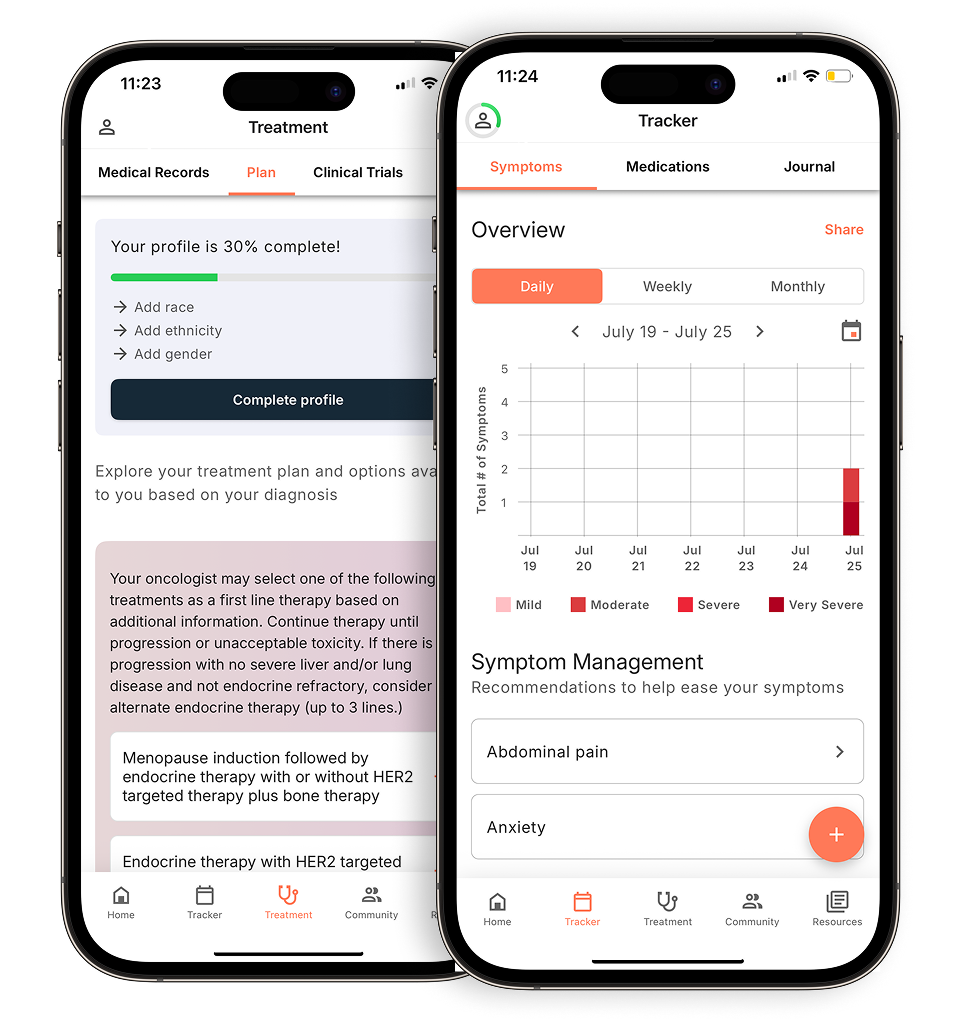
View your personalized treatment plan in the Outcomes4Me app
Use your diagnosis to unlock personalized NCCN Guidelines®-aligned recommendations.
Key Takeaways
- Focus on core functions that matter most: A great app should act as your digital health organizer, helping you track symptoms, manage medications, and keep all your records in one place for more informed discussions with your doctor.
- Always put privacy first: Before downloading, confirm the app is HIPAA compliant and review its privacy policy. You need to be confident that your sensitive health information is secure and that you control how it’s shared.
- Find the right personal fit: The best app is one that matches your specific needs and comfort level with technology. Consider what features are most important to you and whether you need it to connect directly with your doctor’s office.
What makes a great patient health record app?
Choosing an app to manage your health information is a big decision. You’re not just looking for a digital filing cabinet; you need a tool that simplifies your life, keeps your sensitive data secure, and helps you feel more in control of your care. With so many options available, it helps to know what features truly matter. Think of this as your checklist for finding an app that works for you, helping you organize everything from appointments to symptoms without adding extra stress to your plate.
Does it keep your health information secure?
When it comes to your health information, privacy is non-negotiable. Before you download any app, take a close look at its security features. The best apps go beyond basic password protection. They should use encryption to safeguard your data and have clear, transparent privacy policies that explain exactly how your information is stored and used. It’s essential that you have full control over who sees your data. According to the AMA Journal of Ethics, true confidentiality requires strong privacy and security policies, not just limited access. Look for apps that are upfront about their commitment to protecting your personal health information.
Choose an app that’s simple and easy to use
The last thing you need is an app that’s complicated or confusing. A well-designed medical records app should feel intuitive and easy to use from the moment you open it. The layout should be clean, the text should be easy to read, and finding the information you need should be straightforward. The goal is to reduce your mental load, not add to it. Some of the most helpful apps also make it simple to record and share patient-reported outcomes with your care team in real-time, which can lead to more proactive care and a better overall experience. If an app feels clunky or overwhelming, it’s not the right one for you.
Does it connect with your doctor’s office?
The ability to easily share information with your doctors is a game-changer. Look for an app that can either integrate directly with your provider’s electronic health record (EHR) system or allows you to easily export your data in a clear, readable format. This seamless connection ensures your care team has the most up-to-date information on your symptoms, medications, and treatments. However, it’s important to remember that just because an app can link to your patient’s medical record, it doesn’t automatically mean all the information you enter is protected by HIPAA. Always check the app’s specific privacy and data-sharing policies.
A place to track all your medications and treatments
Managing a cancer treatment plan often involves keeping track of multiple medications, therapies, and dosages, which can be overwhelming. A great medical records app acts as your personal health assistant, helping you log every detail of your treatment. You can set reminders for when to take your medications, note any side effects, and keep a running history of every treatment you’ve received. The most useful apps are often developed with the expertise of physicians and other clinicians to ensure they meet the real-world needs of patients. This feature helps you stay organized and prepared for every conversation with your care team.
Manage your appointments and get helpful reminders
Between oncologist visits, lab work, imaging scans, and other specialist appointments, your calendar can fill up quickly. An app that helps you manage your schedule can be incredibly valuable. Look for one with a built-in calendar where you can track all your upcoming appointments and receive timely reminders so you never miss a visit. Some apps even allow you to store important details for each appointment, like the doctor’s name, location, and questions you want to ask. While groups like the President’s Cancer Panel focus on broad issues of data sharing, for your day-to-day life, simple organizational tools like these can make a huge difference.
An easy way to log and report symptoms
Tracking how you feel is one of the most powerful ways to participate in your own care. A good app provides a simple way to log your symptoms, their severity, and when they occur. This creates a detailed record that you can share with your doctor, giving them a clearer picture of your health between appointments. This data is invaluable for making informed decisions about your treatment plan and managing side effects effectively. Apps that integrate electronic patient-reported outcomes can significantly improve the quality of your check-ins and help your care team provide more personalized support. It’s a proactive way to ensure your concerns are heard and addressed.
Some helpful apps for managing your cancer care
Finding the right app to manage your health information can feel like a big task, but it doesn’t have to be. The goal is to find a tool that simplifies your life, not complicates it. A good medical records app acts as your digital health organizer, keeping everything from appointment notes to lab results in one secure, accessible place. This helps you feel more in control and prepared for conversations with your care team.
We’ve looked at some of the most helpful apps available for people with cancer. Each one offers something a little different, whether it’s a deep focus on medication reminders, direct integration with your hospital’s system, or personalized treatment information. Think about what you need most—is it organizing records, tracking symptoms, or getting reminders for your medication? This list will help you find a great starting point for managing your cancer care journey on your own terms.
Outcomes4Me: An AI-Powered Platform for Cancer Care
Specifically designed for cancer patients, Outcomes4Me is an innovative platform that uses artificial intelligence to provide personalized cancer care information and support. It’s the only app that integrates directly with the NCCN Clinical Practice Guidelines in Oncology (NCCN Guidelines®) to give you clear, evidence-based information about your diagnosis. After you securely provide your medical records, the app helps you understand your treatment options, find relevant clinical trials, and track your symptoms. It’s a powerful tool for anyone who wants to be more actively involved in their care decisions and have access to the most current, oncologist-approved information right at their fingertips.
MyChart: A common way to access your health record
If your hospital or clinic is part of a large health system, there’s a good chance they use MyChart. This app is one of the most common patient portals, giving you direct access to your official medical records. MyChart is a free app that helps you manage your health information, acting like a secure window into your file at the doctor’s office. You can use it to see test results as soon as they’re available, request prescription refills, confirm appointments, and even send non-urgent messages to your care team. It’s an excellent way to stay connected with your providers and keep tabs on your comprehensive health history in one place.
Health Storylines: For tracking symptoms and finding support
Managing cancer involves more than just appointments and treatments—it’s also about understanding how you feel day-to-day. Health Storylines lets you safely store and track information about your medicines, symptoms, mood, and more. The app helps you create a clear picture of your health journey, which you can then share with your doctors to have more productive conversations. By logging your daily experiences, you can spot patterns and better explain your side effects or concerns. This makes it easier for your care team to understand your experience and adjust your care plan as needed, making you a more active partner in your treatment.
ACS CARES: The American Cancer Society’s patient app
Coming from one of the most trusted names in cancer support, ACS CARES is a free mobile app from the American Cancer Society. It’s designed to help people dealing with cancer, along with their families and caregivers, by providing reliable information, programs, and services tailored to their specific journey. Beyond just managing records, this app connects you with a community and a wealth of resources for everything from transportation to support groups. It’s a fantastic tool if you’re looking for comprehensive support that addresses both the medical and emotional sides of a cancer diagnosis, all backed by an organization you can trust.
Connect with specialists and trained volunteers
Your oncology team is your core support system, but you don’t have to go through this journey alone. Many apps are designed to connect you with a wider support network of trained volunteers, patient communities, and specialized resources. For example, the American Cancer Society offers programs through its app that can link you with people who provide emotional support or help with practical needs like transportation. These connections can be incredibly reassuring, offering a space to share experiences and get advice from others who truly understand. Having your health information organized and accessible also means that if you get the chance to speak with a specialist, you’re fully prepared to ask informed questions and make the most of that time.
Medisafe: An app focused on managing your medications
For many cancer patients, keeping track of medications can be a major challenge. Medisafe is an app that is all about managing your medicines. It’s a highly-focused tool that sends reminders to take your pills, tracks your adherence, and keeps a running list of all your medications and dosages. It can also remind you when to get refills and even check for potential drug interactions. While it doesn’t store your full medical record, its specialization in medication management can be a lifesaver for anyone on a complex treatment plan. It helps reduce the mental load of remembering every dose, so you can focus more on your well-being.
Apple Health: The health app built into your iPhone
If you use an iPhone, you already have a powerful health tool right in your pocket. The Apple Health app is designed to consolidate health data from various sources, allowing you to manage your health records, track medications, and monitor vital signs all in one place. You can connect it to your hospital’s patient portal to pull in official records, log your symptoms, and even track activity levels or sleep patterns from your Apple Watch. It’s a convenient, secure, and centralized hub for your health information, making it easy to see the big picture of your health and share it with your providers.
Google Health: A health records solution for Android users
For Android users, Google Health offers a similar integrated experience. The platform provides tools for managing health information, including the ability to store and share medical records, track medications, and access health resources directly from your device. By connecting with participating healthcare providers, you can gather your health records from different systems into one unified view. This makes it simpler to keep your information organized and accessible whenever you need it, whether you’re at a doctor’s appointment or just reviewing your recent lab results at home. It’s a solid choice for anyone who wants to leverage their Android device to stay on top of their health.
More apps to support your well-being
Your phone can be a powerful tool for more than just organizing medical records. Managing your well-being during cancer treatment involves tending to your emotional, social, and practical needs, too. The right apps can connect you with a supportive community, offer moments of calm when you need them most, and help you stay organized when things feel overwhelming. Think of these tools as your extended support system, available right in your pocket. From finding peer support to managing the costs of medication, there are many digital resources designed to make your journey a little smoother. Here are some apps that focus on different aspects of your overall well-being.
Apps for community and peer support
Going through cancer can sometimes feel isolating, but you are not alone. Connecting with others who truly understand what you’re experiencing can be incredibly comforting and empowering. Peer support provides a space to share feelings, exchange practical tips, and simply feel heard by people who get it. Research shows that this kind of social connection can significantly improve your quality of life. These apps are designed to help you find your community, whether you’re looking for a large, anonymous network or a private group of close friends and family.
BELONG — Beating Cancer Together
BELONG offers a large, anonymous social network specifically for people with cancer and their families. You can join support groups based on your cancer type to connect with others on a similar path. A unique feature is the ability to chat directly with oncology professionals, like doctors and researchers, who can answer questions and provide information. It’s a great resource for finding both peer support and expert insights in one place.
LivingWith: Cancer Support
This app focuses on building and strengthening your personal support system. LivingWith helps you create private groups to easily share updates with friends and family, so you don’t have to repeat information over and over. It also has a practical feature that lets you ask for help with daily tasks, like rides to appointments or grocery shopping, making it easier for your loved ones to know how they can best support you.
Apps for self-care and mental health
Taking care of your mental and emotional health is just as important as managing your physical symptoms. A cancer diagnosis can bring a wave of complex emotions, and it’s essential to have tools that can help you find moments of peace and process your feelings. These apps offer resources for mindfulness, anxiety management, and creative expression. They are designed to provide a quiet space for you to focus on your inner well-being and build resilience throughout your treatment journey.
Create To Heal
Designed for patients, survivors, and their families, Create To Heal uses the power of art and creativity to promote healing. The app offers guided meditations, calming music, creative projects, and inspiring messages to help you find peace and express yourself. It’s a wonderful tool for anyone looking for a gentle, non-verbal way to process their emotions. Note that this app is currently available only on Apple devices.
MindShift
If you’re dealing with anxiety, MindShift is an excellent resource developed by Anxiety Canada. It uses principles of Cognitive Behavioral Therapy (CBT), a proven method for managing anxiety, to help you change how you think and react to anxious feelings. The app includes tools like breathing exercises, thought journals, and guided meditations to help you cope with the stress that can accompany a cancer diagnosis and treatment.
Apps for organization and information
Staying on top of information and daily tasks can feel like a full-time job. When you’re already managing so much, having tools to keep things organized can make a huge difference. These apps are designed to help you access reliable information, keep track of details, and even manage some of the cognitive challenges that can come with treatment. They can help reduce your mental load so you can focus more of your energy on your health.
Cancer.Net Mobile
From the American Society of Clinical Oncology (ASCO), this app is a trustworthy source of information on over 125 types of cancer. You can use it to learn more about your diagnosis and treatment options. It also includes practical tools to help you track your symptoms, log your medications, and record questions to ask your doctor during your next visit, making it a comprehensive resource for managing your care.
CareZone
CareZone is a great tool for keeping all your health information organized, especially when it comes to medications. You can simply scan the label on your prescription bottle to automatically create a detailed list of your medications, dosages, and refill information. The app also lets you set reminders for when to take your medicine, helping you stay on schedule with your treatment plan.
Tools for “chemo brain”
Many people experience a type of mental fogginess during and after treatment, often called “chemo brain.” This can make it hard to remember details or stay focused. While there isn’t one specific app for this, many tools can help. Brain-training apps like Lumosity or Elevate can offer engaging exercises to challenge your mind. Simple note-taking apps (like your phone’s built-in Notes) or task-management apps like Todoist can also be incredibly helpful for setting reminders and keeping track of your to-do list.
Cancer Dictionary Free
Medical conversations can be filled with complex terms that are hard to understand. This app acts as a straightforward dictionary for cancer-related terminology. It provides clear definitions and pronunciations for thousands of medical terms, helping you feel more confident and informed when talking with your care team. It’s a simple but powerful tool for breaking down communication barriers.
Apps for financial assistance
The cost of cancer care can be a significant source of stress for many families. Managing prescriptions, co-pays, and other expenses adds another layer of complexity to an already challenging time. Fortunately, there are digital tools available that can help you find savings and manage some of the financial burdens associated with treatment. These apps are designed to make medications more affordable, giving you one less thing to worry about.
GoodRx
GoodRx is a popular app that helps you save money on prescription medications. It works by searching for the best prices and finding free coupons from pharmacies in your area. You can simply search for your medication in the app, find the best price, and show the coupon to your pharmacist. It’s a simple way to potentially lower your out-of-pocket costs for the medicines you need.
How a health app can support your cancer journey
Managing your health information during cancer treatment can feel like a full-time job. Between appointments, test results, and medication schedules, it’s easy to feel overwhelmed. A medical records app acts as a digital command center, putting all your essential information in one secure place. This helps you feel more in control and allows you to focus your energy on what matters most: your health.
Using an app can transform how you interact with your own care plan. It simplifies complex information, streamlines communication with your doctors, and empowers you to be a more active participant in your treatment journey.
Keep all your health information in one place
A cancer diagnosis comes with a mountain of paperwork and data. A medical records app helps you tame the chaos by creating a single, organized hub for everything from pathology reports and lab results to imaging scans and clinical notes. Instead of digging through folders before every appointment, you can pull up any document you need with a few taps. This digital organization means your complete medical history is always at your fingertips, ready to share with a new specialist or reference during a consultation. It’s also crucial that these apps have strong privacy and security policies to ensure your sensitive information is always protected.
Share information more easily with your care team
Clear communication with your oncology team is essential. When your medical records are organized in an app, you can have more focused and productive conversations with your doctors. You can easily pull up a timeline of your symptoms, a list of your current medications, or specific questions you’ve logged. Some apps even allow you to share information directly with your provider’s office. Having this data readily available helps you accurately describe what you’re experiencing, which allows your care team to make the best decisions for your treatment. Just be sure you understand the app’s approach to patient privacy and how your information is shared.
Stay on top of your treatment schedule
Cancer treatment plans are often complex, involving a precise schedule of medications, therapies, and appointments. A medical records app can be an invaluable tool for keeping everything straight. You can set up reminders for when to take your pills, get alerts for upcoming appointments, and track your treatment cycles. Many apps can integrate with your provider’s electronic health records, which helps create a seamless flow of information. This proactive approach to managing your care can improve your patient experience and help you feel more confident that you’re following your treatment plan correctly.
Why sticking to your treatment schedule is important
Your treatment schedule isn’t just a series of dates on a calendar; it’s a strategic plan designed by your oncology team to be as effective as possible. Each dose or therapy session is timed to target cancer cells when they are most vulnerable. Sticking to this schedule is so important because missing a cycle can make earlier treatments less effective, giving cancer cells a chance to regroup and grow. Research consistently shows that patients who complete their treatment as prescribed have better outcomes. This is where a health app becomes a key partner in your care. By using it to track appointments and set medication reminders, you can stay organized and confident, ensuring you’re giving your treatment plan the best possible chance to work.
Track symptoms and side effects as they happen
Trying to remember how you felt last Tuesday can be tough, especially when you’re dealing with treatment side effects. An app with a symptom tracker allows you to log how you’re feeling in real time. You can note the severity of symptoms like fatigue or nausea, when they occur, and what might have triggered them. This creates a detailed record that is far more accurate than memory alone. Sharing these electronic patient reported outcomes with your doctor can reveal patterns and provide a clearer picture of how the treatment is affecting you, leading to better, more timely adjustments to your care plan.
Questions to ask about your privacy and data security
When you’re managing your health, the last thing you want to worry about is the security of your personal information. Your medical data is incredibly sensitive, so it’s essential to choose an app that takes your privacy seriously. Before you download and start entering your information, take a moment to play detective. Asking a few key questions can help you understand how an app will handle your data and give you peace of mind.
Is the app HIPAA compliant?
First on the list is a big one: HIPAA. The Health Insurance Portability and Accountability Act (HIPAA) is a federal law that sets the standard for protecting sensitive patient health information. You might assume any health app is automatically covered, but that’s not always the case. An app can link to your medical record without necessarily being protected by HIPAA itself, which can create challenges to patient privacy. Look for a clear statement on the app’s website or in its privacy policy that says it is “HIPAA compliant.” This is a non-negotiable for ensuring your data has the highest level of legal protection.
Find out how your data is used and shared
Next, get clear on where your information is going. A good app will have a transparent privacy policy that explains exactly how your data is used and shared. Some apps de-identify and share data with researchers to advance cancer care, which can be a powerful way to contribute. However, you should always know who it’s being shared with and why. Strong privacy and security policies are about more than just controlling access; they ensure your information is handled responsibly every step of the way. Read the fine print to make sure you’re comfortable with the app’s data-sharing practices.
Confirm that you are in control of your information
You should always be in the driver’s seat when it comes to your health data. Does the app let you see who has accessed your information? Can you easily download a copy of your records or delete your account and all associated data if you choose to? The HIPAA Security Rule requires covered entities to maintain audit trails, which are essentially logs of activity within the system. While not all apps are required to do this, choosing one that offers this level of transparency gives you more control and confidence that your information is secure.
A few simple ways to protect your health data
Beyond the app’s own security features, there are simple steps you can take to protect your information. Always use a strong, unique password for your account and enable two-factor authentication (2FA) if it’s an option. Be mindful of using the app on public Wi-Fi networks, which can be less secure. While there are ongoing discussions about how to maintain privacy while facilitating data sharing for research, your personal security habits are your first line of defense. Taking these small precautions can make a big difference in keeping your sensitive health data safe.
How to choose the right health app for you
With so many options available, finding the right app to manage your health information can feel like another item on an already long to-do list. The best app is ultimately the one that fits your life, your needs, and your comfort level. Think of it as finding a new member of your support team—you want one that’s reliable, easy to communicate with, and truly helpful. By considering a few key factors, you can find a tool that simplifies your care journey instead of complicating it.
Start by thinking about your personal needs
First, think about what you really need from an app. Are you looking for a simple tool to track medications and appointments? Or do you need something more comprehensive that helps you understand treatment options, find clinical trials, and log symptoms in detail? Some people might just want a digital pillbox, while others need an all-in-one command center for their care. As the LUNGevity Foundation suggests, you should “think about what you need most” when making your choice. Make a short list of your must-have features before you start comparing options.
Consider your comfort level with technology
The most powerful app in the world won’t help if it’s too confusing to use. Be honest about your comfort level with technology. Do you prefer a simple, straightforward design, or are you comfortable with an app that has lots of features and customization options? The goal is to reduce stress, not add to it. Many apps offer tutorials or have clean, intuitive interfaces. The best app for you will be one you feel confident using every day. Look for one that feels easy to manage from the moment you open it.
Check if it works with your hospital or clinic
Some apps, especially patient portals like MyChart, are designed to connect directly with your hospital or clinic’s electronic health record system. To use them, you’ll often need to create an account through your specific healthcare provider. This can be incredibly convenient for seeing lab results and messaging your doctors. Other apps work independently of any single provider, allowing you to pull in records from multiple sources. Consider whether you want a tool that’s integrated with your current care team or one that offers more flexibility.
Understand any costs or fees involved
While many health apps are free, others operate on a subscription model or have premium features that come at a cost. It’s important to understand the pricing structure upfront. Some apps, like the ACS CARES app, are offered by non-profits and are completely free to use. For paid apps, check to see if the cost might be covered by your health insurance plan or a flexible spending account (FSA). A quick call to your insurance provider can clarify what, if anything, is covered.
Related Articles
- The 5 Best Oncologist-Approved Cancer Apps
- 5 Best Apps for Managing Cancer Symptoms in 2025
- Top 6 Cancer Treatment & Symptom Tracker Apps
- Free Cancer Care Support App (Download) | Outcomes4Me
View your personalized treatment plan in the Outcomes4Me app
Use your diagnosis to unlock personalized NCCN Guidelines®-aligned recommendations.
Frequently Asked Questions
Is my sensitive health information actually safe in one of these apps? This is the most important question you can ask, and the answer depends on the app you choose. Reputable medical records apps use strong security measures, like encryption, to protect your data from unauthorized access. Before committing to an app, look for a clear statement that it is HIPAA compliant and read its privacy policy. This will tell you exactly how your information is stored, used, and protected, giving you the confidence that your personal health details are in good hands.
What’s the difference between a patient portal like MyChart and a specialized app like Outcomes4Me? Think of it this way: a patient portal like MyChart is a direct window into your official medical file at your doctor’s office. It’s excellent for viewing test results, confirming appointments, and sending messages to your care team. A specialized cancer app like Outcomes4Me does something different. It takes your unique diagnostic information and provides personalized guidance, helping you understand evidence-based treatment options and find relevant clinical trials. One gives you access to your records, while the other helps you make sense of them.
Do I need to pay for a good medical records app? Not at all. Many of the most helpful and widely used apps are completely free. Patient portals provided by your hospital, like MyChart, and apps from non-profit organizations, such as ACS CARES, offer powerful tools at no cost. While some highly specialized apps might have a subscription fee, you can absolutely find a high-quality, secure, and effective app to help manage your care without spending any money.
What if my doctor doesn’t use or recommend a specific app? That’s perfectly fine. While some apps integrate directly with your provider’s system, the primary purpose of most is to help you stay organized. Think of it as your personal health command center. You can use it to track your symptoms, log your medications, and prepare questions for your next visit. When you have all that information neatly organized, you can have much clearer and more productive conversations with your doctor, regardless of whether they use the app themselves.
How do I get my medical records into the app in the first place? This process varies from app to app, but there are usually a few common ways. Many apps can securely connect to your hospital or clinic’s patient portal and automatically import your records, like lab results and visit summaries. For other information, you may be able to upload digital files, such as PDFs of your reports, or manually enter details like medication schedules and appointment dates. The best apps make this process as simple and straightforward as possible.