
Managing a complex health condition can feel overwhelming. It’s easy to feel like you’re in the passenger seat of your own life, with information coming at you from all directions. A patient health record app helps you take back control. It’s a simple tool to track your medical history, log symptoms as they happen, and manage your treatment plan. Having all your information in one place—from lab results to your appointment schedule—empowers you. You can have more productive conversations with your doctors and feel more confident in the decisions you make about your health.
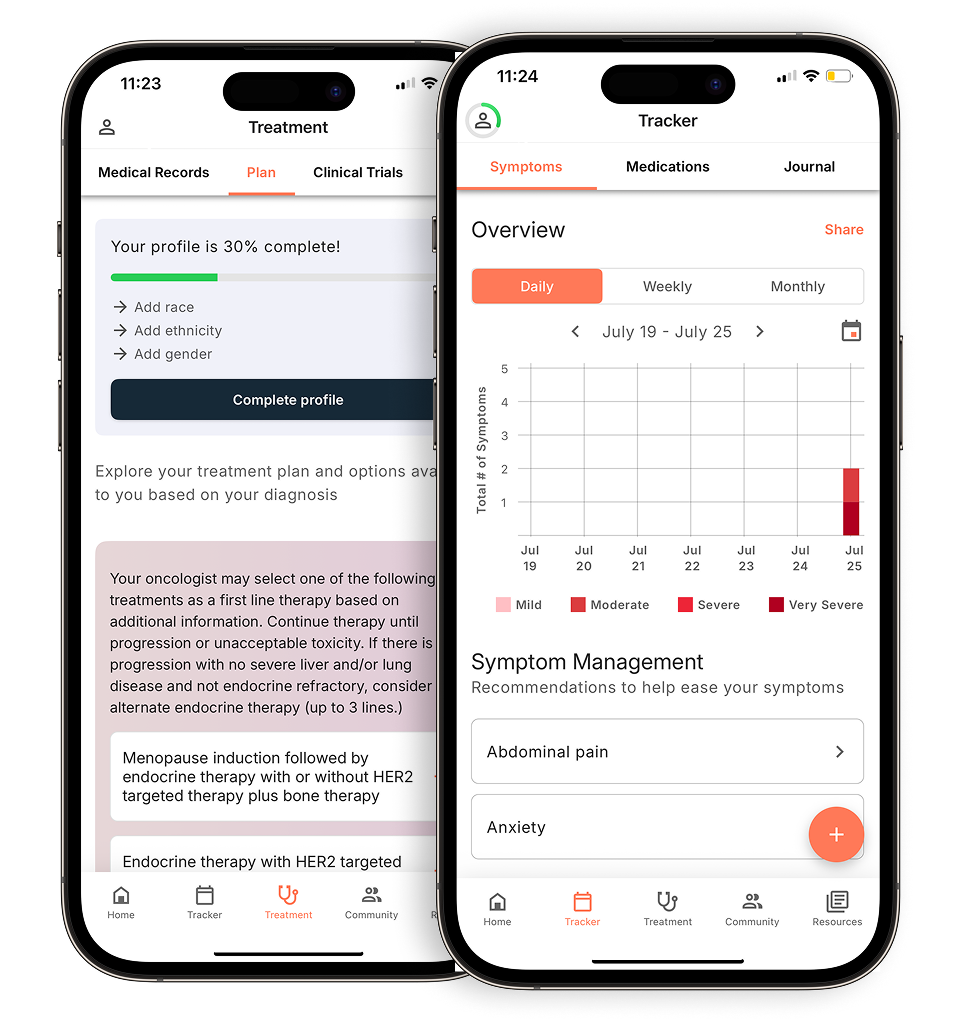
View your personalized treatment plan in the Outcomes4Me app
Use your diagnosis to unlock personalized NCCN Guidelines®-aligned recommendations.
Key Takeaways
- Choose an app that actively helps you manage care: The most useful tools do more than just store information—they help you track symptoms, organize your treatment timeline, and set medication reminders to keep you organized and informed.
- Verify security and provider compatibility before you commit: Your privacy is essential, so look for HIPAA compliance and data encryption. An app that also syncs with your hospital’s system makes sharing information with your care team seamless.
- Find the right tool for your personal needs: The best app is one that feels intuitive to you. Consider if it works with your hospital, is easy to use, and offers features like a patient community that you’ll find genuinely helpful.
What to look for in a cancer care app
When you’re managing a cancer diagnosis, having the right tools can make a world of difference. A good cancer care app acts like a digital command center, helping you keep track of everything in one secure place. But with so many options out there, how do you choose the one that’s right for you? It comes down to a few key areas: practical features that simplify your daily life, ironclad security to protect your private information, and seamless connection with your medical team. Let’s walk through what to look for in each of these categories.
Essential features for managing your care
The best apps are designed to lighten your mental load. Look for features that help you organize the key aspects of your treatment journey. This includes tools for tracking your appointments, managing your medications, and logging any symptoms or side effects you experience. Some apps also offer access to reliable educational resources or a supportive community of other patients. The goal is to find an app that consolidates information and makes it easier to manage your journey, so you can focus more on your well-being. Think of it as a personal health assistant that lives on your phone, ready to help you stay organized and informed every step of the way.
Making sure your health information is secure
Your health information is incredibly personal, so the app you choose must be built with security as a top priority. Before you download anything, check the app’s privacy policy. Look for clear statements about data encryption, which means your information is scrambled so it can’t be read by unauthorized parties. A secure app will also require a strong password and may offer extra protection like two-factor authentication. Reputable apps will be transparent about how they keep patient information secure and will never share your data without your explicit consent. Your peace of mind is non-negotiable, so don’t settle for anything less than top-tier security.
Does the app connect with your doctor’s system?
An app becomes exponentially more useful when it can communicate directly with your hospital or clinic’s system. This integration allows you to see lab results, view appointment notes, and even message your care team from one central place. Some hospitals have their own dedicated patient app that syncs directly with their records. Other apps are designed to connect with multiple healthcare systems. This connectivity saves you from having to juggle different websites and portals, ensuring both you and your doctors are looking at the same, up-to-date information. It streamlines communication and helps you feel more connected to your care team between visits, which is a huge plus.
Popular patient health record apps to consider
Finding the right app to manage your health information can feel like a huge weight off your shoulders. The best tool for you often depends on your hospital’s system and your personal preferences. Some apps connect directly to your provider’s portal, while others help you gather information from multiple sources. Having everything in one place makes it easier to track appointments, review test results, and share updates with your care team and loved ones. This organization can help you feel more in control of your care journey. Here are five of the best medical record apps that can help you stay organized and empowered.
Outcomes4Me: An AI-powered platform for your care
Outcomes4Me is more than just a place to store your records; it’s a smart assistant for your cancer care. Recognized for its high-quality information, it’s one of the top-rated apps for cancer patients. The app uses artificial intelligence (AI) to provide you with personalized support and insights based on your specific diagnosis. After you securely add your medical information, it helps you understand your treatment options, find relevant clinical trials, and manage your symptoms. This kind of tailored guidance can be incredibly helpful when you’re making important decisions. Research highlights that its usefulness makes it one of the leading mHealth applications for adults living with cancer.
MyChart by Epic Systems
If your hospital or clinic uses Epic software, you’re likely already familiar with MyChart. It’s one of the most widely used patient portals available, and for good reason. MyChart gives you a direct line to your medical records, test results, and appointment schedules. You can also use it to send secure messages to your doctors, request prescription refills, and pay medical bills. It’s a comprehensive tool that truly enhances patient engagement by putting all of your essential health information right at your fingertips. Having this direct connection to your care team in one reliable place can make managing the day-to-day details of your treatment plan much simpler.
Cerner HealtheLife Patient Portal
Similar to MyChart, the HealtheLife Patient Portal is another excellent tool offered by many healthcare systems. It’s designed with a user-friendly interface that makes it easy to see your health information, keep up with your treatment plan, and track your progress. One of its biggest strengths is how it helps improve communication between you and your healthcare providers. You can easily share updates, ask questions, and stay connected with your care team without playing phone tag. This seamless connection ensures everyone is on the same page, which is crucial for coordinated and effective cancer care. If your provider uses Cerner, this portal is a fantastic resource for managing your health.
Apple Health Records
For iPhone users, the Apple Health app offers a powerful feature called Health Records. It allows you to securely download and consolidate your medical information from different hospitals and clinics into one single, accessible view. This is especially helpful if you see multiple specialists at different facilities. The app organizes your allergies, conditions, immunizations, lab results, medications, and procedures, so you have a complete picture of your health history. Studies have shown that this kind of tool supports the self-management of symptoms and helps you stick to your treatment plan, making it an invaluable asset for taking charge of your care.
MyRoswell Patient App
The MyRoswell app is a great example of a specialized tool created for patients at a specific cancer center—in this case, Roswell Park Comprehensive Cancer Center. While it’s exclusive to their patients, it highlights the benefits of a hospital-specific app. It’s designed to simplify the management of care from your very first appointment all the way through your recovery. These dedicated apps often include features like campus maps, direct access to your care team, and resources tailored to the services offered at that center. It’s worth checking if your own hospital or cancer center has a similar app, as it can provide a uniquely supportive and integrated experience.
OneRecord: For aggregating all your records
If you’ve ever felt like your medical history is scattered across different doctor’s offices and hospital systems, you’re not alone. OneRecord is a digital platform designed to solve that exact problem by helping you gather all your medical records into one secure place. Available as both an app and a website, it lets you access, combine, and share your health information with your care team or trusted family members. This gives you a complete view of your medical history, including lab results, medications, and immunizations from all your different providers. Most importantly, you control who sees your information, giving you both convenience and peace of mind when managing your care journey.
Medcorder: For recording doctor visits
It’s easy to feel overwhelmed during a doctor’s appointment, and trying to remember every detail afterward can be stressful. Medcorder is a unique app created specifically to help with this. It allows you to record and transcribe your conversations with your doctor, so you can revisit key details and instructions whenever you need to. This can be especially helpful when you’re managing a complex health condition and receiving a lot of new information at once. Having a recording ensures you don’t miss anything important and allows you to share the conversation accurately with family or caregivers. It’s a simple tool that can make a big difference in feeling clear and confident about your care plan.
Which app features are most helpful?
When you’re looking for an app to help manage your cancer care, the sheer number of options can feel overwhelming. While every app has a slightly different approach, the best ones share a few core features that can make a real difference in your day-to-day life. Think of these as your non-negotiables—the tools that will help you feel more organized, informed, and in control of your health journey.
A great app should do more than just store information; it should actively help you manage it. This means providing clear timelines of your treatment, helping you track symptoms, organizing your lab results, and reminding you about medications. These features work together to create a central hub for your care, reducing the mental load of juggling appointments, test results, and treatment schedules. By focusing on apps that excel in these key areas, you can find a tool that truly supports you and your care team.
Keeping track of your treatment timeline
From your first consultation through every stage of treatment and recovery, your care journey has a unique timeline. Keeping track of appointments, scans, and treatment cycles can be a full-time job. A quality medical record app gives you a clear, chronological view of your care plan. This helps you see what you’ve accomplished and what’s coming next, which can be incredibly grounding. Apps like MyRoswell provide a comprehensive platform for patients to manage their care from the initial visit through recovery, allowing you to follow your treatment timeline and see your progress all in one place. This visual roadmap can help you feel more prepared and less stressed about the path ahead.
Monitoring your symptoms and side effects
How you feel between appointments is one of the most important pieces of information your care team needs. An app that lets you log symptoms and side effects in real time creates an accurate record that’s much more reliable than trying to remember everything on the spot. This feature allows you to note things like pain levels, fatigue, or nausea as they happen. Research shows that using mobile health apps to monitor and manage pain is not only effective but also preferred by many patients. Having a detailed log makes your conversations with your doctor more productive, ensuring your treatment plan is adjusted based on how you’re truly feeling.
Keeping your lab results and tests in one place
Cancer treatment often comes with a mountain of paperwork, from blood test results to imaging reports. An app that consolidates all these documents into one digital location can be a lifesaver. Instead of digging through folders or trying to remember which portal has which result, you can have everything at your fingertips. Some apps function as a Personal Health Record Manager, allowing you to keep all your medical records organized and accessible. This makes it much easier to review your history, share information with different specialists, and manage your health information without the clutter. It’s about having the right information ready whenever you or your doctor needs it.
Getting reminders for your medications
Between “chemo brain” and the general stress of managing a serious illness, it’s easy to forget a dose of medication or an upcoming appointment. Simple, automated reminders can make a huge difference in staying on track. The best apps allow you to set up personalized alerts for all your medications, supplements, and doctor visits. This feature acts as a reliable personal assistant, ensuring you adhere to your treatment plan. Many of the most helpful cancer apps are designed specifically to help patients organize their complex schedules, providing timely reminders that are crucial for managing care effectively and reducing one more source of worry.
Adding your own health data and notes
Your official medical record is a great starting point, but it doesn’t always capture the full picture of your day-to-day health. The best apps let you add your own information, turning a static document into a living health diary. This feature allows you to keep track of your medications, including over-the-counter supplements, and log any allergies or sensitivities. You can also jot down questions for your next doctor’s visit or make notes about how you’re feeling. By personalizing your record, you create a more complete and accurate resource that helps you and your care team make better-informed decisions together. It ensures the little details that matter to you don’t get lost in the shuffle.
Managing health records for family members
Being a caregiver is a role filled with love, but it also comes with a lot of responsibility. If you’re helping a loved one through their cancer journey, an app that allows you to manage their health records can be an invaluable tool. This feature, often called proxy or caregiver access, lets you view test results, track appointments, and help manage medications on their behalf. It’s especially helpful for parents of young children with cancer or for those caring for a partner or aging parent. The ability to manage health for children or dependents in one secure place streamlines communication and coordination, ensuring that everyone on the care team is on the same page and your loved one gets the support they need.
How apps help you and your doctor stay connected
Managing your cancer care often involves juggling communication between different doctors, specialists, and caregivers. A good medical record app acts as a central hub, streamlining these conversations and ensuring everyone has the information they need. Instead of playing phone tag or waiting for callbacks, these tools provide a direct line to your care team, helping you feel more connected and in control of your treatment journey.
Sending secure messages and getting updates
One of the most valuable features of a patient app is the ability to communicate directly and securely with your healthcare providers. You can ask non-urgent questions about symptoms, clarify medication instructions, or request a prescription refill without having to call the office. For example, the MyRoswell patient app allows patients to send secure messages to their team and receive important updates about their care. This direct line of communication ensures you stay informed and can get answers when you need them, reducing unnecessary stress and uncertainty.
Keeping your whole care team in the loop
Your care team extends beyond your oncologist to include nurses, specialists, and your caregivers at home. Keeping everyone updated is crucial for coordinated care. Apps like OncoBuddy are designed to connect you with your entire support system, allowing you to share vital information and progress updates easily. This connectivity ensures that everyone involved in your care is on the same page, from your medical team to your family members. When your whole team is in sync, you’re better empowered to manage your health.
Easily sharing appointment information
Keeping track of numerous appointments for treatments, scans, and follow-ups can feel overwhelming. Many patient apps help simplify this process by organizing your schedule in one place. You can often view upcoming appointments and even save them directly to your phone’s calendar with a single tap. This feature makes it much easier to manage your schedule and ensures you don’t miss an important visit. Having all your appointment details in one accessible location helps you stay organized and focused on your health.
Accessing your medical records anytime
Waiting for a staff member to mail you a copy of your latest lab results can be frustrating. Patient apps give you the power to access your medical records whenever you want. You can instantly view test results, read visit summaries, check your list of prescriptions, and even review billing information right from your phone. This digital access eliminates the need to carry around paper files and allows you to review your health information on your own time, preparing you for your next appointment.
How to know your health information is safe
When you’re managing your health, the last thing you want to worry about is the security of your personal information. Your medical data is incredibly sensitive, and it’s completely normal to be cautious about where you store it. Trusting an app with your health records is a big step, but you can feel confident by looking for a few key security features.
Before you download or sync your records with any app, take a moment to play detective. A trustworthy app will be transparent about how it protects you. Think of it as a simple safety check. You’ll want to confirm that the app is built on a foundation of security, with clear policies and modern technology designed to keep your information private. This isn’t about becoming a cybersecurity expert; it’s about knowing what to look for so you can make an informed choice. A great app will make it easy for you to see that they prioritize your privacy just as much as you do. Here are the three non-negotiables to look for to ensure your health data stays safe, secure, and in your control.
Understanding HIPAA compliance
One of the most important things to look for is HIPAA compliance. The Health Insurance Portability and Accountability Act (HIPAA) is a federal law that sets the national standard for protecting sensitive patient health information. If an app is HIPAA compliant, it means the company is legally required to have strict physical, technical, and administrative safeguards in place. This isn’t just a suggestion—it’s the law. This ensures your data is stored securely, access is tightly controlled, and your privacy is always prioritized. Any reputable health app should clearly state its commitment to HIPAA on its website or in its privacy policy.
Your rights to access your data
It’s important to know that your health information belongs to you, and you have a legal right to access it. This isn’t just a courtesy from your doctor’s office—it’s a federally protected right designed to put you in the driver’s seat of your own care. When you can easily review your own health records, you’re better equipped to understand your diagnosis, track your progress, and have more meaningful conversations with your care team. Having this access is a key part of being an informed and active participant in your healthcare journey, ensuring you have the information you need to make confident decisions.
The 21st Century Cures Act
A major law that protects your access is the 21st Century Cures Act. This act makes it clear that you have a right to easily get your electronic health information (EHI). It specifically targets something called “information blocking,” which is when healthcare providers or insurance companies create unnecessary barriers that prevent you from getting your data. The law imposes penalties on those who interfere with your right to access your health information. This legislation is a powerful tool that reinforces your ownership over your own medical story, ensuring you can get the records you need, when you need them.
ONC and CMS Patient Access Rules
Building on the Cures Act, specific rules from federal health agencies put these rights into action. These rules require that you can get your digital health information through a simple, often automated process and at a low cost. The goal is to make sure that getting your records isn’t a complicated or expensive hassle. By ensuring you can obtain your health data, these regulations empower you to be more engaged in your care, share your information with new doctors, or use apps to get personalized insights from your records.
Making sure your login is secure
Your login is the front door to your health information, so it needs to be strong. A secure app will go beyond a simple username and password. Look for options like two-factor authentication (2FA), which adds a critical second layer of security. With 2FA, after you enter your password, the app sends a unique, temporary code to your phone or email that you must enter to log in. This simple step makes it much harder for unauthorized users to access your account. Always enable this feature if it’s available, as it provides a powerful defense for your personal data.
Using passkeys and two-factor authentication
Think of your password as the first lock on your digital door. But for something as personal as your health information, one lock isn’t always enough. That’s where two-factor authentication, or 2FA, comes in as a simple but powerful second layer of security. When you log in, after entering your password, the app will send a unique, one-time code to your phone. You’ll need to enter that code to get in, proving it’s really you. Many newer apps also support passkeys, which let you sign in securely using your fingerprint or face ID—no password to remember at all. Taking a moment to set up one of these features is one of the best ways to protect your account, ensuring your private health data stays private and giving you one less thing to worry about.
What data encryption means for your privacy
Encryption is a must-have for any app that handles medical records. Think of it as translating your data into a secret code that only authorized parties can decipher. A secure app will use data encryption when your information is being stored (at rest) and when it’s being sent to your device (in transit). This means that even if someone were to intercept your data, it would be completely unreadable. Encryption protects everything from your name and diagnosis to your lab results and messages with your doctor, ensuring your sensitive information remains confidential and secure at all times.
How to correct errors in your records
It’s not uncommon to find a mistake in your medical records, whether it’s a simple typo or incorrect information about your health history. The good news is that you have the power to get it fixed. Under a federal law known as HIPAA, you have the right to request amendments to your health information to ensure it’s accurate and complete. The process is straightforward: start by getting a copy of your records and carefully reviewing them. If you spot an error, gather any evidence you have to support your correction—like a note from another doctor or a test result—and submit a formal, written request to your healthcare provider’s office. This ensures your record reflects your true health story, which is essential for receiving the best possible care.
What are other patients saying?
When you’re looking for a tool to help manage your cancer care, hearing from others who have walked a similar path can be incredibly helpful. It’s one thing for a company to list its features, but it’s another to know how an app actually performs in the real world. Patient reviews and clinical studies give us a clearer picture of which apps are genuinely making a difference.
Research into mobile health (mHealth) apps shows that patients value tools that are not only informative but also easy to integrate into their daily lives. The feedback often centers on a few key questions: Is the app simple to use during an already stressful time? Does it connect with different doctors and hospitals? And most importantly, does it actually help with managing treatment? Let’s look at what the research and other patients have to say about these crucial points.
Looking at app store ratings and downloads
Before you try a new restaurant or watch a new movie, you probably check the reviews, right? The same idea applies when you’re choosing a health app. App store ratings and download numbers are a quick way to see what other patients think. They’re more than just popularity contests—they’re a reflection of real-world user satisfaction and reliability. For instance, an app with millions of downloads and thousands of positive reviews, like MyChart, shows that a large community of patients finds it genuinely helpful. When you’re looking at an app, you can consider its ratings as a strong indicator of trust. A high score often means the app is easy to use and successfully meets the needs of people managing complex health journeys, which can give you confidence in your choice.
Is the app easy to use?
When you’re dealing with appointments, treatments, and symptoms, the last thing you need is a complicated app. A good medical record app should feel intuitive and reduce your mental load, not add to it. Simplicity and clarity are key. You want a tool that presents your health information in a way that’s easy to understand and act on.
Fortunately, researchers are paying attention to this. A recent evaluation of mHealth applications for adults with cancer found that while many apps miss the mark, some stand out. The study highlighted Outcomes4Me as a top performer, scoring high marks for both the quality of its information and its usefulness for patients. This feedback shows that a well-designed app can be a powerful, stress-free ally in your care.
Does it work with different hospitals?
Your cancer care might involve a team of specialists from different clinics or hospital systems. That’s why it’s so important for a health app to be able to connect with various electronic health record (EHR) systems. An app that only works with one hospital network can create information silos, leaving you to piece everything together yourself.
The ability to sync with multiple providers is a major factor for patients when choosing a digital health tool. Studies on cancer patients’ perspectives show that technology that seamlessly integrates with their existing care team is a top priority. Having a single, unified view of your medical records, lab results, and treatment history—no matter where you received care—can make coordinating your treatment plan much more manageable.
How the app helps with treatment management
Ultimately, a medical record app should make it easier to manage your treatment day-to-day. This can mean anything from tracking your symptoms to getting reminders for your medication. When an app does this well, it empowers you to play a more active role in your own care and communicate more effectively with your doctor.
Evidence shows that mobile apps can have a significant positive impact on cancer care. They are effective tools for helping patients with treatment adherence and symptom self-management. For example, one study found that using an app to monitor and manage pain was acceptable and helpful for most patients. By making it simple to log side effects or track progress, these apps provide valuable data that you and your care team can use to make informed decisions.
Why use a patient health record app?
A cancer diagnosis comes with a lot of information to manage. Between appointments, test results, treatment schedules, and medication lists, it’s easy to feel overwhelmed. This is where a medical record app can become an essential tool in your care plan. Think of it as a central hub for everything related to your health, right on your phone. It’s more than just a digital filing cabinet; it’s a way to actively participate in your treatment, communicate clearly with your care team, and bring a sense of order to a complex journey.
Using an app helps you move from feeling like a passenger to being a co-pilot in your own care. When all your information is organized and accessible, you can have more informed conversations with your doctors, track your progress, and make sure nothing falls through the cracks. These tools are designed to simplify the logistics so you can focus more of your energy on your well-being. From managing side effects to coordinating with different specialists, a good app can help you feel more in control and less stressed about the details.
Keeping all your health information in one place
One of the biggest challenges of cancer treatment is the sheer volume of paperwork. You’re handed lab reports, imaging scans, prescription details, and appointment summaries. A medical record app consolidates all of this into a single, secure digital space. Instead of carrying a binder or digging through emails, you can pull up any document you need in seconds. This creates a comprehensive personal health record that you control, ensuring you always have your complete medical history at your fingertips, whether you’re at a routine appointment or meeting a new specialist.
Staying on top of your treatment plan
Your treatment plan is your roadmap, and an app can help you follow it precisely. Many apps include features to track your treatments, set medication reminders, and log appointments so you never miss a critical step. You can also manage side effects by recording symptoms as they happen. This creates a detailed log that you can share with your doctor, helping them understand how you’re feeling between visits. This real-time tracking allows your care team to make timely adjustments to your plan, improving your comfort and quality of life throughout treatment.
Making it easier to coordinate with your care team
Effective treatment relies on clear communication between you and your entire care team. Medical record apps often include secure messaging features that let you ask questions, get updates, and share information without waiting for an appointment. You can send a photo of a rash or upload a document for your nurse to review. This direct line of patient-provider communication ensures everyone is on the same page, from your oncologist to your primary care physician. It streamlines the process, making sure your team has the most current information to provide the best possible care.
Feeling more organized and less overwhelmed
When you have a system for managing your health information, it can significantly reduce feelings of stress and anxiety. Knowing that your records are organized and your schedule is under control frees up mental space. Many apps also let you track things like your mood, pain levels, and sleep patterns. This not only gives your doctor valuable insights but also helps you recognize how treatment is affecting your overall well-being. Taking an active role in monitoring your health can be incredibly empowering and helps you cope with the emotions that come with a cancer diagnosis.
How to choose the right app for you
Finding the right app to help manage your cancer care is a personal decision. What works wonders for one person might not be the best fit for another. The goal is to find a tool that simplifies your life and makes you feel more in control of your health information, not one that adds another layer of stress. Think about what matters most to you—is it seamless communication with your doctor, detailed symptom tracking, or connecting with other patients? By focusing on a few key areas, you can narrow down the options and find an app that truly supports you on your journey. Consider your hospital’s system, the app’s design, any potential costs, and the community features it offers. This will help you select a platform that feels like a true partner in your care.
Does the app work with your hospital system?
Before you download an app, one of the first things to check is whether it connects with your hospital or cancer center’s system. Some institutions have their own dedicated apps designed to integrate perfectly with their patient portals. For example, the MyRoswell app is a free tool specifically for patients at Roswell Park Comprehensive Cancer Center, helping them manage everything from their first visit through recovery. Using an app that syncs directly with your provider can make sharing records, scheduling appointments, and communicating with your care team much easier. Ask your doctor’s office or check your hospital’s website to see if they recommend a specific app.
Choosing an app that’s easy to use
When you’re managing appointments, treatments, and symptoms, the last thing you need is a complicated app. The best tools are intuitive and straightforward, designed to reduce your mental load. A well-designed app should make it simple to find what you need without a steep learning curve. Many apps can help with things like getting information, tracking treatments, and managing side effects. Look for a clean layout, clear menus, and features that are easy to understand. Reading reviews from other patients can also give you a good sense of how user-friendly the app is in real-world use.
Understanding any costs or insurance coverage
While many excellent cancer care apps are free, some come with subscription fees or in-app purchases for premium features. It’s important to understand the full cost before you commit and start entering your health information. You can usually find pricing details in the app’s description on the Apple App Store or Google Play. Many of the most helpful resources, including some of the best cancer apps available, are offered at no charge. It’s always a good idea to check for any hidden costs so you can make an informed decision that fits your budget.
Considering accessibility and language support
A great health app should be easy for everyone to use, regardless of their tech-savviness or physical abilities. When you’re exploring options, look for features that make the app accessible to you. This might include adjustable text sizes, high-contrast color schemes for easier reading, or compatibility with screen readers. Some apps also offer support in multiple languages, which can be a huge help for patients and caregivers who are more comfortable communicating in a language other than English. The goal is to find a tool that feels inclusive and is designed to support your needs, ensuring that technology makes your life easier, not more complicated.
Accessing records on a computer vs. a phone
While having your health records on your phone is incredibly convenient for appointments, it’s also helpful to have the option to view them on a larger screen. The best apps offer both a mobile version and a web-based portal you can access from a computer. This flexibility allows you to quickly pull up information on the go, while also giving you the space to sit down and review more detailed reports or lab results on a desktop. A medical record app consolidates all of this into a single, secure digital space, so you can access your information in the way that works best for you at any given moment.
Compatibility with wearable devices
Many of us already use wearable devices like smartwatches or fitness trackers to monitor our daily activity, sleep, and heart rate. Some health record apps can sync with these devices, automatically importing your data to give you and your care team a more complete picture of your overall well-being. This information can be incredibly valuable for tracking things like fatigue levels or changes in your activity patterns, which are important aspects of your cancer journey. When your app can integrate this data, it helps create a holistic view of your health that goes beyond just lab results and appointment notes.
Finding helpful support and a community
Going through cancer treatment can feel isolating at times, but you don’t have to do it alone. Some apps offer more than just medical record management; they provide a built-in community where you can connect with others who understand what you’re going through. For instance, some platforms are designed to help people share their stories, learn from others, and get emotional support. Having access to a supportive community can make a huge difference. If connection is important to you, look for apps with features like patient forums, support groups, or direct messaging.
Related Articles
- The 5 Best Oncologist-Approved Cancer Apps
- Free Cancer Care Support App (Download) | Outcomes4Me
- 5 Best Apps for Managing Cancer Symptoms in 2025
- How Can Cancer Apps Help Patients and Providers? – Outcomes4Me
View your personalized treatment plan in the Outcomes4Me app
Use your diagnosis to unlock personalized NCCN Guidelines®-aligned recommendations.
Frequently Asked Questions
I’m not very tech-savvy. Are these apps difficult to use? That’s a completely valid concern. The last thing you need is another complicated task on your plate. The best apps are designed with this in mind and prioritize simplicity. They aim to reduce your mental load, not add to it. Look for apps with a clean, straightforward layout. A good rule of thumb is to read a few patient reviews in the app store, as people are usually quick to point out if a tool is confusing or difficult to use.
What if my hospital doesn’t have its own app or recommend one? You still have plenty of great options. This is actually where third-party apps can be incredibly useful, especially if you see doctors at different facilities. Apps like Apple Health or Outcomes4Me are designed to help you gather your medical information from multiple sources and consolidate it into one place. This gives you a complete picture of your health history, no matter where you received care.
How can I be sure my personal health information is actually safe in an app? Your privacy is non-negotiable, and any trustworthy app will make its security a top priority. The most important thing to look for is a clear statement that the app is HIPAA-compliant, which is the federal standard for protecting patient data. You should also look for security features like data encryption, which scrambles your information to keep it private, and enable two-factor authentication for a second layer of protection on your account.
Do I have to pay to use these kinds of apps? Many of the most helpful and highly-rated medical record apps are completely free for patients to use. However, some may offer premium features for a subscription fee. It’s always a good idea to check the app’s description in the app store before you download it. Any costs, whether they are one-time or recurring, should be clearly listed there so you can make a choice that fits your budget.
Besides organizing my records, what’s the biggest benefit of using one of these apps? While organization is a huge plus, the biggest benefit is how it helps you become a more active partner in your own care. When you can easily track your symptoms, review lab results on your own time, and prepare questions for your doctor, you’re able to have much more productive conversations during your appointments. It’s about feeling more informed and in control of your health journey, which can make a world of difference.