
A cancer diagnosis can make you feel like you’ve lost the driver’s seat in your own life. But you have more power than you think. Taking an active role in your care starts with clear communication, and a chemo app is the perfect tool to help. It’s designed to help you easily track side effects from cancer medications and your overall treatment progress. This isn’t just a diary—it’s your personal advocate. It organizes everything, so you can have more productive conversations with your doctor and ensure your treatment plan truly fits your needs.
View your personalized treatment plan in the Outcomes4Me app
Use your diagnosis to unlock personalized NCCN Guidelines®-aligned recommendations.
Key Takeaways
- Make Your Doctor’s Appointments More Productive: A side effects log replaces vague memories with specific data. Sharing this organized record helps your doctor understand the full impact of treatment, leading to more effective conversations and better-informed adjustments to your care plan.
- Gain Control by Identifying Symptom Patterns: Consistently tracking your symptoms helps you connect the dots between your daily activities and how you feel. Recognizing these patterns and triggers empowers you to proactively manage side effects and work with your doctor on targeted solutions.
- Choose a Simple Tool and Build a Consistent Habit: The best app is one that fits seamlessly into your life. Focus on finding a user-friendly tool with features you’ll actually use, and then link your logging to a daily routine—consistency is what creates a truly valuable health record.
What is a chemo side effects app?
Going through chemotherapy can feel like a whirlwind, and keeping track of how you’re feeling is often the last thing on your mind. When your doctor asks, “How have the side effects been?” it can be tough to remember the specifics beyond “not great.” Did the nausea hit on Tuesday or Wednesday? Was the fatigue worse in the morning or afternoon? This is where a chemo side effects log app becomes an invaluable tool.
Think of it as a digital health diary designed specifically for your cancer journey. Using an app to manage chemotherapy side effects helps you create a detailed, real-time log of your symptoms, mood, and medications. Instead of trying to recall details days or weeks later, you can quickly note them as they happen. This simple habit transforms vague feelings into clear, useful data that can make a real difference in your care. It puts a powerful tool right in your hands, helping you play a more active role in your treatment.
How does a chemo app work?
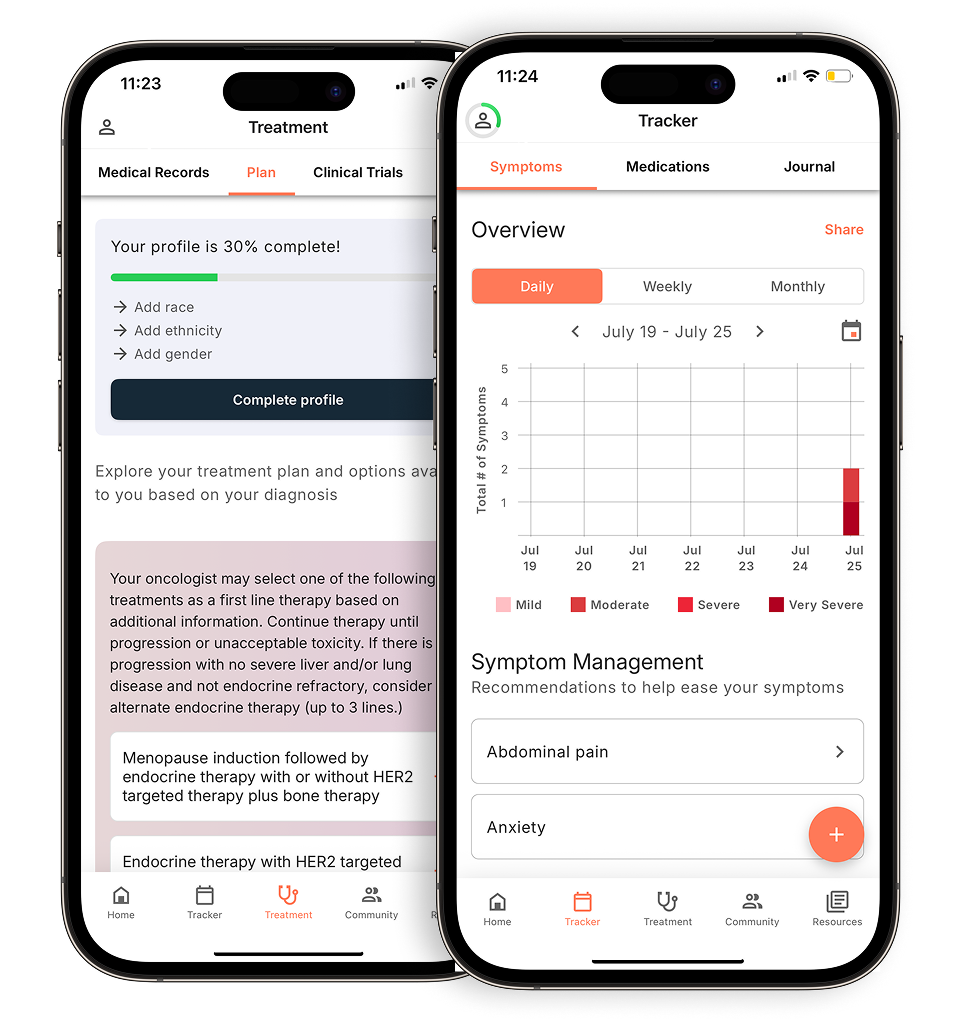
Most side effect tracking apps are designed to be straightforward and easy to use, even on days when you’re feeling drained. When you experience a symptom—like fatigue, pain, or brain fog—you simply open the app and log it. You can often rate the severity on a simple scale, add notes about what might have triggered it, and record the time it occurred. Some apps also let you track your mood, medications, and daily activities.
This process helps you keep a clear, real-time record of your experience. Over time, the app builds a comprehensive picture of your good days and bad days. This organized history gives your care team a much clearer understanding of what you’re going through, allowing them to provide better, more personalized advice to help you feel better.
Why is it helpful to track your side effects?
Tracking your side effects is one of the most proactive steps you can take during treatment. It’s not just about remembering details; it’s about turning your personal experience into a powerful tool for communication with your medical team. When you can show your doctor a log of your symptoms, it helps them see patterns and understand the full impact treatment is having on your daily life.
According to Cancer Care, maintaining an accurate record of when side effects occur, how severe they are, and how they affect your activities is crucial. This information allows your doctor to make informed decisions, like adjusting your treatment plan or prescribing medication to manage a specific symptom before it becomes severe. Catching these patterns early can help prevent some side effects from getting worse and significantly improve your quality of life during chemo.
A quick note before you download
Apps are helpful tools, not medical advice
Smartphone apps can be fantastic allies on your cancer journey. They can help you feel more organized, track your health, and connect with others who understand what you’re going through. But it’s essential to remember their role: they are tools to support you, not to replace your medical team. The information you log is for you and your doctor to review together. An app can’t diagnose a new issue or tell you whether to change your medication. Think of it as your personal health assistant, gathering important notes so you can have more informed and productive conversations with the real experts—your doctors and nurses.
Talk to your care team for recommendations
The data you collect in a side effects log is most powerful when you share it. Bringing a clear, organized summary of your symptoms to your appointments helps your doctor see the full picture of your experience between visits. This detailed information allows them to spot patterns, understand how treatment is truly affecting your daily life, and make better-informed decisions about your care. Don’t hesitate to ask your oncologist or nurse if they have an app they recommend; they may be familiar with tools that other patients have found helpful. Your app is part of your communication toolkit, strengthening the partnership between you and your care team.
Common chemo side effects to log in your app
Going through chemotherapy is a unique journey for everyone, but knowing what to expect can make the process feel more manageable. Tracking your side effects is one of the most powerful things you can do for yourself. It’s not just about making a list; it’s about gathering information that helps you and your care team make the best decisions for your health. When you keep a record, you create a clear picture of your experience, which is invaluable for managing your treatment plan and improving your quality of life. Think of it as creating your own personal health story, one that you can share with your doctor to ensure you get the support you need, right when you need it.
Common physical symptoms to log
Many of the most well-known chemotherapy side effects are physical. You might experience things like fatigue, nausea, hair loss, mouth sores, or changes to your skin and nails. While this sounds like a lot, remember that you likely won’t experience all of them, and their intensity can vary. The key is to pay attention to your body. Did you feel exhausted the day after treatment? Did a certain food trigger nausea? Jotting down these details helps you and your doctor connect the dots. By tracking these physical responses, you can start to see patterns, which allows your care team to suggest ways to manage them more effectively, from medication adjustments to lifestyle tips.
Tracking changes in your mood and focus
Chemotherapy doesn’t just affect your body; it can impact your mind, too. It’s common to experience emotional shifts, like anxiety or mood swings. You might also notice cognitive changes, often called “chemo brain,” which can feel like a mental fog that makes it hard to remember things or focus. These symptoms are just as real and important to track as physical ones. Noting when you feel forgetful or overwhelmed provides crucial information for your care team. It helps them understand the full scope of your experience and can open up conversations about support systems, coping strategies, or resources to help you feel more like yourself. Using an app can be especially helpful for managing chemotherapy side effects when you’re dealing with memory fog.
When should you log your symptoms?
Consistency is your best friend when it comes to tracking side effects. Try to log your symptoms as they happen or at a set time each day. For each entry, it’s helpful to record the date and time, what the symptom is, how severe it feels (maybe on a scale of 1 to 10), and how it’s affecting your daily activities. This detailed record helps you and your doctor see trends over time. For example, you might notice that your fatigue always peaks two days after treatment. This insight allows you to plan ahead and adjust your schedule. An accurate log is one of the best tools you have to communicate effectively with your medical team and take a proactive role in your care.
Using a chemo app to talk with your doctor
Doctor’s appointments can feel rushed, and it’s easy to forget important details when you’re on the spot. A side effects app acts as your personal health diary, helping you capture exactly how you’re feeling between visits. When you can present a clear picture of your experience, your care team gets the insights they need to provide the best possible support. This turns your appointments into productive, collaborative conversations focused on your well-being. Instead of trying to recall weeks of information in a few minutes, you have organized data right at your fingertips, ensuring nothing important gets missed.
Give your care team a clearer picture
Trying to remember every symptom, its severity, and when it occurred can be a real challenge. Using an app for managing chemotherapy side effects solves this problem. It helps you create a detailed, real-time log of your symptoms, mood, and medications. This log gives your doctor a clear, day-by-day account of your experience, which is far more accurate than memory alone. When you can show them a graph of your fatigue levels or a list of dates when you experienced nausea, the conversation becomes more specific and effective. This data-driven approach ensures your care team has a full understanding of what you’re going through.
Spotting patterns and potential triggers
Consistently logging your symptoms can reveal connections you might not have noticed otherwise. Maybe your headaches always appear the day after a specific medication, or your energy levels dip at the same time each afternoon. Tracking your symptoms helps your care team understand what you’re going through. This allows them to change your treatment or give you better advice to help you feel better. By identifying these patterns, you and your doctor can work together to proactively manage side effects, whether it’s by adjusting your schedule, changing your diet, or trying a new supportive care medication.
Helping your doctor make informed treatment adjustments
Beyond just tracking symptoms, these apps are powerful organizational tools. They can help you remember when to take medicines, keep notes for your doctor, and manage appointments. This is especially helpful if you’re dealing with “chemo brain” (memory fog), which can make it tough to keep track of everything. Having all your questions, medication schedules, and symptom history in one place streamlines your appointments. It allows you to have more focused discussions about what’s working and what isn’t, making it easier for your doctor to make timely and effective adjustments to your treatment plan.
What to look for in a chemo side effects app
With so many health apps available, finding the right one to help you manage chemotherapy side effects can feel like a job in itself. The best apps go beyond simple note-taking, offering features that make your life easier and help you feel more in control of your health journey. A great app should be your trusted partner, helping you track symptoms accurately, manage your medications, and communicate more effectively with your care team. When you’re evaluating your options, look for a tool that feels intuitive and supportive. It should reduce your mental load, not add to it. Think of it as a digital advocate that organizes the details so you can focus on your well-being. The goal is to find a platform that consolidates your health information in one secure place, making it simple to see patterns, stay on top of your treatment plan, and have more productive conversations with your doctors. Here are the key features that can make a real difference.
Features for detailed symptom tracking
Trying to remember every symptom, its severity, and when it happened can be tough, especially when you’re not feeling your best. A good app solves this by helping you create a detailed, real-time log of your physical symptoms, mood, and medications. Look for an app that lets you track a wide range of side effects, from nausea and fatigue to anxiety and brain fog. The ability to add custom notes is also a huge plus. This detailed record gives you and your doctor a much clearer picture of your experience between appointments, ensuring nothing important gets forgotten or overlooked.
Personalized insights to understand your health
Some of the most powerful apps use artificial intelligence (AI) to make sense of the information you log. This isn’t just about storing data; it’s about turning that data into useful guidance. The integration of AI in oncology is helping to personalize cancer care like never before. An AI-driven app can analyze your symptom patterns and provide personalized insights based on your unique diagnosis and treatment plan. It might suggest relevant articles, highlight potential treatment options, or point you toward clinical trials you may qualify for, giving you evidence-based information tailored specifically to you.
Helpful medication and appointment reminders
When you’re juggling multiple medications, appointments, and the mental fog that often comes with treatment—sometimes called “chemo brain”—it’s easy to lose track of things. An app with built-in medication management can be a lifesaver. Look for features like customizable reminders for pills, injections, and appointments. This helps you stay on schedule and reduces the stress of managing a complex routine. Having everything in one place ensures you can focus more on your well-being and less on logistics, which is especially helpful on days when you feel overwhelmed.
Your data should be private and secure
Your health information is incredibly personal, so it’s essential to choose an app that takes your privacy seriously. Before downloading, take a moment to review the app’s privacy policy. A trustworthy app will be transparent about how it protects your data, using encryption and secure storage to maintain confidentiality. You should feel confident that your information is safe and used only for your benefit. For example, at Outcomes4Me, we are committed to maintaining the confidentiality and security of all personal data our users provide, so you know your information is in good hands.
Simple ways to share information with your doctor
The ultimate goal of tracking your side effects is to improve communication with your medical team. The best apps make this step simple. Look for a feature that allows you to easily export or share your symptom log. This might be a printable report, a PDF, or a secure digital summary you can show your doctor during appointments. Presenting clear, organized data helps your care team understand exactly what you’re going through. This enables more productive conversations and helps them make informed adjustments to your treatment plan to better manage your side effects and improve your quality of life.
What are the best apps for tracking chemo side effects?
Finding the right app to track your chemotherapy side effects can feel like one more thing on an already long to-do list. The good news is that you have options, and the best one for you really depends on what you need most. Using an app helps you create a detailed, real-time log of your symptoms, mood, and medications, which can be difficult to recall accurately during appointments. This detailed record empowers you to have more informed conversations with your doctor, leading to better management of your side effects.
Some apps are fantastic all-in-one platforms that offer treatment guidance alongside tracking, while others are simple, focused tools for logging symptoms. Think about what would make your life easiest. Do you want an app that integrates directly with your hospital’s records? Or one that helps you manage complex medication schedules? Below are some of the most trusted and effective apps available. Each one offers a unique approach to help you monitor your health, stay organized, and feel more in control of your treatment journey. We’ll walk through the features of each so you can find the perfect fit.
Outcomes4Me
The Outcomes4Me app is more than just a symptom tracker; it’s a comprehensive cancer care partner. It uses AI to provide you with personalized, evidence-based information, including treatment options and clinical trials that match your specific diagnosis. The app makes it simple to create a detailed, real-time log of your symptoms, mood, and medications, which helps you and your doctor see the complete picture. By integrating with the NCCN Clinical Practice Guidelines in Oncology (NCCN Guidelines®), it ensures the information you receive is credible and up-to-date. If you’re looking for a single tool to manage your side effects while also getting personalized treatment guidance, this is an excellent choice.
MyChart Bedside
If your hospital or clinic uses the Epic electronic health record system, you may already have access to MyChart. The MyChart Bedside app is designed for hospital stays but offers features that are useful for ongoing treatment management. You can use it to access your health information, view test results, and communicate directly with your healthcare team. This direct line of communication is invaluable for tracking symptoms and managing side effects in near real-time. Because it’s connected to your official medical record, any symptoms you log can be seen immediately by your doctors and nurses, making it a powerful tool for integrated care.
CareZone
Managing medications can be one of the most challenging parts of chemotherapy. CareZone, which is now part of Amazon Pharmacy, excels at this. The app helps you keep all your health information in one place. Its standout feature is the ability to scan medicine bottles to automatically create a detailed list, which is a huge time-saver. You can also set up reminders to take your medicine or check your blood sugar, and even manage prescription refills. While it’s a powerful medication management tool, it’s also helpful for caregivers who are helping a loved one stay on track with their treatment plan.
Medication scanning and refill reminders
Keeping track of multiple prescriptions can feel like a full-time job, especially when you’re dealing with treatment-related fatigue. Instead of manually typing in long medication names, some apps let you use your phone’s camera to scan the label on the bottle. This instantly creates an accurate, digital list of your medications, saving you time and preventing typos. Once your list is set up, the app can send you reminders for when to take each dose and notify you when it’s time for a refill. This kind of tool helps reduce the mental load of managing a complex routine, making it easier to stay on top of your medication schedule and focus on your well-being.
Symple Symptom Tracker
As the name suggests, Symple is all about simplicity. If you want a straightforward, no-fuss way to track how you’re feeling, this app is a great option. Symple Symptom Tracker allows you to easily log up to 20 symptoms, medications, and other factors like diet and fitness that might impact your well-being. One of its best features is the ability to create interactive charts and spreadsheets from your data. This makes it easy to spot trends and patterns over time, giving you clear, visual information to share with your doctor during your appointments. It’s a focused tool that does one thing and does it very well.
Cancer.Net Mobile
When you’re going through treatment, having access to reliable information is crucial. The Cancer.Net Mobile app comes from the American Society of Clinical Oncology (ASCO), so you can be sure the content is trustworthy and oncologist-approved. The app provides trusted information on over 125 types of cancer. Beyond its educational resources, it includes practical tools to help you track symptoms, record questions for your doctor, and keep a log of your medications. This combination of expert information and personal tracking tools makes it a valuable resource for feeling informed and prepared throughout your cancer journey.
Information on 120+ cancer types
When you’re looking for answers, the internet can feel like a maze of conflicting and sometimes scary information. The Cancer.Net Mobile app cuts through the noise by offering a library of reliable information on more than 125 different types of cancer. Because this content is developed by the American Society of Clinical Oncology (ASCO), you can trust that what you’re reading is accurate, current, and approved by cancer experts. This feature gives you a single, dependable place to learn about your diagnosis and treatment, helping you feel more knowledgeable and prepared for conversations with your care team.
Access to podcasts and videos
Some days, reading an article is the last thing you want to do, especially when you’re feeling tired or dealing with chemo brain. The app understands this and connects you with a variety of podcasts and videos for an easier way to take in information. Listening to an expert discussion or a patient’s story can make you feel less alone and provide comfort and practical tips in a format that’s easy to digest. These multimedia resources offer another layer of support, giving you different ways to learn and stay connected throughout your treatment journey.
Other helpful apps for your cancer journey
Managing your health during cancer treatment goes far beyond tracking symptoms. It’s also about taking care of your emotional well-being, finding community, and handling the practical day-to-day challenges that arise. While a dedicated chemo app is essential for your medical journey, a whole ecosystem of other apps can provide support in different areas of your life. Think of them as your extended digital support team, ready to help you connect with others who understand, find a moment of calm, or even save money on prescriptions. We’ve gathered some of the most helpful apps to support your emotional, mental, and practical needs.
Apps for emotional support and community
Going through cancer can feel isolating, but you are never truly alone. Connecting with others who are on a similar path can be incredibly comforting and empowering. Whether you’re looking for a large, anonymous community or a private space to keep your loved ones updated, there’s an app designed to help you find the support you need. These tools make it easier to share your experience, ask for help, and build a network of people who genuinely get it. Finding your community can make a world of difference in how you feel day-to-day.
BELONG — Beating Cancer Together
BELONG offers a large online space for people with cancer to connect. You can join support groups specific to your cancer type, which is great for finding others with shared experiences. The app also gives you a unique opportunity to chat with cancer doctors and researchers, asking questions in a supportive environment. It’s completely free and anonymous, so you can feel comfortable sharing openly and getting the peer support you need without any pressure.
LivingWith: Cancer Support
This app is all about connecting you with your personal community and making it easier to ask for and receive help. You can create a private group to share updates with friends and family, so you don’t have to repeat the same information over and over. One of its most helpful features is the ability to ask for support with specific tasks, like getting a ride to an appointment or help with grocery shopping. It helps you organize the support from your loved ones in one simple, private place.
ACS CARES
From the American Cancer Society, ACS CARES is a free app that provides personalized resources for your specific journey. It’s designed not just for patients, but for families and caregivers as well, making it a comprehensive tool for your entire support system. The app delivers trusted information, support, and resources tailored to your needs, helping you feel more informed and connected. Because it comes from such a reputable source, you can count on the quality of the guidance you receive.
Apps for mental health and self-care
Taking care of your mental health is just as important as managing your physical symptoms. The emotional weight of a cancer diagnosis and treatment can be heavy, and it’s essential to have tools that help you find moments of peace and process your feelings. Self-care isn’t a luxury; it’s a necessary part of your overall well-being. The following apps are designed to help you manage anxiety, practice mindfulness, and find creative outlets for healing, giving you accessible ways to support your mind and spirit whenever you need it.
Create To Heal
If you’re looking for a creative and gentle way to find some peace, Create To Heal is a wonderful resource. The app is filled with music, guided meditations, art, and inspiring messages designed to support the healing process. It’s a space where you can step away from the clinical side of treatment and connect with your creative side. It’s a great tool for patients, survivors, and family members who need a quiet moment to relax and focus on something positive.
MindShift
Developed by Anxiety Canada, MindShift is an app that uses evidence-based strategies to help you manage anxiety. It’s built on principles of Cognitive Behavioral Therapy (CBT), a proven approach for dealing with anxious thoughts. The app offers practical tools you can use anytime, like guided breathing exercises, thought journals to help you reframe your thinking, and meditations. It’s like having a set of coping tools in your pocket, ready to help you handle feelings of worry and stress.
Apps for practical and financial support
A cancer diagnosis comes with a lot of new information and practical hurdles to manage, from a whole new vocabulary of medical terms to the financial strain of treatment. It can feel overwhelming, but there are tools that can help simplify these challenges. The apps below are designed to provide practical assistance, whether it’s by helping you understand the language your doctors are using or by finding ways to lower the cost of your medications. These resources can help lighten the load so you can focus more of your energy on your health.
GoodRx
The cost of medication can add up quickly, and GoodRx is a straightforward app designed to help you save money. It works by finding the best prices and free coupons for your prescriptions at pharmacies near you. You simply search for your medication in the app, find a coupon, and show it to the pharmacist when you pick up your prescription. It’s an easy way to potentially reduce the cost of your treatment and take some of the financial pressure off.
Cancer Dictionary Free
Feeling empowered in conversations with your doctor often starts with understanding the terminology they use. The Cancer Dictionary Free app is a simple tool that can help you do just that. It provides easy-to-understand definitions for medical words related to cancer, along with pronunciation guides and synonyms. Having this resource on your phone (it’s currently available for iOS) means you can quickly look up a term you don’t recognize, helping you feel more confident and informed during your appointments.
Overcoming common challenges with symptom tracking
Let’s be honest: when you’re going through chemotherapy, keeping a detailed log of your side effects is probably the last thing on your mind. You’re focused on getting through the day, and the idea of documenting every feeling can seem like just another chore. It’s completely normal to face a few hurdles when trying to keep track of everything. Understanding these common challenges is the first step toward finding a system that works for you.
Many people struggle with memory issues, often called “chemo brain,” which can make recalling details difficult. It’s also tough to be consistent with logging when you’re feeling exhausted or unwell. And when you’re dealing with multiple symptoms at once, it’s easy to feel overwhelmed and unsure of what’s important to share with your doctor. Recognizing these obstacles can help you see how a dedicated app can provide the structure and support you need, turning a difficult task into a manageable and empowering habit.
When you’re dealing with chemo brain
One of the most frustrating aspects of treatment can be “chemo brain,” a type of cognitive fog that makes it hard to remember details. You might forget when a headache started, how long nausea lasted, or whether you took your medication on time. Trying to recall this information during a doctor’s appointment can feel impossible. An app helps you create a clear, real-time record of your symptoms, mood, and medicines as they happen. Think of it as your personal health diary that does the remembering for you, ensuring you have accurate information right at your fingertips when you need it most.
The Chemo Brain app
This free app for Apple devices was created specifically to help with the memory problems that can happen during chemotherapy. It’s a simple tool where you can quickly write down reminders for medicines, appointments, and questions you want to ask your doctor. You can also log side effects as they occur, so you don’t have to rely on memory later. One of its most helpful features is the ability to record what your doctor says during an appointment, which you can listen to later. You can even use it to send updates to family members, keeping them in the loop without having to make multiple calls or send texts.
Apple’s Reminders app
If you use an iPhone or iPad, you already have a powerful tool for managing chemo brain. The built-in Reminders app is great for creating simple to-do lists to keep you on track. You can use Siri to add reminders without even having to type, which is perfect for moments when you think of something but don’t have the energy to write it down. Just say, “Hey Siri, remind me to call the pharmacy at 2 p.m.” It’s also a great tool for your support system. Caregivers can create shared lists to delegate tasks with family and friends, making it easier to coordinate help with meals, errands, or rides to appointments.
Forgetting to log your symptoms consistently
When you’re not feeling your best, consistency is a huge challenge. Some days you might have the energy to write everything down, while on other days, just getting out of bed is a victory. However, an accurate record of your chemotherapy side effects—including when they occurred, how severe they were, and their impact on your daily life—gives your care team the clearest picture of your experience. A good tracking app simplifies this process with quick-tap entries and reminders, making it easier to build a consistent habit without draining your precious energy. This way, your log reflects the full story, not just the good days.
When it feels like too much to track
Dealing with multiple symptoms at once can be incredibly overwhelming. It’s easy for everything to blur together into a general feeling of being unwell, making it difficult to explain what’s happening to your medical team. Tracking your symptoms helps your care team truly understand what you’re going through. When they can see specific patterns—like fatigue that peaks two days after treatment or nausea that improves after a certain meal—they can offer better advice. This detailed insight allows them to adjust your treatment plan or suggest targeted strategies to help you feel better and more in control.
How often should you update your log?
When you’re managing treatment, adding another daily task can feel overwhelming. The key to successfully tracking your side effects is to find a routine that works for you without adding stress. There’s no single right answer for how often you should log your symptoms; the best frequency is the one you can stick with consistently.
Some people find a quick daily check-in helpful, while others prefer to log symptoms only as they arise. Your ideal rhythm might even change from week to week depending on your treatment cycle and how you’re feeling. The goal isn’t to create a perfect, minute-by-minute record. It’s to build a useful history of your experience that you and your care team can use to make informed decisions about your health. By creating a consistent habit, you turn symptom tracking from a chore into a powerful tool for communicating your needs and advocating for your care.
Daily vs. as-needed: finding your rhythm
Deciding between daily updates and as-needed entries depends entirely on your personal preference. A brief daily entry, even if it’s just to note that you’re feeling fine, can help establish a clear baseline. This makes it easier to spot subtle changes or new patterns over time.
However, if a daily log feels like too much pressure, logging symptoms only when they occur is perfectly fine. The most important thing is that you track your symptoms in a way that gives your care team a clear picture of what you’re going through. This information allows them to adjust your treatment plan or suggest strategies to help you feel better. Experiment with both methods to see which one feels most manageable for you.
Using your log to prepare for appointments
One of the biggest benefits of consistent logging is walking into your doctor’s appointments feeling prepared and confident. Instead of trying to remember how you felt last Tuesday, you’ll have specific data points to share. To make your log as useful as possible, try to maintain an accurate record of each side effect.
For each entry, note the date and time it occurred, how long it lasted, and its severity on a simple scale (like 1-10). It’s also incredibly helpful to describe how the symptom impacted your daily activities. For example, noting “felt too fatigued to make dinner” provides much more context than just writing “fatigue.” This level of detail helps your doctor understand the true impact of your side effects.
Tips for building a consistent logging habit
The easiest way to build a new habit is to attach it to an existing one. Try updating your log at the same time every day, perhaps while you take your morning medications or before you go to bed. Many apps also have built-in reminder features you can set to prompt you at a specific time.
These tools are especially helpful if you’re dealing with cognitive fog, or “chemo brain.” An app can serve as an external memory aid, helping you remember when to take medicines and keep track of symptoms when your own memory feels unreliable. Don’t worry about making every entry perfect. The goal is consistency, not perfection. A simple, consistent log is far more valuable than a few highly detailed entries with large gaps in between.
How to get started with a side effects app
Diving into a new app can feel like one more thing on your to-do list, but getting started with a side effects tracker is usually quick and simple. Taking a few minutes to set it up properly will pay off by making your daily logging easier and the data you collect more valuable for you and your care team. Think of it as setting up your new health headquarters. Here’s a simple, step-by-step guide to get you going.
First, set up your profile and medical info
The first thing you’ll do is create your profile. This step is more than just entering your name; it’s about giving the app the context it needs to help you. You’ll be asked to provide details about your diagnosis, treatment plan, and medical history. Be as thorough as you can. This information allows smart apps to personalize your experience. For example, an AI-driven patient empowerment platform can use your specific details to offer evidence-based knowledge and resources tailored to your unique situation, helping you feel more in control of your cancer care.
Next, customize what you want to track
Your experience with chemotherapy is unique, and your tracking should be too. Most apps come with a standard list of symptoms, but the best ones let you customize what you monitor. Go through the settings and add any specific physical or emotional side effects you’re experiencing. Beyond nausea or fatigue, you might want to track things like your mood, energy levels, or cognitive changes (“chemo brain”). Creating a detailed, real-time log of your symptoms helps you see the full picture of how treatment is affecting you, making it easier to spot patterns over time.
Finally, make tracking part of your routine
Consistency is key to making your side effects log a powerful tool. The best way to stay consistent is to build logging into your daily routine. Pick a time that works for you—maybe it’s first thing in the morning, during a quiet moment in the afternoon, or right before bed. Set a reminder on your phone to help you remember. When you log, be sure to maintain an accurate record of when a symptom occurred, how severe it was, how long it lasted, and how it impacted your daily activities. This habit will ensure you have a rich, detailed history to share with your doctor.
Making the most of your side effects data
Tracking your side effects is the first step, but the real power comes from knowing how to use that information. Your log isn’t just a diary; it’s a tool that can help you and your care team make more informed decisions about your treatment and well-being. By turning your daily experiences into clear, organized data, you can take a more active role in managing your health. This data helps paint a complete picture of your treatment journey, highlighting patterns and providing concrete details that are easy to miss when you’re just trying to get through the day. Think of it as your personal health record, one that gives you the evidence needed to advocate for yourself and collaborate effectively with your medical team.
Bring your data to your doctor visits
Walking into an appointment armed with detailed data completely changes the conversation. Instead of trying to recall how you felt weeks ago, you can show your doctor specific trends and instances. For example, rather than saying, “I’ve been feeling tired,” you can say, “I experienced debilitating fatigue every afternoon for three days following my last infusion.” This level of detail helps your care team truly understand what you’re going through. Clear information allows them to offer more personalized advice, adjust your medications, or suggest supportive care strategies to help you manage your treatment and feel better.
Look for trends to better manage your symptoms
Your side effects log can help you become a detective for your own body. By consistently tracking your symptoms, you can start to see patterns you might not have noticed otherwise. You might discover that your nausea is worse on days you don’t eat a full breakfast or that a short walk in the morning helps ease your fatigue. This information is incredibly empowering. By identifying these triggers and remedies, you can learn what truly helps you feel better and manage your symptoms more effectively. An app helps you create a detailed, real-time log, making it easier to connect the dots between your actions and how you feel.
Easily share updates with your entire care team
Sharing your log with your doctors and nurses makes you an active partner in your care. It’s important to maintain an accurate record of the side effects you experience, including when they occurred, how severe they were, and how they impacted your daily activities. Many apps allow you to easily export or share this data, so your team can review it before or during your appointment. This seamless communication ensures that your care team has a full and accurate understanding of your experience between visits, allowing for quicker interventions and more personalized adjustments to your treatment plan.
Related Articles
- “Is chemotherapy causing major side effects for others?” | Outcomes4Me Community
- What Are the Side Effects of Strong Chemo and How Can They Be Managed? | Outcomes4Me Community
- Struggling with Chemo Side Effects and Mood Changes | Outcomes4Me Community
- Is anyone else struggling with chemo side effects? | Outcomes4Me Community
View your personalized treatment plan in the Outcomes4Me app
Use your diagnosis to unlock personalized NCCN Guidelines®-aligned recommendations.
Frequently Asked Questions
Can’t I just use a regular notebook to track my side effects? You absolutely can, and any form of tracking is better than none at all. However, an app is designed to make the process easier and the information more useful. It can send you reminders, help you spot trends with charts, and let you share a clear summary with your doctor. Think of it as an upgrade that organizes the information for you, which is especially helpful when you’re dealing with the mental fog that can come with treatment.
What if I forget to log my symptoms for a few days? Is it still useful? Of course. The goal is progress, not perfection. Your side effects log is a tool to help you, not a test you can fail. Even if there are gaps, the information you do record is valuable. It can still help you and your doctor identify important patterns or see how you’re feeling on your most challenging days. Just pick it back up when you can—any data you collect is a step in the right direction.
Will my doctor actually have time to look at all this data? That’s a great question. The idea isn’t to hand your doctor pages of notes to read. Instead, the app helps you summarize your experience. You can quickly show them a chart of your fatigue levels or point to the specific days your nausea was at its worst. This allows you to have a much more focused and productive conversation, turning vague feelings into specific points you can address together.
How do I know my sensitive health information is safe in an app? Your privacy is incredibly important, and it’s smart to be cautious. Reputable health apps take security very seriously and use measures like encryption to protect your personal information. Before you commit to an app, take a moment to look for its privacy policy. A trustworthy company will be transparent about how they keep your data confidential and secure.
I’m feeling overwhelmed by all my symptoms. What’s the most important information to record? When you’re feeling overwhelmed, start small. You don’t have to track everything at once. Pick the one or two symptoms that are bothering you the most. For each entry, just try to note three things: how severe it felt (a simple 1-10 scale works well), the time of day it happened, and how it affected your activities. This simple approach can provide powerful insights without adding more stress to your plate.