
Your cancer journey is unlike anyone else’s, so the information you rely on should be just as unique. Sifting through generic health websites can be confusing and even frightening, leaving you with more questions than answers. A high-quality cancer support app cuts through the noise by delivering guidance tailored specifically to your diagnosis. Using smart technology, the best apps can analyze your health profile to provide relevant treatment options, potential clinical trials, and educational resources based on trusted medical guidelines. This personalized approach ensures you’re getting information that truly applies to you. The first step toward receiving this customized support is to download cancer treatment guide app that is built to understand your individual needs and empower you with knowledge.
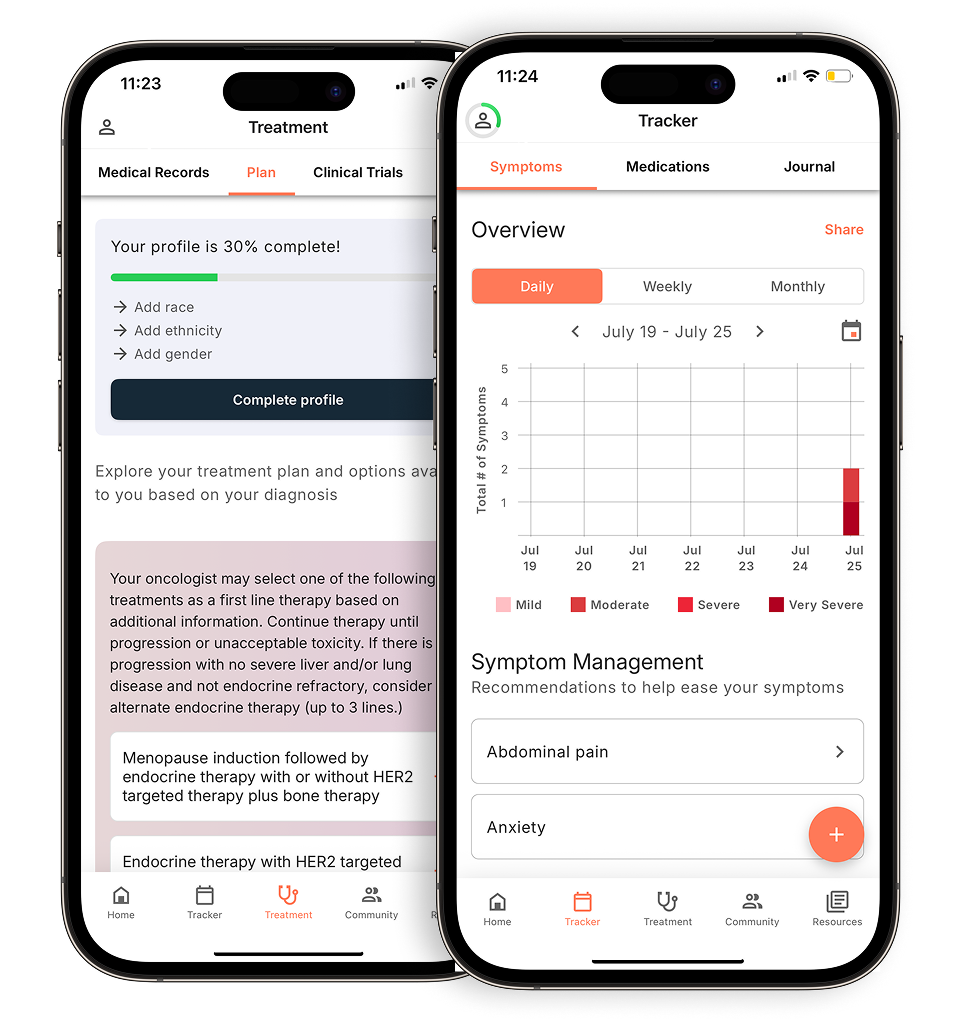
View your personalized treatment plan in the Outcomes4Me app
Use your diagnosis to unlock personalized NCCN Guidelines®-aligned recommendations.
Key Takeaways
- Simplify your daily routine: A support app can act as your personal organizer, keeping track of appointments, medications, and symptoms in one place to reduce your mental load.
- Become a more informed patient: Look for an app that offers guidance tailored to your specific diagnosis from trusted medical sources, empowering you to ask better questions and understand your care plan.
- Make your doctor’s visits more effective: Use tracking tools to log how you’re feeling between appointments, giving your care team a clear, detailed picture of your health to help guide treatment decisions.
How can a cancer support app help you?
When you’re managing a cancer diagnosis, it can feel like you’re juggling a million different things at once—appointments, medications, symptoms, and a sea of new information. A cancer support app acts as a digital companion, putting helpful tools and resources right in the palm of your hand. Think of it as a central hub to help you organize the logistics of your care, understand your diagnosis, and feel more in control of your health journey.
These apps are designed to simplify the complexities that come with treatment. Instead of relying on scattered notes or trying to remember every question you have for your doctor, you can use an app to keep everything in one secure place. From tracking how you’re feeling each day to accessing easy-to-understand information about your specific type of cancer, a good support app can lighten your mental load. This allows you to focus more of your energy on what truly matters: your well-being.
Support for you and your caregivers
A cancer diagnosis impacts your whole circle of support, and an app can be a valuable tool for everyone involved. It provides a shared space where you and your caregivers can stay on the same page. Instead of having to repeat information after every appointment, your loved ones can access updates on your treatment plan, medication schedules, and upcoming visits.
This helps your caregivers coordinate practical needs more effectively, whether it’s arranging rides to the hospital or picking up prescriptions. By centralizing information, the app can reduce miscommunication and stress for both you and your support team, ensuring everyone feels informed and empowered to help.
Features that can make a difference
The most helpful cancer apps are packed with practical features designed to make your day-to-day life easier. Many include tools that allow you to log your symptoms and side effects, which can provide your care team with a clearer picture of how you’re responding to treatment. You can also track your medications, set reminders, and keep a running list of questions to ask at your next appointment.
Beyond organization, these apps often serve as a reliable educational resource. You can find up-to-date information on more than 120 types of cancer and learn about different treatments. Having access to these cancer app benefits can help you feel more prepared for conversations with your doctor and more confident in your care decisions.
How AI creates a personalized experience
Some of the most advanced cancer support apps use artificial intelligence (AI) to deliver an experience that’s tailored specifically to you. Instead of you having to sift through generic information, AI can analyze your unique diagnostic details to provide relevant articles, treatment options, and potential clinical trials. This personalization ensures the information you receive is directly applicable to your situation.
This technology can make a huge difference in how you engage with your health information. By collecting patient-reported outcomes and health data, these smart apps can offer insights that are both timely and specific. Of course, it’s important to choose an app that bases its guidance on trusted medical sources to ensure the information is both safe and accurate. This level of mobile app engagement helps you become a more active partner in your own care.
What to look for in a cancer support app
With so many apps available, it can be tough to know which one is right for you. The best cancer support app is one that fits your specific needs and makes you feel more empowered, not more overwhelmed. Think of it as a digital partner in your care journey—a tool that helps you organize information, understand your options, and connect with others, all from your phone.
A great app can help you keep track of the countless details that come with a cancer diagnosis, from appointment dates to medication schedules. It can also be a reliable source of information, helping you learn about your diagnosis and treatment options in a way that’s easy to understand. Most importantly, it should give you a sense of control and support. As you explore your options, look for a few key features that can make a real difference in how you manage your health.
Guidance tailored to your diagnosis
Every cancer journey is unique, so the support you receive should be, too. Look for an app that provides information and resources specific to your diagnosis, including your cancer type and stage. Generic advice can only get you so far. A personalized app can filter out the noise and deliver content that’s truly relevant to you. This means you get information about the treatment options and potential side effects that apply to your situation, helping you have more informed conversations with your doctor. When an app tailors its guidance to your health profile, it becomes a much more powerful tool for your care.
Tools to track symptoms and medications
Managing cancer often involves keeping track of many moving parts, including appointments, medications, and daily symptoms. An app with built-in tracking tools can be a huge help. Being able to log how you’re feeling or note side effects as they happen creates a detailed health journal you can share with your care team. This makes it easier to spot patterns and communicate clearly about your experience during appointments. Instead of trying to remember everything, you’ll have a reliable record right at your fingertips, which can help you and your doctor make better decisions together about managing your care.
Access to resources and community support
Going through cancer can feel isolating, but you don’t have to do it alone. Many apps offer a sense of connection, whether through a community forum with other patients or by providing links to external support services. Finding a supportive community can provide emotional comfort and practical advice from people who truly understand what you’re going through. An app that helps you find these resources can be an invaluable source of strength and encouragement for both you and your loved ones. It’s a reminder that there’s a whole network of people ready to help.
Help finding clinical trials
Clinical trials are research studies that explore new treatments and can be an important option for many people with cancer. However, finding a trial that’s right for you can be a complicated process. A high-quality cancer support app can simplify this search. Some apps have features that help you identify clinical trials you may be eligible for based on your specific diagnosis and treatment history. This can make it much easier to discuss potential opportunities with your oncologist and explore all available avenues for your care.
Information based on trusted medical guidelines
When it comes to your health, the quality of information matters. The most reliable cancer support apps base their content on evidence-based, oncologist-approved sources. Look for apps that reference established medical guidelines, such as those from the National Comprehensive Cancer Network (NCCN) or the American Society of Clinical Oncology (ASCO). This ensures that the information you’re receiving about treatments and care is accurate, up-to-date, and aligned with the standards your own oncology team follows. Using an app grounded in trusted medical expertise can give you confidence in the guidance you receive.
Exploring different cancer support apps
With so many apps available, it can be tough to know where to start. Each one offers something a little different, so the best choice for you depends on your personal needs and what you hope to get out of the experience. Some apps focus on providing personalized treatment information based on your specific diagnosis, while others are geared more toward symptom tracking or connecting with a community. Let’s look at a few options to see how they can support you on your cancer journey.
Outcomes4Me: AI-driven personalized guidance with NCCN Guidelines integration
Outcomes4Me uses smart technology to give you information that’s specific to you. After you securely enter your medical information, the app provides personalized guidance on treatment options, clinical trials, and even potential genetic testing. A key feature is its direct integration with the National Comprehensive Cancer Network (NCCN) Guidelines®, which are the same evidence-based standards your oncology team uses. One evaluation of mHealth applications found that the app scored high in quality and usefulness for providing this kind of personalized, guideline-driven information. This makes it a powerful tool for understanding your care plan and preparing for conversations with your doctor.
NCCN Guidelines for Patients: Evidence-based treatment information
If you want to go straight to the source, the NCCN Patient Guides for Cancer app is a great resource. This app provides patient-friendly versions of the NCCN Guidelines, which are the recognized standard for clinical policy in cancer care. The goal is to present this complex information in a way that’s easy to understand, so you can have more informed discussions with your doctors about the best treatment choices for you. The NCCN offers several mobile apps, and this one is specifically designed to empower you with credible, up-to-date information about your diagnosis and treatment options, helping you become a more active partner in your own care.
CancerNet Mobile: Comprehensive cancer resources
The Cancer.Net Mobile app is another excellent source for reliable cancer information. It’s produced by the American Society of Clinical Oncology (ASCO), the world’s leading organization of oncology professionals. The app gives you access to a library of comprehensive, oncologist-approved information covering more than 120 types of cancer. You can find articles, podcasts, and videos on topics ranging from managing side effects to coping with emotions. It also includes tools for tracking symptoms, medications, and questions you want to ask your doctor, making it a well-rounded resource for staying organized and informed throughout your treatment.
My Cancer Coach: Symptom management and support
For those who want to focus on tracking their day-to-day health, the My Cancer Coach app is a helpful option. Developed by the charity Cancer Care Map, this app is designed to provide information about your diagnosis and treatment while also offering practical tools to monitor how you’re feeling. You can use it to log and track your symptoms, which can help you and your care team better understand and manage treatment side effects. The app also provides information on where to find support services. According to Cancer Care Map, its purpose is to give you a simple way to record your experiences and access supportive resources.
Getting started with a cancer support app
Once you’ve found an app that feels like a good fit, taking the first steps to set it up can feel empowering. It’s a proactive way to organize your health information and connect with resources all in one place. Living with a cancer diagnosis can sometimes feel like you’re managing a full-time job, with appointments to track, symptoms to monitor, and a lot of new information to process. A support app can act as a central hub for all of it, helping to bring a sense of order and control.
Most cancer support apps are designed with patients in mind, so the process is usually quite simple and intuitive. The goal is to get you to the information and tools you need without adding any extra stress. Think of the setup process as building your personalized support system. By providing some basic information about your diagnosis and needs, you help the app deliver the most relevant guidance, from treatment information to symptom tracking tools. This initial investment of a few minutes can save you hours of searching later on and ensure the support you receive is truly helpful for your unique journey. Let’s walk through the common steps you’ll take to get your app up and running.
How to download the app on your phone
You can find and download most cancer support apps right from your smartphone’s app store—that’s the App Store for iPhones or the Google Play Store for Android phones. Simply open the store, type the name of the app into the search bar, and tap “Download” or “Install.” Many valuable apps are available for free, making support accessible when you need it. For example, the ACS CARES program offers a free app to connect you with a supportive community. The download process only takes a minute or two, and then you’ll be ready to open the app and begin creating your profile. It’s a simple first step toward having helpful resources right at your fingertips.
Setting up your personal profile
After you’ve downloaded and opened the app, the next step is usually to create a personal profile. This is where the app gets to know you a little better so it can provide the most helpful information for your specific situation. You’ll likely be asked a few questions about your diagnosis, treatment stage, and what you’re looking for in the app. While it might feel like just another form to fill out, this step is key to personalizing your experience. It ensures the articles, resources, and tools you see are relevant to you, saving you time and helping you find what you need more easily. This way, you get information tailored to you, not a generic library you have to sift through.
Sharing information with your care team
Many cancer support apps have features that let you track symptoms, log medications, and take notes on how you’re feeling. This isn’t just for your own records—it can be an incredibly useful tool for communicating with your care team. Instead of trying to remember how you felt three weeks ago, you can pull up your notes right in the app during an appointment. This helps you have more productive conversations with your doctors and nurses, ensuring they have a clear and accurate picture of your experience between visits. Sharing this information can help you and your team make informed decisions about your care together, making you an even more active partner in your treatment.
Keeping your health information secure
It’s completely normal to think about the privacy of your health information when using a new app. Reputable cancer support apps take security very seriously. Before you enter any personal data, it’s a good idea to look for the app’s privacy policy, which is often linked in the app store description or within the app itself. This document explains how your information is protected. Remember, these tools are designed to support you and work alongside your medical team, not replace their advice. Choosing apps from trusted organizations, like the NCCN Patient Guides, can give you extra peace of mind that your information is being handled responsibly.
Tips for using your cancer support app
A cancer support app can be an incredible resource, but like any new tool, it takes a little time to get the hang of it. To get the most out of your app, it helps to have a few strategies in mind. Think of it as your digital partner in care—one that can help you stay organized, informed, and connected. By using it intentionally, you can make it a powerful part of your support system. These tips can help you feel confident as you start exploring the features and making the app work for you and your unique needs.
How to handle information overload
A new diagnosis can feel like an information avalanche. A good support app helps you manage that flow rather than get buried by it. Instead of trying to learn everything at once, focus on one feature at a time. You might start by simply using the symptom tracker for a week. Once you’re comfortable with that, you can explore medication reminders. This approach allows you to build confidence and integrate the app into your routine without feeling overwhelmed. The goal is to let the app bring you clarity, not more clutter. By breaking down information into manageable pieces, these tools can help you focus on the next right step and successfully promote behavioral changes that support your treatment plan.
Making sense of medical terms
It’s easy to feel lost when your care team uses complex medical terms. Many cancer support apps have built-in glossaries or resource libraries that explain medical jargon in plain language. Use these features to look up words from your latest pathology report or to understand the name of a new medication. This can help you feel more prepared for your appointments. When you have a better grasp of the terminology, you can ask more specific questions and have more meaningful conversations with your doctors. Having access to up to date information about your specific diagnosis empowers you to be a more active participant in your own care.
What to do if you run into technical issues
Even the best apps can have a glitch now and then. If you run into a technical problem, don’t let frustration stop you from getting the support you need. The first step is often the simplest: try closing and reopening the app or restarting your phone. If the issue continues, look for a “Help,” “FAQ,” or “Support” section within the app. Most app developers provide an email address or contact form for user support. Remember, there are people behind the technology who want to ensure it works for you. While these tools are incredibly helpful, it’s good to know where to turn for help with any technical issues that may arise.
Understanding app costs and features
Many cancer support apps are free, but some may require a subscription or a one-time payment for premium features. Before you download, read the description in the app store to understand the costs involved. If you’re trying a new app, start by exploring its free features to see if it’s a good fit for your needs. Think about what’s most important to you. Do you need help tracking symptoms, or are you looking for a community forum? Knowing your priorities will help you decide if paying for extra features is worthwhile. Many apps offer valuable tools that can help you organize questions for your doctor or coordinate care, so it’s all about finding the right match for you.
Related Articles
- 5 best apps for managing cancer symptoms in 2025
- The 5 best oncologist-approved cancer apps
- Top 5 apps to connect with breast cancer patients
- Free cancer care support app (download) | Outcomes4Me
View your personalized treatment plan in the Outcomes4Me app
Use your diagnosis to unlock personalized NCCN Guidelines®-aligned recommendations.
Frequently Asked Questions
With so many options, how do I pick the cancer support app that’s right for me? The best way to start is by thinking about your biggest need right now. Are you feeling overwhelmed by appointments and medications? Look for an app with strong organizational tools. Do you want to better understand your diagnosis and treatment options? An app that provides personalized, evidence-based information might be a better fit. You don’t need an app that does everything, just one that helps you with your most pressing challenge.
Can I trust these apps with my private health information? It’s completely understandable to be concerned about your privacy. Reputable apps take security very seriously and have clear policies on how they protect your data. Before you commit, look for the app’s privacy policy, which is usually available in the app store description or on the developer’s website. Choosing apps from trusted organizations, like major cancer centers or advocacy groups, can also give you peace of mind.
Will using an app like this replace conversations with my doctor? Not at all. Think of a support app as a tool to make your conversations with your doctor more effective. It can help you track symptoms accurately, organize your questions, and learn about your diagnosis so you can have more informed discussions. The app is there to support your care journey, but your medical team should always be your primary source for advice and treatment decisions.
How can I bring up information from my app during an appointment? It can be as simple as saying, “I’ve been tracking my side effects in an app, and I noticed a pattern I’d like to discuss,” or “I used an app to prepare a few questions for today.” Having your notes and symptom logs ready on your phone can make it easier to share a clear picture of how you’ve been feeling between visits. Your care team will appreciate you coming prepared, as it helps them provide you with the best possible care.
What if I’m not very comfortable with technology? Are these apps hard to use? Most cancer support apps are designed with patients in mind, so they are often very straightforward and easy to use. You don’t need to be a tech expert. If you’re feeling hesitant, start small. Ask a friend or family member to help you download an app and explore just one feature, like the medication reminder tool. Once you feel comfortable with that, you can begin to explore its other features at your own pace.