
The time between doctor’s appointments can feel long and isolating. Questions pop up late at night, a new symptom appears over the weekend, and you might find yourself searching online for answers—a stressful and confusing task. A cancer support app puts help directly in your hands, 24/7. Instead of waiting for your next visit, you can access content and programs tailored to your specific needs. Apps like the Outcomes for Me app provide this constant access, offering a sense of stability when things feel uncertain. If you’re looking for this kind of support, the best cancer apps offer everything from symptom trackers to communities of people who get it.
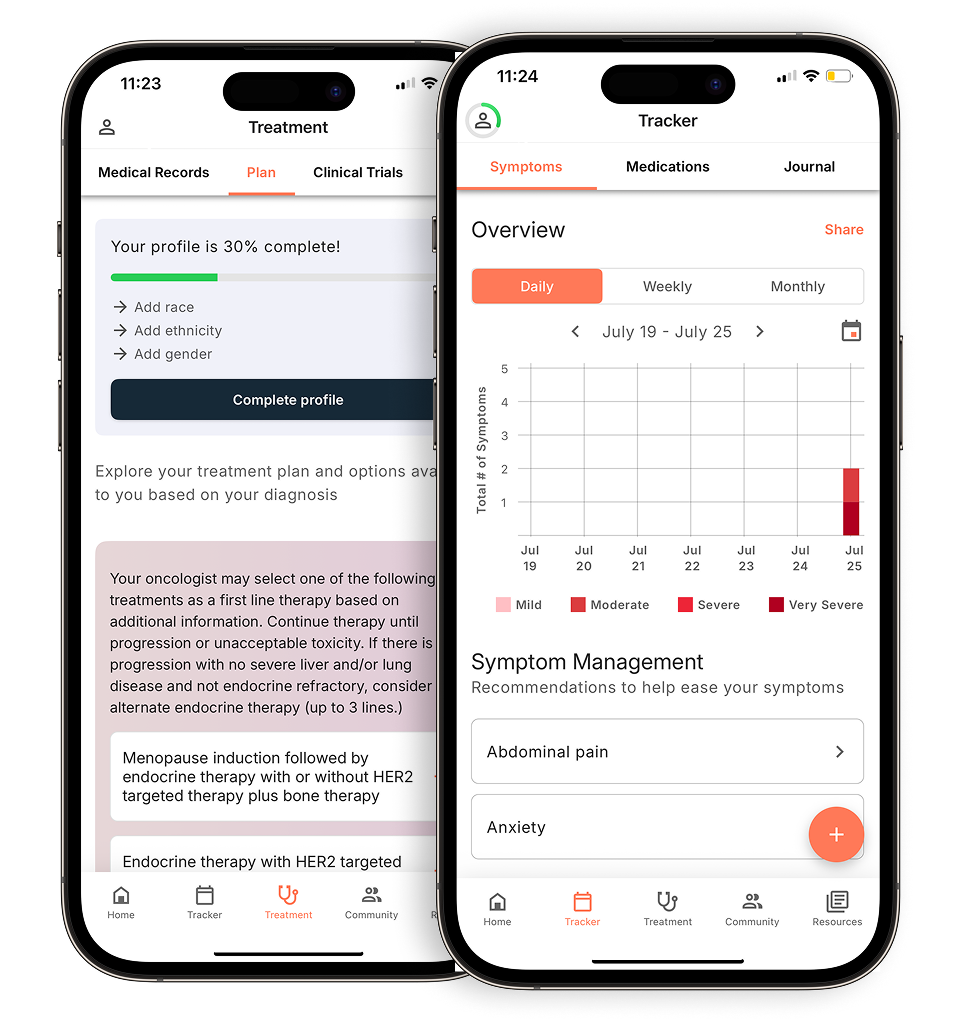
View your personalized treatment plan in the Outcomes4Me app
Use your diagnosis to unlock personalized NCCN Guidelines®-aligned recommendations.
Key Takeaways
- Become a more active partner in your care: A cancer app helps you track symptoms, manage medications, and prepare questions, which allows you to have more informed and productive conversations with your healthcare team.
- Find reliable answers and support anytime: Instead of getting lost in online searches, a good app provides trustworthy information tailored to your diagnosis and connects you with a community of people who understand what you’re going through.
- Use an app as a helpful tool, not a doctor: Choose an app with a clear privacy policy to protect your personal data. Remember to use it as a resource to stay organized, but always consult your care team for direct medical advice.
What can a cancer app do for you?
When you’re dealing with a cancer diagnosis, it can feel like you’re suddenly managing a full-time job you never asked for. Between appointments, medications, and trying to understand complex information, it’s easy to feel overwhelmed. This is where a cancer support app can become an essential tool in your toolkit. Think of it as a personal assistant, a library, and a support group all in one, conveniently located on your phone.
These apps are designed to help you organize the details of your care, giving you a central place to keep track of everything. They can provide access to reliable information, connect you with others who understand what you’re going through, and offer tools that help you feel more in control of your health journey. Whether you need to remember a question for your doctor, track a new symptom, or simply find a moment of connection, an app can provide the support you need, right when you need it.
Find support whenever you need it
One of the most challenging parts of a cancer journey can be the feeling of isolation. Questions and worries don’t stick to a 9-to-5 schedule, and you might need support at unexpected times. A cancer app puts help directly in your hands, 24/7. Instead of waiting for your next appointment, you can access curated content, programs, and services tailored to your specific needs. Many apps offer a wealth of support programs and services that can help you feel more connected and less alone, no matter the time of day. This constant access can be a huge comfort, providing a sense of stability when things feel uncertain.
Access resources for you and your loved ones
A cancer diagnosis affects more than just your physical health; it touches every part of your life, and the lives of those who care for you. Cancer apps can be an incredible resource for both patients and caregivers, connecting you to information on everything from managing emotional health to finding financial assistance or transportation. They consolidate reliable information and support into one easy-to-access place. This helps you and your loved ones find what you need without getting lost in confusing or untrustworthy search results online. These tools can help you find practical solutions, allowing you to focus more of your energy on your well-being.
Feel more confident managing your treatment
Feeling empowered during your treatment starts with having the right information and tools. Many cancer apps let you log your medications, track your appointments, and monitor your symptoms over time. You can jot down notes and questions as they come to you, so you’re prepared for your next doctor’s visit. By tracking how you feel each day, you can start to see patterns and create reports to share with your care team. This information helps you have more productive conversations about your treatment plan and makes it easier to communicate with your doctor effectively. It’s a simple way to take an active role in your care and feel more confident in the decisions you make together.
What to look for in the best cancer apps
With so many apps available, it can be tough to know which one is right for you. A great cancer app should feel like a reliable partner, helping you organize information and feel more in control of your health journey. Look for an app that goes beyond just tracking data and offers clear, trustworthy guidance that’s relevant to your specific situation. The best tools are easy to use, protect your privacy, and connect you with the resources and support you need, right when you need them.
Information that’s tailored to your diagnosis
When you’re managing a cancer diagnosis, generic health advice often isn’t enough. The most helpful apps provide personalized information based on your specific diagnosis, stage, and medical history. Instead of you having to sift through endless articles, the app should bring relevant cancer education directly to you. This might include details about your treatment options, potential clinical trials you could join, or information on genetic testing. This tailored approach saves you time and energy, ensuring the guidance you receive is truly useful for your care.
Access to evidence-based guidelines
One of the most powerful features a cancer app can offer is direct access to evidence-based guidelines. This ensures the information you receive is credible and up-to-date. For example, the Outcomes4Me app is the only free platform that integrates directly with the NCCN Clinical Practice Guidelines in Oncology (NCCN Guidelines®). These aren’t just random articles; they are comprehensive recommendations developed and updated by experts from 33 leading cancer centers in the U.S. They cover all FDA-approved treatment options, giving you a complete picture of the standard of care for your specific diagnosis and stage. This means you’re getting the same high-quality information that oncologists use to make treatment decisions.
Having access to these guidelines is one thing, but understanding them is another. This is where technology can make a huge difference. The Outcomes4Me app uses artificial intelligence (AI) to translate complex medical recommendations into clear, easy-to-understand language. This process empowers you to engage more actively in your care and have more informed conversations with your doctor. You can walk into your appointments with a better understanding of your options and feel more confident asking questions. In fact, many users have shared that the app provided them with crucial insights about their condition that they hadn’t heard from their own care teams, highlighting the value of having this resource at your fingertips.
Easy ways to track symptoms and medications
Many apps include features to log your symptoms, medications, and appointments. These tools are more than just digital diaries; they create a clear, organized record of your experience over time. Consistently using a symptom tracker can help you spot patterns and provide your doctor with specific details during your visits. Think of it as an appointment prep tool. Instead of trying to remember how you felt last Tuesday, you can simply pull up your log and have a more productive conversation with your care team about what’s working and what isn’t.
Connect with a community that gets it
Going through cancer can feel isolating, but you don’t have to do it alone. A good app can connect you with a community of people who truly understand what you’re experiencing. This peer support can be incredibly comforting and empowering. Some apps also offer helpful resources like a glossary of common cancer terms or a list of questions to ask your doctor. Having access to a supportive network and reliable information can make a significant difference in how you manage the emotional and practical challenges of treatment.
A simple way to connect with your care team
The right app can act as a bridge between you and your healthcare providers. Features like a question prompt list can help you organize your thoughts before an appointment so you don’t forget anything important. Some apps also make it easier to find and learn about clinical trials, with simple search filters and even ways to get a referral directly through the app. These tools are designed to help you become a more active participant in your care and facilitate clearer communication with your oncology team.
Assurance that your data is safe and private
Your health information is incredibly personal, so it’s essential to choose an app that takes your privacy seriously. Before you download and start sharing your data, take a moment to look for the app’s privacy policy. A trustworthy app will be transparent about how it protects your information and uses it. Strong privacy and data security measures are not just a feature—they’re a fundamental requirement for any health app you use. You should feel confident that your sensitive information is safe and secure.
Clear data privacy policies
Your health information is deeply personal, so it’s essential to choose an app that takes your privacy seriously. Before you download anything, take a moment to look for the app’s privacy policy. A trustworthy app will be transparent about how it protects your information and will have a clear privacy policy you can review before committing. Strong privacy and data security measures aren’t just a nice feature—they’re a fundamental requirement for any health app you use. You should feel confident that your sensitive information is safe and secure, allowing you to focus on your health journey without the added stress of worrying about your personal data.
Free cancer support apps to consider
With so many apps available, it can be helpful to think about what kind of support you need most right now. Some apps focus on providing personalized treatment information, while others are designed to help you manage medications or connect with a community. Below are a few trusted, free apps that excel in different areas, so you can find the one that feels right for you.
For personalized guidance: Outcomes4Me
When you’re dealing with a cancer diagnosis, the amount of information can feel overwhelming. The Outcomes4Me app is designed to help you understand your options and make informed decisions. A study on its use in breast cancer care found that the app provides evidence-based management tools that help patients feel more in control of their treatment journey. By securely entering your medical information, you can receive personalized guidance on treatment options, clinical trials, and other resources that are relevant to your specific diagnosis. It’s like having a digital guide to help you make sense of complex medical information.
Direct integration with NCCN Guidelines®
The Outcomes4Me app is the only free cancer app that uses the NCCN Clinical Practice Guidelines in Oncology (NCCN Guidelines®). These are the same evidence-based guidelines that your oncologist uses to make treatment decisions. Developed by experts from 33 top cancer centers, they outline all FDA-approved treatment options for your specific cancer type and stage. By giving you access to this information, the app helps you understand the standard of care for your diagnosis. This allows you to have more informed conversations with your doctor and feel like an active partner in your care, equipped with the same trusted resources your care team uses.
AI-powered translation of medical information
Medical reports and treatment plans can be filled with complex terms that are hard to understand. The Outcomes4Me app uses Artificial Intelligence (AI) to translate complex treatment recommendations, usually meant for doctors, into language that patients can understand. This feature helps demystify your care plan, breaking down the jargon into clear, simple explanations. Instead of feeling confused or having to search for definitions, you can get a straightforward summary of your options. This clarity can help you feel more confident and prepared when discussing your treatment with your healthcare team.
Consolidated medical records
Keeping track of your health information can be a challenge, especially when you’re seeing multiple specialists. The app helps by gathering all your medical records into one easy-to-read report. You can securely link your patient portal accounts, and the app will pull your information into a single, organized timeline. This means no more digging through papers or trying to remember the date of a specific scan or lab result. Having all your information in one place makes it simple to review your health history and share it with your doctors, ensuring everyone on your care team is on the same page.
Personalized news and testing information
Searching for information online can be overwhelming, and it’s often difficult to know which sources to trust. The Outcomes4Me app cuts through the noise by providing personalized news and articles about your cancer, insurance, and more. Based on your diagnosis, the app delivers curated, relevant content directly to you. This could include updates on the latest research, information about genetic testing that might be right for you, or articles on managing your well-being. It’s a simple way to stay informed with credible information that’s tailored to your journey.
Direct access to oncology professionals
Questions about your care don’t always come up during office hours. For those non-urgent concerns that arise between appointments, the app provides a valuable resource. You can ask a team of cancer nurses questions about your care directly through the app. Whether you have a question about a side effect, need clarification on a term, or want to know more about a resource, you can get a timely, reliable answer from a trained oncology professional. This feature offers peace of mind, knowing that trusted support is just a message away.
Community connections
Connecting with others who understand what you’re going through can be a powerful source of comfort and strength. The app has redesigned community groups where you can connect with other cancer patients, survivors, or caregivers based on your cancer type or identity. These groups provide a safe space to share experiences, ask questions, and offer mutual support. Finding people who truly get it can make you feel less alone on your journey. It’s a place to find encouragement and build connections with a community that understands.
Platform availability
Getting started with the app is simple and accessible. You can download the app for free from the Apple App Store or Google Play Store. It’s designed to be a supportive tool that you can carry with you, providing access to your health information, personalized resources, and community support whenever you need it. Since it’s available at no cost, you can explore all of its features without any financial commitment, making it an easy resource to add to your cancer care toolkit.
For all-in-one support: ACS CARES & Cancer.net Mobile
If you’re looking for a single app that covers a little bit of everything, these two are great places to start. The American Cancer Society’s ACS CARES app provides content, programs, and services that are tailored to your specific cancer journey. It’s a reliable source for essential resources and support from a trusted organization. Similarly, Cancer.net Mobile is a comprehensive tool that offers information on 125 types of cancer. It’s especially useful for keeping your health information organized. You can use it to track symptoms, take notes during appointments, and keep a detailed log of all your medications, making it easier to manage the day-to-day details of your care.
For managing medications: CareZone & MediSafe
Keeping track of medications can be a job in itself. CareZone is designed to simplify this process by keeping all your health information in one place. A standout feature is its medication scanner—you can simply take a picture of your prescription bottle to create a list, set up reminders for when to take each pill, and even arrange for automatic refills. Another excellent option is MediSafe, which focuses specifically on medication management. The app sends reminders, tracks how well you’re sticking to your schedule, and lists your medications and doses. It also checks for potential drug interactions, which is a crucial feature for people with cancer who may be on complex treatment plans.
For finding community: BELONG & LivingWith
Connecting with others who understand what you’re going through can make a world of difference. BELONG — Beating Cancer Together offers a large online community where you can find support groups for specific cancer types. It also gives you a unique opportunity to chat with cancer doctors and researchers, providing another layer of support and information. If you’re looking to connect with your existing support system, LivingWith is a great choice. The app helps you find local cancer support events and allows you to create private groups to share updates with friends and family. This makes it easier to keep your loved ones in the loop and build a sense of connection without having to send multiple texts or make several phone calls.
How to get started with a cancer app
Getting started with a new app can feel like one more thing on your to-do list, but the process is usually quick and straightforward. Most apps are designed to be user-friendly, so you can find the support you need without any hassle. Taking just a few minutes to set things up can open the door to valuable resources that make managing your care just a little bit easier. Think of it as creating a personalized toolkit that fits in your pocket, ready whenever you need it.
From tracking appointments and medications to connecting with people who understand what you’re going through, these apps can help lighten the mental load that often comes with a cancer diagnosis. They put powerful tools right at your fingertips, helping you feel more organized and less alone on your journey. The goal is to simplify, not complicate, your life. Instead of searching through endless websites for information, a good app brings trusted resources directly to you, tailored to your specific situation. Here are the simple steps to get you going.
Find and download your chosen app
First things first, you’ll need to get the app on your phone. You can find the apps we’ve mentioned by searching for their names in your phone’s app store. If you have an Android phone, you’ll use the Google Play Store, and if you have an iPhone, you’ll use the Apple App Store. Once you find the app you want to try, just tap “Install” or “Get.” All the apps on our list are free to download, so you can explore them without any commitment to see which one feels right for you.
Set up your personal profile
After you’ve downloaded and opened the app, it will likely ask you to answer a few questions to create a personal profile. This step is what makes the app truly useful. By providing some basic information about your diagnosis and where you are in your treatment, the app can tailor its resources specifically for you. This ensures you’re seeing relevant treatment information, articles, and community discussions instead of having to sift through information that doesn’t apply to your situation. It’s a simple way to create a personalized health hub that meets your unique needs.
Use it to track appointments and set reminders
Once your profile is set up, take a moment to explore the app’s tools. Many apps have features that help you stay organized, which can be a huge relief. You can often set up reminders for taking medications, log your appointments, and track any symptoms you’re experiencing. Some even have a place to write down questions for your doctor. Using these tools to keep your health information organized can help you feel more in control and prepared for conversations with your care team. It’s like having a digital notebook dedicated to your health.
Share updates with your support system
One of the most powerful features of these apps is the ability to connect with others. Look for a community or support section where you can join forums or chat groups. Some apps can even match you with a trained volunteer who has gone through a similar cancer experience. Finding emotional and social support is so important, and these features make it possible to connect with people who truly understand, right from your phone. It’s a comforting reminder that you don’t have to go through this alone.
Your questions about cancer apps, answered
It’s completely normal to have questions before you download and start using a new app, especially when it comes to your health. You might wonder if it will be easy to use, how your privacy is handled, or how it fits in with your medical care. Let’s walk through some of the most common questions people have when they start exploring cancer support apps. Getting these answers can help you feel more confident as you find the right tools to support you.
What if I’m not tech-savvy?
You don’t need to be a technology expert to use a cancer app. Many of these apps are designed with patients in mind, knowing you’re already dealing with complex medical information. The goal is to make your life easier, not add another complicated task to your plate. For example, a study on the feasibility of a smartphone navigation application in breast cancer care showed that apps can successfully help patients manage their journey. Most apps use simple layouts and clear instructions. Think of it as a tool to simplify information, not complicate it. If you can use other apps on your phone, you can likely use a cancer support app.
How is my personal information protected?
Your privacy is a top priority. Reputable health apps use strong security measures, like encryption, to protect your personal information. Before downloading, you can usually find a privacy policy on the app’s website or in the app store description. This document explains what data is collected and how it’s used and protected. These apps are part of a growing field of health informatics that plays a role in supporting cancer patients securely through every phase of their care. Always choose apps from trusted sources that are transparent about their security practices, so you can feel confident that your sensitive health data is safe.
What if the app seems complicated?
It’s okay to feel a little overwhelmed when trying something new. If an app seems too complicated at first, try to start small. Focus on learning one feature at a time, like the symptom tracker or medication reminders. Many apps also have help sections or tutorials to guide you. It’s a known issue that there can be problems and barriers when using mobile health apps, and developers are always working to make them more user-friendly. If you try an app and it just doesn’t feel right for you, don’t be discouraged. There are many options available, and you can always try a different one that better suits your needs.
When should I talk to my doctor instead of using the app?
Think of a cancer app as a supportive tool in your pocket, not a replacement for your medical team. It’s there to help you stay organized and informed between appointments. You can use it to track symptoms, manage medications, and prepare questions for your next visit. This kind of digital access can help you with the many self-management challenges that come with cancer treatment. However, the app is not a doctor. Always talk directly to your healthcare provider about any new or worsening symptoms, medical concerns, or decisions about your treatment plan. Your care team should always be your primary source for medical advice.
Related Articles
- The 5 Best Oncologist-Approved Cancer Apps
- 5 Best Lung Cancer Support Apps for Patients
- 5 Best Apps for Managing Cancer Symptoms in 2025
View your personalized treatment plan in the Outcomes4Me app
Use your diagnosis to unlock personalized NCCN Guidelines®-aligned recommendations.
Frequently Asked Questions
Can a cancer app give me medical advice? Think of a cancer app as a supportive partner, not a replacement for your doctor. It’s an excellent tool for organizing your health information, tracking how you feel, and learning more about your diagnosis. However, it cannot provide medical advice. Always consult your oncology team for any questions about your treatment, new symptoms, or specific health concerns.
How do I know the health information in an app is reliable? This is a great question. The most trustworthy apps are transparent about where their information comes from. Look for apps developed by well-known cancer organizations or those that clearly state they use evidence-based guidelines from medical experts. This ensures the information you’re getting is credible and up-to-date, not just random advice from the internet.
Do I have to pay to use these apps? Many of the most helpful cancer support apps are completely free to download and use. All of the apps mentioned in this post are available at no cost. While some apps might offer optional paid subscriptions for advanced features, their core tools for tracking symptoms, managing medications, and finding information are typically free.
Can my caregiver or family members use these apps too? Absolutely. A cancer diagnosis impacts your whole support system, and many apps are designed with that in mind. Some apps allow you to share updates with a private circle of family and friends, while others offer specific resources and articles to help caregivers. It can be a great way to keep your loved ones in the loop and help them find the support they need as well.
What if I’m not very comfortable with technology? You don’t need to be a tech expert to benefit from these tools. Most cancer apps are designed to be simple and intuitive because the last thing you need is more complication in your life. If you feel overwhelmed, just start with one feature. Try using it only to track your medications or to jot down questions for your next appointment. Once you get comfortable with that, you can explore its other features.