
Taking an active role in your cancer care is one of the most powerful things you can do. But turning daily feelings into clear information for your medical team can be a challenge. That’s where a good digital tool comes in. It helps you move from saying, “I’ve been feeling tired,” to showing, “I’ve experienced severe fatigue for three days after each treatment.” This simple shift makes your conversations more productive. Using an advanced breast cancer treatment tracker helps you log side effects from medications and create a data-rich story of your journey, leading to more personalized care. This guide will help you find the right tool to capture your story with confidence.
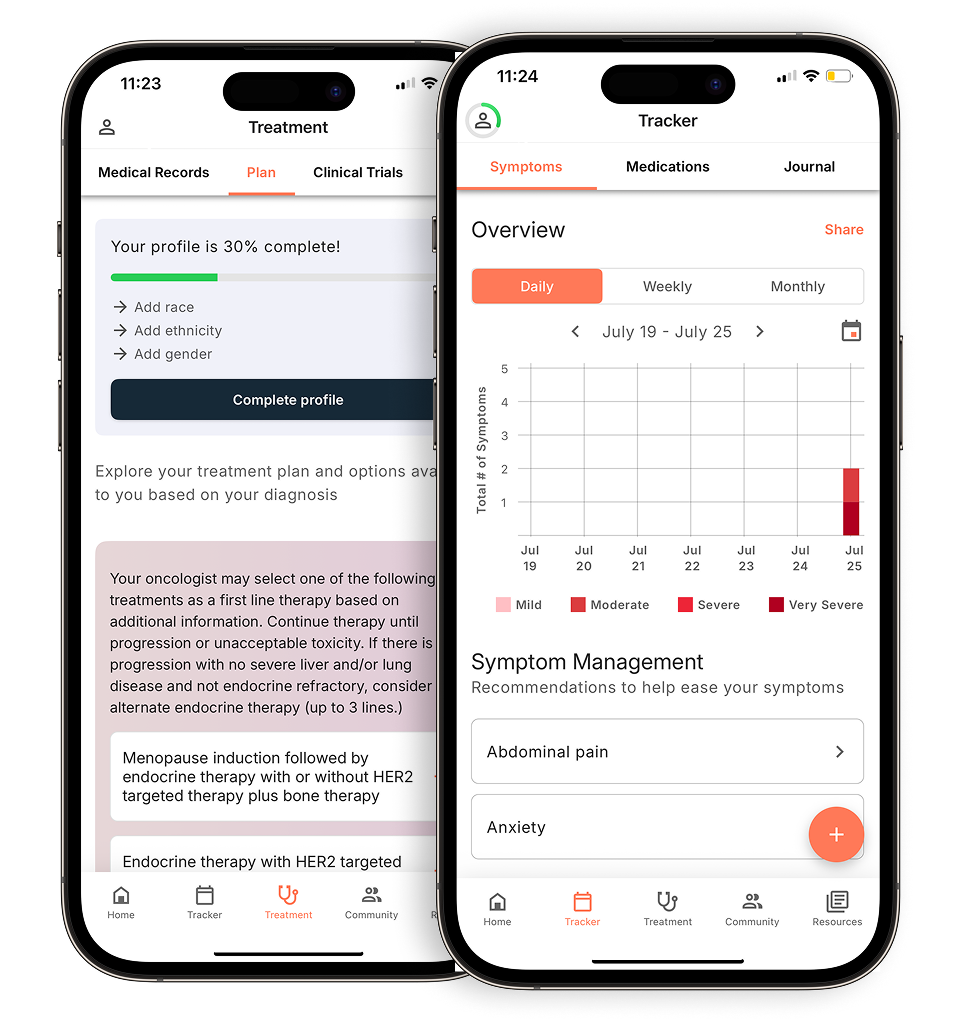
View your personalized treatment plan in the Outcomes4Me app
Use your diagnosis to unlock personalized NCCN Guidelines®-aligned recommendations.
Key Takeaways
- Make Every Doctor’s Visit Count: A symptom tracker helps you turn daily experiences into clear data. This allows you to communicate precisely with your care team, leading to more informed decisions and a treatment plan that truly reflects how you’re feeling.
- Look for Cancer-Focused Tools: A general wellness app won’t cover the specifics of your care. The best apps are designed to track treatment side effects, manage complex medication schedules, and generate reports that are genuinely useful for your oncologist.
- Define Your Needs Before You Download: The right app is one that fits your life. Before choosing, decide on your “must-have” features, find an app that is simple to use, and always check the privacy policy to ensure your personal health information is kept safe.
What is a symptom tracker app and how can it help?
If you’ve ever left a doctor’s appointment and immediately remembered a symptom or question you forgot to mention, you’re not alone. Managing cancer care involves keeping track of countless details, and it can feel overwhelming. This is where a symptom tracker app can make a real difference.
Think of it as a digital health diary right on your phone. It’s a dedicated space to log how you’re feeling day-to-day, note any side effects from treatment, keep a record of your medications, and even track things like your mood or energy levels. Instead of trying to recall how you felt three weeks ago, you have a detailed, real-time record at your fingertips.
This information is incredibly valuable for your care team. Having a clear log of your experience allows you to have more productive conversations during your appointments. Studies show that using mobile apps to track patient-reported outcomes is key for clear and accurate communication with your providers.
Beyond just tracking, many of these apps have become helpful tools for staying informed about your condition, connecting with other patients, and accessing reliable information when you need it most. By helping you monitor your health and communicate effectively, a symptom tracker empowers you to be an active and confident partner in your own care.
What to look for in a Symptom Tracker App
When you’re managing cancer care, keeping track of symptoms, medications, and appointments can feel like a full-time job. A good symptom tracker app can lighten that load, helping you organize your health information in one place. But with so many apps available, finding the right one is key. The best apps go beyond simple note-taking; they are designed to capture the specific details of your experience with cancer.
A great app acts as your digital health journal, making it easier to see patterns, remember medication schedules, and prepare for doctor’s visits. Look for features that are built with cancer patients in mind. While a general wellness app might track headaches or sleep, an app designed for cancer care will help you monitor specific side effects from treatment, like nausea or fatigue, and rate their severity. The goal is to find a tool that simplifies your life and helps you feel more in control of your health journey.
A place to track your symptoms and side effects
A quality symptom tracker should let you log more than just the basics. You need an app that understands the unique challenges of cancer treatment. While there are many general health apps, an evaluation of mobile health applications found that few are specifically targeted toward patients with cancer. Look for an app that allows you to record a wide range of symptoms and side effects—from fatigue and pain to neuropathy and appetite changes. The ability to note the severity, frequency, and duration of each symptom provides a detailed picture of your health that is invaluable for you and your care team.
Get helpful reminders to manage your medications
Your treatment plan can involve multiple medications, each with its own schedule and instructions. An effective app will help you manage this complexity with features for medication tracking and reminders. You should be able to input your prescriptions, dosages, and the time you need to take them. Customizable reminders can help you stay on track, reducing the stress of remembering everything yourself. This feature is more than a convenience; it’s a crucial tool for adhering to your treatment plan and ensuring you get the full benefit of your prescribed therapies.
Easily share updates with your care team
One of the most powerful features of a symptom tracker is its ability to improve communication with your doctors. Instead of trying to recall how you felt weeks ago, you can show them a detailed log of your symptoms. Look for an app that makes it easy to generate and share reports with your care team. Some apps can create summaries or graphs that visualize your symptom patterns over time. This data facilitates more productive conversations during appointments, helping your doctor make informed decisions about your treatment and symptom management plan.
Your health information, kept safe and secure
Your health data is personal and sensitive, so security should be a top priority. Before downloading an app, check its privacy policy to understand how your information is stored and used. A trustworthy app will be transparent about its security measures. Look for features like HIPAA compliance, which is the standard for protecting sensitive patient health information. You should also see if the app offers options for protecting your data, such as local-only storage or the ability to opt out of cloud syncing, giving you more control over your information.
6 popular cancer symptom tracker apps to consider
Choosing the right app to help manage your cancer care can feel like one more big decision on an already full plate. The good news is that there are excellent tools available, each with a slightly different focus. Some apps are designed to be your all-in-one health dashboard, while others specialize in specific areas like medication management or connecting your physical symptoms to your daily mood. Think of this list as a starting point to find what works for you.
The goal is to find a tool that simplifies your life, not complicates it. As you read through these options, consider what you need most right now. Is it a better way to organize your appointments and medications? A tool to help you see patterns in your side effects? Or maybe a platform that provides personalized treatment information based on your specific diagnosis? Each of these apps offers a unique way to feel more in control of your health information and have more productive conversations with your care team.
Outcomes4Me: For AI-Driven Personalized Care
Outcomes4Me is designed to give you personalized care information using AI-driven insights to help you manage your cancer journey. Instead of providing generic information, the app uses your specific medical records to offer tailored guidance. This includes helping you understand your treatment options, find relevant clinical trials, and see potential genetic testing options that apply to you. The platform integrates directly with the NCCN Clinical Practice Guidelines in Oncology (NCCN Guidelines®), so you can feel confident that the information is evidence-based and up-to-date. It’s a powerful tool for anyone who wants to take an active role in their care and have access to the same kind of information their oncologist uses.
Cancer.Net Mobile: For a comprehensive cancer resource
Backed by the American Society of Clinical Oncology (ASCO), the Cancer.Net Mobile app is a trustworthy and detailed resource for managing the logistics of your care. Think of it as a digital organizer specifically for your cancer journey. You can use it to track your symptoms and their severity over time, log questions for your doctor, and keep a running list of your medications. It also helps you manage appointments and provides a place to record important details from your visits. If you’re looking for a straightforward, all-in-one tool from a reputable source to keep all your health information organized, this is an excellent choice.
MediSafe: For a focus on medication management
Juggling multiple medications, supplements, and vitamins can be a huge challenge. MediSafe is an app that focuses on doing one thing exceptionally well: helping you manage your medications. It sends you reminders when it’s time to take a pill, tracks your adherence so you can see how consistent you’ve been, and can even alert you to potential drug interactions. One of its most helpful features is the ability to connect with a “Medfriend”—a family member or caregiver who gets an alert if you miss a dose. This adds a layer of support and peace of mind, making it a great option for anyone whose primary concern is staying on top of a complex medication schedule.
Bearable: For correlating mood and symptoms
If you’ve ever wondered how your daily activities, sleep patterns, or mood might be affecting your physical symptoms, Bearable could be the app for you. It’s designed to help you track not just your symptoms but also factors like your mood, energy levels, diet, and sleep. By logging this information, the app helps you identify patterns and correlations you might not have noticed otherwise. For example, you might discover that your fatigue is worse on days with poor sleep or that a certain activity improves your mood. This insight is incredibly valuable for understanding your body and finding ways to feel better day-to-day, making it especially useful for managing a long-term illness.
Wave Health: For all-in-one cancer support
Wave Health is a comprehensive app that acts as a central hub for your health journey. It allows you to log a wide range of daily metrics, including symptoms, sleep, medications, and daily activities, giving you a holistic view of your well-being. You can easily generate reports from this data to share with your care team, which can lead to more informed and productive conversations during your appointments. Beyond tracking, Wave Health also has a built-in community feature, allowing you to connect with other people who understand what you’re going through. This combination of detailed health tracking and peer support makes it a great all-in-one option for managing your care.
ACS CARES: For support from the American Cancer Society
Managing cancer involves more than just tracking symptoms and medications—it also involves coordinating a support system. The ACS CARES app from the American Cancer Society is designed to help patients, families, and caregivers do just that. It’s a free tool that helps you organize your community of support. You can use it to send updates to friends and family all at once, request help with specific needs like meals or rides to appointments, and keep a journal. The app also provides access to reliable information and resources from the American Cancer Society. It’s an excellent tool for streamlining communication and letting your loved ones know exactly how they can help.
Connecting with specialists and volunteers
Sometimes, the most helpful support comes from someone who has walked a similar path. Beyond your immediate circle, many organizations can connect you with trained volunteers who have firsthand experience with cancer. These peer support programs offer a safe space to talk openly, ask questions, and get advice from someone who truly understands what you’re going through. Because this support is often available virtually, you can find a connection no matter where you live. Building this network can be a huge source of comfort and strength, helping you feel less isolated and more empowered in your own care journey.
Health Storylines: For tracking your health journey
Developed by the Canadian Breast Cancer Network, Health Storylines is a mobile app designed to help you take control of your health management. It allows you to log symptoms, medications, and appointments, creating a detailed picture of your health over time. This is especially useful for seeing patterns you might not notice otherwise, like how your energy levels change throughout your treatment cycle. By turning your daily experiences into organized data, the app helps you have more productive conversations with your care team. The Canadian Breast Cancer Network notes that this tracking can facilitate more informed discussions with healthcare providers. Beyond just tracking, the app also connects you with support resources, helping you feel less alone on your journey. It’s a holistic tool that combines practical health logging with community support.
Beyond symptom tracking: More digital tools for your cancer journey
While a great symptom tracker is a cornerstone of managing your day-to-day health, the world of digital health offers so much more. Technology is creating new ways for you to understand your diagnosis, explore your options, and partner with your care team more effectively. These tools can help you access the latest research, see if your treatment is working in near real-time, and even help your doctor fine-tune your care plan. It’s all about giving you access to information that was once hard to find, putting it right at your fingertips.
Think of these tools as extensions of your care team. They can help you prepare for appointments with specific, data-driven questions and give you the confidence that comes from being well-informed. From apps that match you with clinical trials to new blood tests that monitor treatment response, technology is opening up incredible possibilities. Exploring these resources can help you feel more engaged and empowered, transforming you from a passive recipient of care into an active participant in your health journey.
Apps that connect you to research and clinical trials
Clinical trials are at the heart of every advance in cancer treatment, but finding one that’s right for you can be a challenge. The good news is that technology is making this process much easier. Several apps and online tools are now available to help you discover research opportunities based on your specific cancer type, stage, and treatment history. These platforms can demystify the world of clinical research and present you with options you might not have known existed, making it simpler to discuss potential trials with your oncologist.
MBC Connect
Developed by the Metastatic Breast Cancer Alliance, MBC Connect is more than just an app—it’s a patient-powered research tool. It allows you to contribute your de-identified data to a central database that researchers can use to find new patterns and insights into metastatic breast cancer. At the same time, the app helps you find and connect with clinical trials that may be a good fit for you, bridging the gap between patients and the research that could change the future of cancer care.
Breast Advocate
Feeling overwhelmed by treatment options is completely normal. Breast Advocate is a smart, user-friendly app designed to help you make sense of it all. By entering details about your specific cancer type and stage, the app helps you understand the different treatment paths available to you, all based on the latest research. It’s a great way to prepare for conversations with your doctor, helping you ask informed questions and feel more confident in the decisions you make together about your care plan.
New ways to see if your treatment is working
Waiting for a scan to find out if your treatment is effective can be one of the most stressful parts of the cancer journey. But new technologies are emerging that can offer earlier insights into how your body is responding. These innovative methods are changing the way doctors monitor progress, allowing for quicker adjustments to your care plan if needed. This shift toward real-time feedback can provide peace of mind and ensure you’re always on the most effective treatment path for you.
Tracking tumor DNA with blood tests
One of the most exciting developments in cancer care is the use of simple blood tests, often called liquid biopsies, to monitor treatment response. These tests can detect and measure circulating tumor DNA (ctDNA) in your bloodstream. Research shows that tracking these levels can quickly indicate whether a treatment is working, sometimes long before changes would appear on a scan. This allows your care team to make faster, more informed decisions, potentially switching to a more effective therapy without delay.
Using physical activity trackers
You might already have a powerful health-monitoring tool on your wrist. Wearable devices like smartwatches and fitness trackers are increasingly being used in cancer research and care. Studies are exploring how data on physical activity, sleep, and heart rate can provide a clearer picture of a patient’s overall well-being during treatment. This information can help your care team understand how you’re tolerating therapy and may even highlight opportunities to incorporate activities like exercise to improve your quality of life.
Tools that help your doctor with treatment planning
Deciding on a treatment plan involves weighing many different factors, and it’s a process you and your doctor navigate together. A new generation of digital tools is designed to support these crucial conversations. By processing complex data and research, these platforms can help visualize the potential outcomes of different treatment options. This allows for a more personalized discussion about your prognosis and what to expect from various therapies, ensuring your treatment plan aligns with your personal goals and preferences.
Predict Breast
Predict Breast is an online tool that helps you and your doctor see the potential long-term benefits of different treatments for early-stage breast cancer. After your doctor inputs key information about your diagnosis, the tool provides personalized estimates of survival rates with and without treatments like chemotherapy or hormone therapy. It’s a powerful way to visualize how a specific therapy might impact your prognosis, facilitating a clearer, more data-driven conversation about the best path forward for you.
Breast Cancer Symptom Explorer
Understanding the potential side effects of a treatment is just as important as knowing its benefits. The Breast Cancer Symptom Explorer is an interactive tool that visualizes patient-reported outcomes and side effects from various breast cancer treatments. It allows you to see how other patients felt while on a particular therapy, helping you prepare for potential side effects and have a more informed discussion with your doctor about symptom management. This focus on the patient experience is key to making a truly informed decision.
Understanding your personal risk of breast cancer
For many people, understanding their personal risk of developing cancer is a key part of proactive health management. While factors like family history and genetics play a role, new digital tools are making it easier to get a more comprehensive picture of your risk. These tools use sophisticated models to analyze various risk factors, providing a personalized assessment that can help guide decisions about screening and prevention strategies. This information empowers you to have more specific conversations with your doctor about a surveillance plan that’s right for you.
Calculating risk with digital tools
Researchers are developing new ways to more accurately calculate a woman’s risk of developing advanced breast cancer. One such tool developed at UCSF is designed to identify women who may be at higher risk even with regular mammograms. By considering factors beyond just breast density, these advanced calculators can help doctors identify individuals who might benefit from supplemental screening, like an MRI or ultrasound. This personalized approach to risk assessment is a major step toward earlier detection and better outcomes.
How a symptom tracker can improve your care
Using a symptom tracker is about more than just keeping a digital diary. It’s a powerful way to turn your day-to-day experiences into clear, organized information that can make a real difference in your treatment. When you’re managing cancer, details matter. A symptom tracker helps you capture those details, giving you and your care team a clearer picture of your health between appointments. This information allows you to take a more active role in your care, ensuring your treatment plan is always aligned with how you’re actually feeling.
Think of it as a bridge between your daily life and your doctor’s office, helping you communicate your needs with confidence and precision. By consistently logging how you feel, you create a valuable record that can help guide decisions, manage side effects, and ultimately, improve your quality of life during treatment. It empowers you to move from being a passive recipient of care to an active partner in your health journey. Instead of relying solely on memory, you’ll have concrete data to share, which can lead to more personalized and effective care. This simple habit can transform your relationship with your health, giving you a sense of control and a clear path for discussing what matters most with your care team.
Have more productive conversations with your doctor
Appointments with your oncologist can often feel rushed, and it’s easy to forget the specific details of the past few weeks. A symptom tracker solves this problem by giving you a reliable record to reference. Instead of trying to recall how you felt, you can show your doctor exactly when a symptom occurred, how severe it was, and how long it lasted. This transforms a vague statement like, “I’ve been feeling tired,” into a concrete data point: “I experienced fatigue rated 8/10 for three days after my last infusion.” This level of detail helps your care team make more informed decisions. The best apps are designed to support communication with providers, ensuring your concerns are heard and addressed effectively.
See and understand your symptom patterns
Tracking your symptoms over time helps you and your doctor see the bigger picture. You might notice that a certain side effect always appears a few days after treatment or that your energy levels are consistently higher on days you get a full night’s sleep. These patterns provide crucial insights into how your body is responding to treatment and what might be triggering certain symptoms. This real-time collection of patient-reported outcomes—information that comes directly from you—is essential for personalizing your care. By identifying these trends, your care team can proactively adjust your treatment plan or suggest strategies to manage side effects before they become severe, helping you feel more in control.
Helping you manage treatments and self-care
Managing a cancer diagnosis involves juggling medications, appointments, and self-care routines, which can be overwhelming. A symptom tracker app often includes features that help you stay organized. You can set reminders for medications, track your water intake, log your sleep, and note your daily activities. Apps like Wave Health are designed to help you log all these different aspects of your health in one place. By offloading some of this mental work to an app, you can free up energy to focus on your well-being. It simplifies the logistics of your care, making it easier to follow your treatment plan and stick to the self-care habits that help you feel your best.
Informing important treatment conversations
A symptom tracker is not just a tool for logging your daily experiences; it’s a powerful instrument for improving communication with your healthcare team. By consistently recording your symptoms, you create a detailed, factual account of your health that can significantly shape your treatment discussions. This log turns subjective feelings into clear data, allowing you to share exactly what you’re going through with precision. When you can show your doctor a timeline of your symptoms, it helps them understand the full context of your health beyond what can be observed in a brief appointment. This clarity ensures that your voice is a central part of the conversation, empowering you to be an active participant in your own care journey.
Making decisions about your treatment plan
When you arrive at your appointments with concrete data from your tracker, it transforms the conversation. Instead of relying on memory, you can present your healthcare provider with specific insights that lead to better decisions. This detailed information is invaluable, as it helps your care team make more informed choices about adjusting your treatment or managing side effects. For example, knowing exactly when and how severely you experience fatigue can help your doctor pinpoint the cause and find a solution. When this data is combined with personalized, evidence-based information, like the treatment guidance available in the Outcomes4Me app, you are better equipped to collaborate with your doctor on a plan that truly works for you.
What about privacy and security?
Sharing sensitive health information can feel vulnerable, so it’s completely normal to have questions about privacy when using a symptom tracker app. While these apps can be powerful tools in your care plan, it’s smart to understand how your personal data is handled. Taking a few moments to check an app’s security practices can give you the peace of mind you need to use it confidently. The best apps are transparent about their policies and make it easy for you to feel in control of your information.
Understanding where your data is stored and shared
When you start using a new app, one of the first things to consider is where your information is going. Some apps store your data locally on your phone, while others sync it to the cloud. If privacy is a top concern, it’s helpful to protect your data by looking for apps that offer local-only storage or give you the choice to opt out of cloud syncing. This simply means your information stays on your device instead of being sent to the company’s servers. Knowing where your data lives helps you make an informed decision that feels right for you.
How to read an app’s privacy policy
I know, I know—reading a privacy policy sounds about as fun as watching paint dry. But taking a quick scan can tell you a lot. You don’t need to be a lawyer to get the gist. Look for clear, simple language that explains what information is collected and how it’s used. A recent assessment of privacy policies for cancer apps found that clarity can vary widely. A trustworthy app will be upfront about whether your data is shared with third parties and for what purpose. If the policy is full of confusing jargon, that might be a red flag.
Tips for protecting your information
Ultimately, you want to choose an app that prioritizes your security. Experts agree that while cancer apps can help patients, it’s important to pick one with clear security measures. Look for statements that mention your data is encrypted, which means it’s scrambled to prevent unauthorized access. You might also see terms like “HIPAA-compliant,” which indicates the app follows federal privacy standards for protecting medical information. This level of security ensures your personal health details are kept safe, allowing you to focus on what matters most: your well-being.
How to choose the right symptom tracker app for you
Okay, we’ve covered a lot of ground. You know what these apps can do and why security matters. But how do you actually pick the one that’s right for you? It can feel like one more overwhelming decision when you already have so much on your plate. The key is to find a tool that simplifies your life, not complicates it. Think of it as hiring a personal assistant for your health journey. Let’s walk through a few simple steps to find the perfect fit.
Figure out what you need most
Before you even look at the app store, take a moment to think about what you truly need. Are you mainly looking for a way to log daily symptoms for your oncologist? Or do you also need medication reminders and a place to jot down questions? The best cancer apps often provide a mix of educational resources, communication support, and self-management tools. Make a quick list of your top three priorities. This will help you cut through the noise and focus on the apps that meet your specific needs.
Choose an app that’s simple to use
An app packed with features is useless if it’s too complicated. The goal is to find something that feels intuitive and fits into your daily routine. When you’re testing an app, notice how you feel. Is it easy to find what you’re looking for? Does logging a symptom take just a few seconds? A user-friendly format is crucial for making symptom tracking a consistent habit, which leads to better conversations with your care team. Don’t be afraid to try a few options before committing. The one that feels most natural is likely the one you’ll stick with.
Review the privacy policy
I know, reading privacy policies isn’t fun, but with your health data, it’s non-negotiable. Before entering personal information, find the app’s privacy policy. Look for clear language that explains how your data is stored and protected. If privacy is a major concern, see if the app offers local-only storage or lets you opt out of cloud-syncing. A trustworthy app will be transparent. Taking a few minutes to assess the privacy policies of your top choices will give you peace of mind to use the tool securely.
Related Articles
- Top 6 Cancer Treatment & Symptom Tracker Apps
- 5 Best Apps for Managing Cancer Symptoms in 2025
- Symptom tracking made for breast cancer – Outcomes4Me
- Top 5 Apps for Breast Cancer Symptom Tracking
View your personalized treatment plan in the Outcomes4Me app
Use your diagnosis to unlock personalized NCCN Guidelines®-aligned recommendations.
Frequently Asked Questions
How often should I log my symptoms for the information to be useful? Consistency is more important than frequency. A good starting point is to log your symptoms once a day, perhaps at the same time each evening so it becomes a habit. You can also make a note anytime a new symptom appears or an existing one changes significantly. The goal is to create a record that shows patterns, not to add another stressful task to your day.
I’m overwhelmed by all the app choices. Where should I even start? It’s completely understandable to feel that way. Instead of trying to compare every feature of every app, start by identifying your single biggest need right now. Is it remembering to take your medications? Is it understanding your treatment options? Pick the one thing that would make your life easier, and then try the app from the list that specializes in that area. You can always switch later if your needs change.
What’s the best way to present this information to my doctor? You can let your doctor or nurse know at the beginning of your appointment that you’ve been keeping a log of your symptoms to help you remember details. Ask them what format is most helpful for them. Some may prefer to look at a summary graph on your phone, while others might appreciate you reading off a few key points. This shows you’re an engaged partner in your care and helps make the most of your limited time together.
Are these symptom tracker apps free to use? Many of the apps designed for cancer care offer a robust set of features for free, as their goal is to support patients. However, some apps with a broader wellness focus might operate on a “freemium” model, where the basic tools are free but advanced features require a subscription. It’s always a good idea to check the app’s description in the app store for any potential costs before you download it.
What if I’m not very comfortable with technology? Are these apps difficult to use? Most of these apps are designed with simplicity in mind because their creators know you have enough to deal with. They often use large buttons and clear, straightforward instructions. If you’re feeling hesitant, start with an app known for its user-friendly design, like Cancer.Net Mobile. Don’t be afraid to ask a friend or family member to help you get it set up. The right tool should make your life easier, not more complicated.