
How many times have you left a doctor’s appointment and immediately remembered the one question you forgot to ask? It’s a frustratingly common experience, especially when you’re trying to recall weeks of subtle symptoms and side effects on the spot. Effective communication with your care team is vital, but it’s hard when you have to rely on memory alone. This is where a cancer support app becomes an indispensable tool. It helps you capture how you’re feeling in the moment, creating a clear and accurate record over time. The best app for managing cancer symptoms transforms your daily experiences into actionable data, ensuring your doctor gets the full picture. In this article, we’ll explore how these apps can help you prepare for appointments, track your progress, and make sure your voice is always heard.
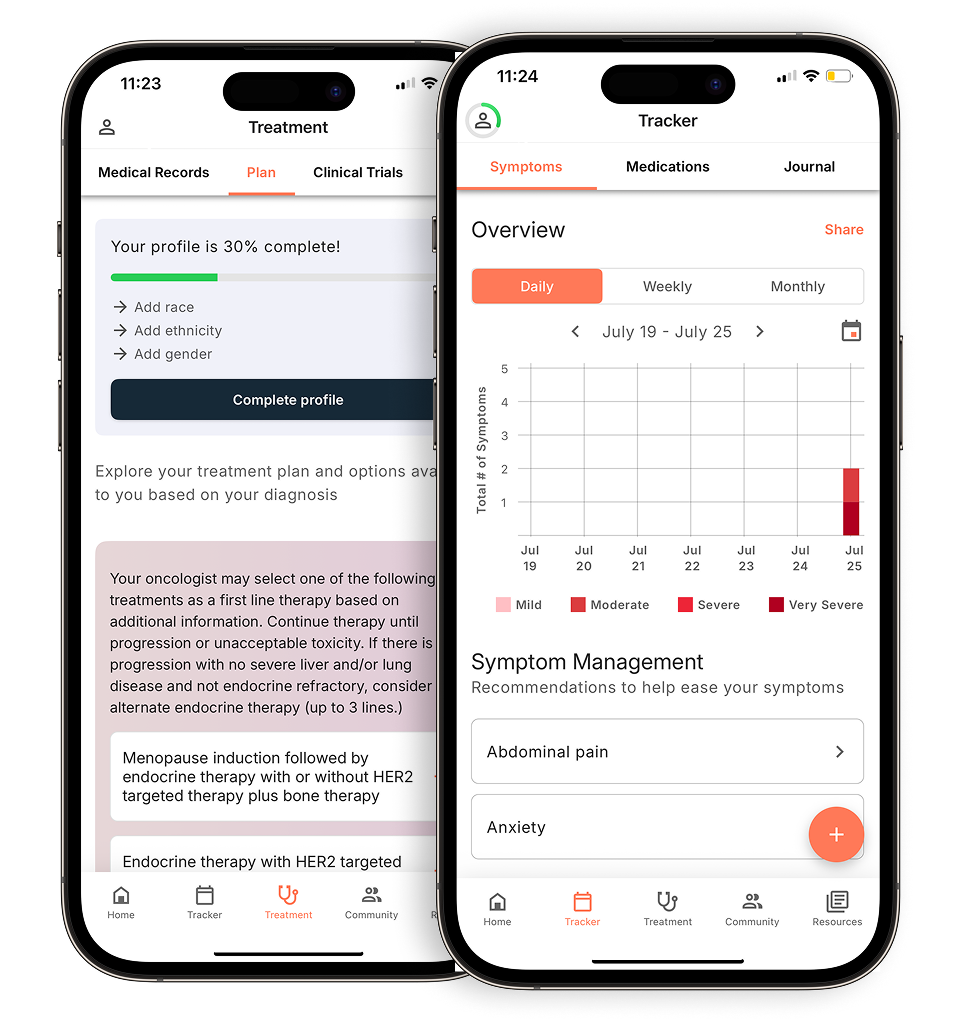
View your personalized treatment plan in the Outcomes4Me app
Use your diagnosis to unlock personalized NCCN Guidelines®-aligned recommendations.
Key Takeaways
- Centralize Your Care Details: Use an app to track symptoms, log medications, and list questions for your doctor all in one place. This creates a clear, organized record that helps you and your care team make better, more informed decisions together.
- Choose Personalization Over a Generic Tracker: The most helpful apps adapt to your specific diagnosis and treatment plan. Look for a tool that provides tailored guidance and trusted educational resources, ensuring the information you receive is always relevant and reliable.
- Lean on Digital Community Features: Emotional support is just as important as physical tracking. Select an app that offers connections to a peer community, health experts, or tools to coordinate help from caregivers, reminding you that you aren’t alone.
What to Look For in a Cancer Support App
When you’re managing a cancer diagnosis, having the right tools can make a world of difference. A good support app acts like a personal health assistant in your pocket, helping you stay organized and feel more in control. But with so many options available, it can be tough to know which one is right for you. The best apps share a few key features designed to simplify your life and support your health journey. Let’s walk through the most important things to look for.
Track and monitor your symptoms
One of the most powerful features of a cancer support app is the ability to log your symptoms and health metrics daily. Keeping a consistent record of how you’re feeling—whether it’s fatigue, nausea, or pain—helps you and your care team see patterns over time. This information is incredibly valuable during appointments, allowing you to have more specific conversations about what’s working and what isn’t. Many features of cancer mHealth apps are designed to capture this data, giving your doctor a clearer picture of your experience between visits and helping to guide treatment adjustments.
Manage medications and get reminders
Juggling multiple medications, each with its own schedule, can be overwhelming. A great app takes the guesswork out of medication management by providing a clear summary of your regimen and sending timely reminders. This simple feature can significantly reduce stress and help you adhere to your treatment plan, which is crucial for the best possible outcomes. Some apps also allow you to track when you’ve taken each dose, creating a helpful log for you and your doctor. This is one of the key ways cancer apps can help both patients and their providers stay on the same page.
Communicate with your care team
An app can be a vital link to your healthcare providers, especially between scheduled appointments. Look for features that help you organize your thoughts and questions before a visit or create reports of your tracked symptoms. Some mobile apps for cancer patients are designed to improve how you share patient-reported outcomes, ensuring your doctor has a full understanding of your day-to-day health. This enhanced communication helps you become a more active partner in your own care, leading to better symptom management and a stronger relationship with your medical team.
Access trusted medical information
When you have questions about your diagnosis or treatment, you need answers you can trust. The internet is filled with conflicting and often inaccurate information, which can cause unnecessary anxiety. A high-quality cancer app will provide reliable, evidence-based educational resources right at your fingertips. Having access to vetted articles, treatment news, and expert-approved content empowers you to make informed decisions about your health. This focus on reliable medical information is a hallmark of an app that truly puts patients first.
Connect with a support community
You don’t have to go through this journey alone. Living with cancer has its emotional challenges, and connecting with others who understand can be incredibly comforting. Many apps include features that foster a sense of community, whether it’s through peer support forums or tools that let you share updates with family and friends. These connections can provide encouragement, practical advice, and a much-needed reminder that you have a network of support. The best symptom-management apps recognize the importance of this and build features to help you find and lean on your community.
The Best Apps for Managing Cancer Symptoms
Living with cancer means managing a lot of moving parts, from tracking symptoms and side effects to remembering medications and doctor’s appointments. It can feel like a full-time job. Thankfully, your smartphone can be a powerful ally in keeping everything organized. The right app can help you feel more in control of your health journey by putting vital information and tools right at your fingertips.
We’ve looked at some of the best apps available to help you manage your cancer care. Each one offers something a little different, whether you need personalized treatment guidance, a simple way to track medications, or a direct line to a support community. Think about what you need most right now—is it organizing your records, understanding your treatment options, or simply remembering to take your pills on time? Exploring these options can help you find the perfect digital tool to support you.
Outcomes4Me: For personalized, AI-driven guidance
If you’re looking for a tool that goes beyond simple tracking, Outcomes4Me is a fantastic choice. This app uses AI to provide guidance that’s tailored specifically to you. After you securely input your medical information, the platform offers personalized information based on your unique diagnosis and stage. It can help you understand your treatment options, find relevant clinical trials, and even suggest potential genetic testing. It’s like having a personal navigator for your cancer journey, helping you make informed decisions with evidence-based information that’s easy to understand. This level of personalization can make a huge difference in feeling empowered and proactive about your care.
Cancer.Net Mobile: For trusted oncology information
When you have questions, you want answers from a source you can trust. The Cancer.Net Mobile app, created by the American Society of Clinical Oncology (ASCO), is an excellent resource for reliable, oncologist-approved information. It covers 125 types of cancer and provides tools to help you track your symptoms and side effects over time. One of its most helpful features is the ability to record questions for your doctor as they come to you, so you never leave an appointment feeling like you forgot to ask something important. It’s a straightforward, dependable tool for staying informed and organized throughout your treatment.
ACS CARES™: For 24/7 specialist support
Sometimes, you need support outside of a 9-to-5 schedule. The American Cancer Society’s free app, ACS CARES™, is designed to connect you with resources and support whenever you need it. The app provides personalized information and connects you with a community of other people facing cancer. You can get answers to your questions from trained specialists, find local resources, and get help coordinating rides to treatment. It’s a great option if you’re looking for a blend of practical tools and human connection to help you through the emotional and logistical challenges of cancer.
MediSafe: For a focus on medication adherence
Managing multiple medications can be one of the most stressful parts of cancer treatment. Forgetting a dose or taking it at the wrong time can have real consequences. MediSafe is an app designed specifically to solve this problem. It’s a sophisticated pill reminder that helps you stay on schedule with your medications, supplements, and vitamins. The app can also track your adherence over time, check for potential drug interactions, and even notify a family member or caregiver if you miss a dose. If your primary concern is keeping your medication schedule straight, this app’s focused approach is incredibly helpful.
My Cancer Tracker: For organizing your medical records
Keeping all your medical information in one place can simplify your life immensely. My Cancer Tracker is built to be your digital filing cabinet for everything related to your diagnosis and treatment. You can use it to log appointments, track test results, store contact information for your care team, and keep notes on your symptoms and side effects. Having all this information organized and easily accessible is invaluable, especially when you’re communicating with different doctors or need to recall specific details about your treatment history. It helps you maintain a clear, comprehensive record of your health journey.
How These Apps Help You Stay on Track
Managing a cancer diagnosis can feel like taking on a second full-time job. Between appointments, medications, and tracking how you feel, it’s easy to get overwhelmed. This is where a good cancer support app becomes an indispensable tool. Think of it as your personal health assistant, designed to keep all your crucial information organized and accessible right from your phone. These apps help you transform scattered notes and fuzzy memories into clear, actionable data. By centralizing your health information, they empower you to take a more active role in your care, making communication with your medical team more effective and helping you feel more in control of your treatment journey.
Log daily symptoms and their severity
It’s one thing to feel a new side effect, but it’s another to remember exactly when it started, how intense it was, and how long it lasted by the time your next appointment rolls around. Many cancer support apps feature symptom trackers that let you log daily symptoms and their severity in real time. Instead of relying on memory, you can quickly note things like fatigue, nausea, or pain as they happen. Over time, this creates a detailed record that can reveal patterns you and your doctor might otherwise miss. This clear, consistent data helps your care team make more informed decisions about managing your side effects and adjusting your treatment plan.
Get automatic medication reminders
Your treatment plan can involve a complex schedule of pills, infusions, and other therapies. Keeping it all straight can be a major source of stress. Cancer management apps can take that weight off your shoulders by providing automatic medication reminders. You can set up alerts for every dose, ensuring you stay on schedule and maintain treatment adherence, which is critical for the best possible outcomes. Many apps also let you log when you’ve taken a medication, creating a simple but powerful record of your routine. This log is incredibly useful for your care team to see how well the treatment plan is being followed.
Create progress reports for doctor visits
All the information you diligently track—symptoms, medication adherence, mood changes—is most powerful when shared with your doctor. The best apps make this simple by compiling your data into clear, easy-to-read progress reports. Instead of trying to recall weeks of information on the spot, you can pull up a summary on your phone or even print a report to bring with you. This allows you to have more productive conversations with your oncologist, grounded in specific data. It shifts the focus from remembering details to discussing what they mean for your care, helping you and your doctor make shared decisions about the next steps.
Prepare questions for your appointments
How many times have you left a doctor’s office and immediately remembered the one question you forgot to ask? It happens to everyone. Questions often pop into our heads at random times, not just during the 15 minutes we have with our doctor. Many cancer support apps include a feature to jot down questions as you think of them. You can create a running list in the app, so when your appointment arrives, you’re fully prepared. Walking in with your questions ready helps you make the most of your time, ensures your concerns are addressed, and leaves you feeling more confident and informed about your care plan.
Finding Support and Community Through Your App
Going through cancer treatment can feel incredibly isolating, but you don’t have to navigate it alone. Beyond tracking symptoms and medications, many cancer support apps are designed to connect you with a network of people who can help. These digital communities offer emotional support, practical help, and expert guidance, making your phone a powerful tool for building your support system. From connecting with fellow patients who understand what you’re going through to coordinating help from loved ones, an app can bridge the gap and remind you that a whole community has your back.
Connect with other patients for peer support
There’s a unique comfort in talking to someone who just gets it. Many cancer management apps include features that connect you with other patients, creating a space to share experiences, ask questions, and offer encouragement. This kind of peer support can be a lifeline, helping you feel less alone on your journey. Whether it’s through a forum, a messaging group, or a one-on-one chat, connecting with others who have walked a similar path can provide validation, practical tips, and a sense of belonging that is hard to find anywhere else.
Get direct access to health experts
When a question pops into your head late at night, waiting for your next appointment can feel like an eternity. Some apps offer a direct line to health professionals, like the American Cancer Society’s specialists who are available 24/7. This feature gives you a reliable place to turn for answers about your treatment, symptoms, or side effects. Having access to trusted experts whenever you need them provides peace of mind and ensures you’re getting accurate information, helping you feel more in control of your health.
Coordinate tasks with your caregivers
It can be tough to ask for help, and even tougher for friends and family to know what you need. Certain apps simplify this by letting you create a “care team” of your loved ones. You can post updates and list specific tasks you need help with, like a ride to an appointment, a home-cooked meal, or someone to pick up groceries. Team members can then sign up for tasks that fit their schedule, making it easier to accept and organize help without the awkwardness of asking directly.
Stay informed with educational resources
Knowledge is power, especially when it comes to your health. The best cancer apps provide a library of educational resources right at your fingertips. Instead of falling down an internet rabbit hole, you can access trusted, up-to-date articles, videos, and guides about your specific diagnosis, treatment options, and ways to manage side effects. This access to vetted information empowers you to have more informed conversations with your doctor and play an active role in your care decisions.
Potential Challenges (and How to Solve Them)
While cancer support apps can be incredibly helpful, it’s normal to run into a few roadblocks. Knowing what to expect can help you choose an app that truly fits your life and makes things easier, not harder. From confusing layouts to privacy questions, let’s walk through some common challenges and how you can handle them.
The app feels complicated to use
When you’re already managing appointments and treatments, the last thing you need is a complicated app. Some apps are straightforward, focusing only on one or two features, while others are more comprehensive. Research from Lancaster University highlights a need for smarter, more integrated apps that do more than just record symptoms. The key is finding one that’s powerful but still intuitive.
How to solve it: Look for an app with a clean, user-friendly design. Before committing, check for tutorial videos or guides. When you start, focus on mastering one feature that you need most, like symptom tracking. You can explore the other tools later, once you feel more comfortable.
Your doctor can’t see your data
You’ve been diligently tracking your symptoms and side effects, but what’s the point if you can’t easily share this information with your care team? The best apps bridge this gap by making your data portable and easy to understand. An app should help you track and manage symptoms in a way that translates into productive conversations with your oncologist.
How to solve it: Choose an app that allows you to export your data or create a summary report. Many apps can generate a PDF or a simple chart that you can print or email to your doctor’s office ahead of your visit. This turns your daily tracking into a clear, concise record that helps your doctor get a full picture of your health.
You’re feeling overwhelmed by information
A cancer diagnosis can feel like an information overload. Your app should be a tool to quiet the noise, not add to it. The goal is to find a resource that delivers personalized, relevant information when you need it, helping you focus on what matters most for your specific situation. A good app should support the self-management of symptoms and improve communication, not just be another library of dense medical articles.
How to solve it: Look for apps that tailor content to your diagnosis, treatment type, and personal preferences. For example, Outcomes4Me uses AI to provide guidance that’s specific to you. This ensures you’re getting actionable insights instead of wading through information that doesn’t apply to your journey.
You’re worried about your privacy
Your health information is deeply personal, so it’s completely understandable to be concerned about privacy. You should always feel in control of your data and know exactly how it’s being used. Many apps include community features or allow you to share updates with caregivers, but these functions should always be based on your explicit consent.
How to solve it: Before you even download an app, take a moment to read its privacy policy. Look for clear language about what data is collected and whether it’s shared with third parties. The best apps give you granular control, allowing you to decide what information to share and with whom, whether you want to share data with family or keep it just for yourself.
How to Choose the Right App for You
With so many options out there, picking the right app can feel like one more overwhelming decision. But finding the right tool doesn’t have to be complicated. Think of it as hiring a personal assistant for your health journey—you want someone who understands your needs and makes your life easier, not harder. By focusing on a few key areas, you can confidently choose an app that will become a trusted partner in managing your care.
Define your main goals
Before you even start browsing, take a moment to think about what you truly need help with. Are you looking for a simple way to log side effects? Do you need reliable reminders for your medications? Or are you hoping to find clear, trustworthy information about your diagnosis? Many apps offer popular features like symptom trackers and cancer education. Making a quick list of your top one or two priorities will help you cut through the noise and focus on the apps that will actually make a difference for you.
Check if it fits your treatment plan
A cancer support app is only helpful if it understands your specific situation. A generic wellness tracker won’t cut it. Look for an app that allows you to input details about your diagnosis, stage, and treatments. The best tools will use this information to provide personalized guidance. Some apps even let you upload medical records to generate an easy-to-read summary, ensuring the information you receive will align with your specific treatment plans. This level of personalization is key to making an app a truly useful part of your care.
Test how easy the app is to use
When you’re managing appointments and symptoms, the last thing you need is a complicated app that causes more stress. Good design and ease of use are non-negotiable. Research shows that usability is crucial for keeping patients engaged. Before committing to an app, download it and give it a quick test drive. Can you easily find the main features? Is the layout clean and intuitive? If you can’t figure out how to log a symptom within a few minutes, it’s probably not the right fit for you.
Look for emotional and mental health support
Managing cancer is about more than just tracking physical symptoms—it’s an emotional and mental journey, too. A great app will recognize this and offer resources that support your overall well-being. Look for features that encourage the self-management of symptoms and make it easier to communicate how you’re feeling. This could be a private journal, a connection to a peer support community, or guided relaxation exercises. Having these resources right at your fingertips can provide comfort and a sense of connection when you need it most.
Related Articles
- Recommended Support Apps? | Outcomes4Me Community
- Free Cancer Care Support App (Download) | Outcomes4Me
- Tracking breast cancer symptoms matters: why it matters
- How Can Cancer Apps Help Patients and Providers? – Outcomes4Me
- Symptom tracking made for breast cancer – Outcomes4Me
View your personalized treatment plan in the Outcomes4Me app
Use your diagnosis to unlock personalized NCCN Guidelines®-aligned recommendations.
Frequently Asked Questions
Is it really worth the effort to track my symptoms every day? It absolutely is. Think of it this way: your appointments with your oncologist are short, and it’s hard to remember exactly how you felt three weeks ago. Consistently logging your symptoms, even for just a minute a day, creates a clear record of your experience. This data helps you have more specific, productive conversations with your doctor about what’s working and what isn’t, leading to better and more personalized care.
How can I share the information from my app with my doctor? This is a great question because the data is most powerful when your care team can see it. Look for an app that has a feature to create a summary or report. Many apps can generate a simple PDF that you can either print out and bring to your appointment or email to your doctor’s office beforehand. This turns your personal tracking into a valuable tool that helps your doctor get a complete picture of your health between visits.
My health data is so personal. How do I know an app is safe to use? Your concern is completely valid, and privacy should be a top priority. Before downloading any app, take a few minutes to read its privacy policy. A trustworthy app will be transparent about what data it collects and how it is used. The best platforms give you full control, allowing you to decide exactly what you want to share and with whom. If the policy is confusing or vague, it’s best to look for another option.
What if I’m not very comfortable with technology? You don’t need to be a tech expert to benefit from these tools. Many of the best apps are designed to be simple and intuitive. My advice is to start small. Choose an app with a clean layout and focus on learning just one feature that meets your most pressing need, like medication reminders. The goal is for the app to reduce your stress, not add to it, so find one that feels straightforward to you.
Do I need to pay for a good cancer support app? Not at all. Many of the most effective and highly-rated cancer support apps, including all the ones mentioned in this post, are available for free. These resources are created by organizations whose mission is to support patients and their families. You should be able to get the organizational tools, trusted information, and community connections you need without facing a subscription fee or a paywall.