
“How did you feel last week?” It’s a simple question from your doctor, but the answer is often a blur. Trying to recall the specifics of your symptoms—when they started, how severe they were, what made them better or worse—can be incredibly difficult, especially when you’re dealing with the stress of treatment. You might forget to mention a nagging side effect or struggle to describe a pattern you’ve noticed. A cancer symptom diary app is designed to solve this exact problem. It acts as your personal health journal, creating a clear, detailed record of your day-to-day experience so you can have more productive, informed conversations with your care team.
View your personalized treatment plan in the Outcomes4Me app
Use your diagnosis to unlock personalized NCCN Guidelines®-aligned recommendations.
Key Takeaways
- Have More Productive Doctor Visits: Consistently tracking your symptoms and side effects in an app provides your care team with a clear, detailed health record. This helps them make better-informed decisions about your treatment plan based on your day-to-day experience.
- Prioritize Features That Simplify Your Life: A great app does more than just log symptoms. Look for practical tools that make your life easier, like medication reminders, a place to jot down questions for your doctor, and simple ways to share your health reports.
- Choose the App That Fits You Best: The most effective tool is one you’ll actually use. Consider your comfort with technology and find an app that feels supportive, not stressful, then make tracking a simple part of your daily routine.
What Is a Cancer Symptom Diary App?
Think of a cancer symptom diary app as your personal health journal, right on your phone. It’s a dedicated space to keep track of your cancer journey, from daily symptoms and side effects to medications and appointments. Instead of trying to remember how you felt last Tuesday when your doctor asks, you’ll have a clear, detailed record at your fingertips. These apps are designed to help you organize the complexities of treatment so you can focus more on your well-being.
How an App Can Help You Track Your Health
Going through cancer treatment can feel overwhelming, but having the right tools can make the journey a little less daunting. A symptom diary app helps you document your health day by day, which is incredibly valuable. When you track your symptoms and side effects consistently, you can provide your care team with a clear and accurate picture of how you’re responding to treatment. This detailed information helps your doctors understand what’s working and allows them to make more informed decisions about your care plan, whether that means adjusting medications or trying a new approach.
What These Apps Actually Do
At their core, these apps are designed to help you record important details about your diagnosis, treatments, and symptoms. This makes it much easier to manage your health and have productive conversations with your doctors. Many apps allow you to log the severity of symptoms like fatigue or nausea, track your medications, and note any side effects you experience. This process of documenting your experience is often referred to as tracking patient-reported outcomes30265-7/pdf), and it’s a powerful way to ensure your voice is heard and your day-to-day reality is factored into your treatment.
Connecting Your App to Your Care Team
While these apps are powerful tools, it’s important to remember they are meant to support—not replace—the guidance you receive from your medical team. The goal is to use the app to improve communication and collaboration with your doctors. Some apps even allow you to build a support network or share your data directly with your providers, creating a seamless link between the information you track at home and the care you receive in the clinic. Think of it as a bridge that helps you and your care team work together more effectively.
Key Features to Look For in a Symptom Diary App
With so many health apps available, it can be tough to figure out which one is right for you. A great symptom diary app does more than just record how you’re feeling; it becomes a trusted partner in your cancer care. The best apps are designed with your needs in mind, making it simple to track what matters, communicate effectively with your care team, and manage the day-to-day realities of treatment.
Think of it as your personal health command center. The right app can help you see patterns in your symptoms, remember to take medications on time, and prepare for doctor’s appointments so you can make the most of every conversation. As you explore your options, look for a combination of features that support both your physical and emotional well-being. Here are the key functions that can make a real difference.
Track Symptoms and Their Severity
The core of any good diary app is the ability to easily log your symptoms. Living with cancer often means dealing with a range of side effects, from fatigue and nausea to pain and brain fog. A quality app lets you record not just the symptom itself, but also its severity, timing, and what might have triggered it. This detailed log makes it easier to spot trends over time. When you can show your doctor a clear record of what you’ve been experiencing, it helps them make more informed decisions about your care plan and symptom management.
Manage Medications and Get Reminders
Keeping track of medications, supplements, and treatment schedules can feel like a full-time job. Look for an app that simplifies this process. Top-tier apps offer features like medication reminders to ensure you never miss a dose and a digital list of all your prescriptions. Some even allow you to scan the barcode on a medication bottle to automatically add it to your list. This organization is not only helpful for you but also provides a clear, accurate medication history for your doctors, which is crucial for preventing negative drug interactions.
Tools to Communicate with Your Doctor
Your appointments with your oncologist are incredibly important, but it’s easy to forget a question in the moment. A helpful feature is a dedicated space to jot down questions as they come to you. This way, you arrive at your appointment prepared and ready to have a productive conversation. Beyond a simple notes feature, some apps provide access to reliable patient education resources from trusted organizations like the American Society of Clinical Oncology (ASCO). This ensures you have access to credible information right at your fingertips, helping you become a more informed advocate for your own health.
Easily Share Your Health Data
All the information you diligently track is most powerful when you can share it with your care team. The best apps make this simple. Look for the ability to create and view health reports that you can filter by date or symptom. The option to easily print or securely email these reports to your doctor’s office means your care team gets a comprehensive view of your health between visits. This data can help them understand your experience more fully and adjust your treatment plan as needed, making your tracking efforts a vital part of your collaborative care.
Features for Emotional and Mental Well-being
A cancer diagnosis affects every part of your life, including your emotional and mental health. An app that recognizes this is a huge asset. Many now include features designed to support your well-being, such as guided meditations, calming soundscapes, or simple breathing exercises. Some also offer a journaling space where you can privately process your thoughts and feelings. These tools provide a convenient way to find a moment of calm and tend to your mental health, which is an essential part of coping with cancer.
How Your Privacy Is Protected
When you’re recording sensitive health information, you need to know it’s secure. Always check an app’s privacy policy before you start using it. Reputable apps will be transparent about how they protect your data. Look for features like passcode, Touch ID, or Face ID protection to ensure your personal information stays private. Understanding that your data is secure gives you the peace of mind to track your health openly and honestly. Learning about your rights under health privacy laws can also help you feel more confident in choosing a secure app.
Top Cancer Symptom Diary Apps to Consider
With so many apps available, finding the right one can feel like another task on an already long to-do list. To make it easier, I’ve gathered some of the best cancer symptom diary apps out there. Each one offers a slightly different approach to tracking your health, from comprehensive care management to focused emotional support. As you look through these options, think about what matters most to you right now. Are you looking for a simple way to log daily symptoms to share with your doctor? Or do you need a more robust tool that helps you understand treatment options and manage your entire care plan? Maybe connecting with a community or focusing on your mental well-being is your top priority.
There’s no single “best” app for everyone; the right choice is the one that fits seamlessly into your life and supports your specific needs. Some people prefer a clean, no-fuss interface, while others might want an app packed with features like clinical trial matching and educational resources. Your comfort level with technology also plays a role. The goal is to find a tool that reduces stress, not adds to it. This list covers a range of options, highlighting what makes each one unique. Use it as a starting point to explore what’s available and find an app that empowers you on your health journey.
Outcomes4Me
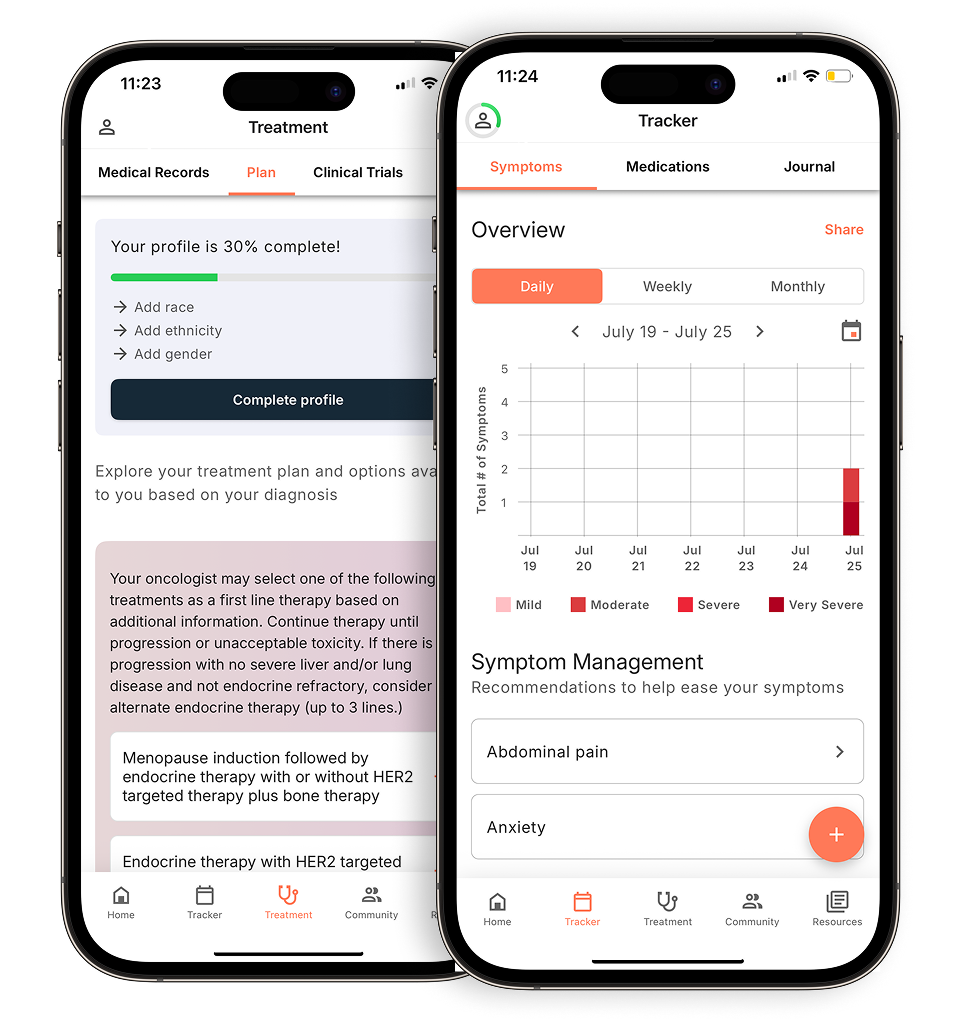
Outcomes4Me is a powerful, comprehensive tool designed to do more than just track symptoms. It helps you find the best treatment options by organizing your care and improving how you communicate with your healthcare team. The app provides personalized guidance based on your specific diagnosis, including information on clinical trials and treatment options that align with NCCN Guidelines®. It’s an incredibly valuable resource for not only managing your day-to-day symptoms but also for taking an active and informed role in your overall treatment plan. This makes it a fantastic all-in-one tool for navigating your cancer journey.
Cancer.Net Mobile
From the American Society of Clinical Oncology (ASCO), Cancer.Net Mobile provides trusted, expert information on more than 125 types of cancer. The app is great for tracking symptoms with specifics like severity, date, and time, which can create a clear picture for your doctor. One of its most helpful features is the ability to record questions and take notes during your appointments, ensuring you don’t forget to ask something important. This focus on preparation and information makes it one of the best apps for cancer patients and caregivers who want to stay organized and well-informed.
My Cancer Tracker
Think of My Cancer Tracker as your personal health diary. This free mobile app is designed to help you document every step of your cancer journey in one organized place. You can log your diagnosis, treatments, medications, and symptoms as they happen. The goal is to give you a simple, straightforward way to keep all your important health information at your fingertips. For anyone feeling overwhelmed by paperwork and scattered notes, this app offers a clean and simple solution to help you stay organized and informed about your care.
OncoDiary
While many apps focus on physical symptoms, OncoDiary places a strong emphasis on your mental and emotional well-being. It recognizes that a cancer diagnosis affects more than just your body. The app offers personalized tools and connects you with a supportive community of others who understand what you’re going through. If you’re looking for a space to manage the emotional side of your cancer journey, OncoDiary’s focus on cancer support can be an incredibly comforting and helpful resource. It’s a great reminder that taking care of your mind is just as important as taking care of your body.
Bearable
Bearable isn’t specifically a cancer app, but it’s a highly versatile symptom and mood tracker that many people find useful. Its strength lies in helping you identify patterns and trends in your health by correlating your activities, mood, diet, and symptoms. You can customize what you track, making it adaptable to your unique situation. The app also includes features for setting medication reminders and creating personal health goals. For those who are data-driven and want to see how different factors impact their well-being, Bearable is a powerful tool for navigating the cancer journey.
Careology
Careology is designed to help you feel more in control of your care by making it easy to track your symptoms, medications, and appointments. One of its standout features is the ability to build an in-app support network by sharing your journal with family and friends. This keeps your loved ones updated and allows them to offer support when you need it most. By documenting your journey in an easy-to-use format, Careology aims to enhance the overall care experience for both you and your support system, making sure you never feel like you’re going through it alone.
Common Challenges and How to Solve Them
Symptom diary apps can be incredibly helpful, but they aren’t always perfect. Like any new tool, there can be a learning curve, and you might run into a few bumps along the way. The good news is that most common issues have simple solutions. Knowing what to expect can help you choose the right app and turn tracking into a sustainable habit that truly supports your health journey. Let’s walk through some of the typical challenges and how you can handle them.
Sticking with It: The Challenge of Consistent Tracking
It’s easy to be motivated when you first download an app, but remembering to log your symptoms every day—especially on days you feel unwell—can be tough. Consistency is what makes this data so valuable for you and your care team, as it helps reveal patterns over time. Digital health journals are designed to make this process easier than a paper notebook. To build a routine, try linking your tracking to an existing daily habit, like while you have your morning coffee or before you go to bed. Setting a daily reminder on your phone can also be a simple, effective nudge to keep you on track.
Dealing with Technical Glitches and Confusing Layouts
Nothing is more frustrating than an app that freezes, crashes, or has a layout that’s hard to figure out. You’re using this tool to simplify your life, not add more stress. Before committing to an app, read recent user reviews to see what others are saying about its performance and ease of use. Look for apps known for having an easy-to-navigate format. If you’re struggling with an app, check its help section or contact its support team. If it continues to be a hassle, don’t be afraid to try a different one. The best app is the one you’ll actually use.
Understanding Data Privacy and Security
Sharing your personal health information requires trust. It’s completely normal to wonder where your data is going and how it’s being protected. Reputable apps will have a clear and accessible privacy policy that explains what information they collect and how they use it. Many apps use your initial health information to personalize your experience, tailoring the content and features to your specific situation. Look for apps that are transparent about their security measures and give you control over what you share. Taking a few minutes to review the privacy policy can give you peace of mind.
When an App Isn’t a Perfect Fit
It’s important to remember that a symptom tracker is a tool to support your care, not direct it. While these apps provide valuable insights, they are meant to help, and they do not replace the advice and guidance you receive from your medical team. If an app is causing you anxiety or feels like it’s not meeting your specific needs, it might not be the right fit for you—and that’s okay. The goal is to find a tool that empowers your conversations with your doctor and helps you feel more in control of your health, not one that adds another layer of worry.
Tips for Overcoming These Hurdles
If you’re finding it hard to get into a rhythm, start small. Focus on tracking just one or two of your most important symptoms. Many apps use periodic push notifications to gently remind you to log your data, so make sure you enable that feature if it’s available. You can also ask a family member or caregiver to help you remember or even assist with data entry. The key is to integrate the app into your life in a way that feels helpful, not burdensome. Be patient with yourself as you build this new habit.
Cost vs. Value: What to Expect
When you’re managing your health, the last thing you need is another complicated financial decision. The good news is that many excellent symptom diary apps are available at no cost. Others might have a subscription fee, so it’s helpful to understand what you’re getting and whether it’s worth it for you.
Thinking about cost versus value is a personal calculation. An app that one person finds essential might feel unnecessary to another. The goal is to find a tool that fits your budget while providing the support you need to feel more in control of your health journey. Some people find everything they need in a free app, while others are happy to pay for premium features that make their lives easier. We’ll walk through the differences so you can decide what makes the most sense for you.
Free vs. Paid Apps
You can find many high-quality cancer management apps that are completely free to use. These apps often provide core features like symptom and medication tracking without asking for a dime. However, some apps operate on a “freemium” model or require a subscription for full access. These paid versions might offer more advanced tools or a more personalized experience. When deciding, it’s important to evaluate whether the additional features justify the cost based on your specific needs. A free app might be perfect, or you may find that a small monthly fee for a premium feature is a worthwhile investment in your well-being.
Will Insurance Cover the Cost?
This is a common and important question, but the answer is usually no. Currently, most insurance plans do not cover the cost of mobile health applications, including cancer symptom diary apps. While the healthcare industry is slowly adapting to digital tools, patient cancer mobile apps are rarely included in coverage. It’s always a good idea to check directly with your insurance provider to understand your specific benefits, but it’s best to assume that you will be paying for any subscription fees out of pocket. This makes it even more important to weigh the cost against the value the app provides.
What You Get for Your Money
So, what exactly are you paying for with a premium app? Paid apps often provide enhanced features that can significantly improve your experience. This could include more detailed and personalized health tracking, the ability to integrate directly with your healthcare provider’s patient portal, or access to a wider range of educational resources and support networks. For some, these features can make communication with their care team more seamless and provide a deeper sense of community. Think of it as paying for a more tailored and connected service that goes beyond basic tracking.
How to Choose the Right App for You
With so many options available, picking the right symptom diary app can feel like another task on an already long to-do list. The best app for you is the one you’ll consistently use and that provides real value to you and your care team. Think of it as finding a new member of your support system—it needs to be a good fit. To find the right match, focus on your specific diagnosis, your personal comfort with technology, and how you plan to integrate the app into your daily routine and medical care.
Find Features That Match Your Diagnosis
Every cancer journey is unique, and your symptoms and side effects will be, too. Look for an app that allows for personalization. The best apps help you track your specific symptoms and treatment outcomes, providing insights based on your cancer type. For example, if you’re experiencing neuropathy, you’ll want an app that lets you track tingling or numbness, not just general pain. Before downloading, check the app’s feature list to see if it aligns with the side effects common to your cancer treatment plan. A generic wellness tracker might not be specific enough to capture the details your oncologist needs.
Consider Your Comfort with Technology
An app is only helpful if you can use it easily. Be honest about your tech skills and preferences. Do you prefer a simple, clean interface with large buttons, or are you comfortable with an app that has more complex features and data visualization? Many apps offer free trials, so you can test them out before committing. The goal is to find a digital health journal that makes it easier to log information, not harder. If an app feels confusing or overwhelming, it’s not the right one for you, no matter how many features it has.
What to Ask Your Doctor
Your care team is your most important partner, so bring them into the conversation. While these apps are meant to help, they do not replace the advice and care from a medical professional. During your next appointment, ask your doctor or nurse navigator if they have an app they recommend. You can also ask what specific information would be most useful for them. Knowing whether they want to see symptom severity on a scale of 1-10 or detailed notes about your energy levels can help you choose an app that facilitates better patient-doctor communication.
How to Make Tracking a Habit
Consistency is key to getting the most out of a symptom diary. To make tracking a regular habit, try linking it to an existing part of your daily routine, like when you take your morning medications or before you go to bed. Many apps also offer reminders to help you stay on track. These periodic push notifications can make it easier to remember to enter your data. Don’t feel pressured to write a novel every day; even a quick log of your key symptoms can provide valuable insights over time. The goal is to build a sustainable habit that supports your health without adding stress.
Related Articles
- Top 6 Cancer Treatment & Symptom Tracker Apps
- 5 Best Apps for Managing Cancer Symptoms in 2025
- 6 Best Apps to Track Cancer Treatment Symptoms
- Symptom tracking made for breast cancer – Outcomes4Me
View your personalized treatment plan in the Outcomes4Me app
Use your diagnosis to unlock personalized NCCN Guidelines®-aligned recommendations.
Frequently Asked Questions
Why should I use an app instead of just a paper notebook? A simple notebook is a great start, but an app offers powerful advantages. It can help you spot patterns you might otherwise miss, like noticing that your fatigue is always worse on a certain day after treatment. Apps can also send you reminders for medications and appointments, and they make sharing a clear, organized summary with your doctor incredibly simple. Think of it as a smart journal that does some of the work for you.
How do I actually share this information with my doctor during an appointment? This is where the app really shines. Many apps can generate a summary report that you can print or email to your doctor’s office ahead of time. You can also simply pull up the app on your phone during your visit to show your doctor a graph of your symptoms over the past few weeks. This gives them a clear, data-driven picture of your experience, which helps make your short time together as productive as possible.
I feel overwhelmed already. Won’t tracking everything just add more stress? That’s a completely valid concern. The goal of these apps is to reduce your mental load, not add to it. If you’re feeling overwhelmed, start small. You don’t have to track every single thing every single day. Begin by just logging one or two of your most challenging symptoms. Once you get into a rhythm, you might find that having this information organized in one place actually brings a sense of control and calm.
Is my personal health information safe in these apps? Your privacy is incredibly important, and reputable app developers take it seriously. Before you start using an app, take a moment to review its privacy policy to understand how your data is protected. Look for apps that offer security features like a passcode or Face ID lock. A trustworthy app will be transparent about its security measures, giving you the confidence to track your health honestly.
Can my family or caregivers use these apps to help me? Yes, many apps are designed with your support system in mind. Some, like Careology, have features that allow you to share your journal with designated family members or friends. This can be a wonderful way to keep your loved ones in the loop without having to repeat yourself constantly. It allows them to see how you’re doing and offer support where it’s needed most, making care a more collaborative effort.