
Is your fatigue worse on certain days? Does a specific food seem to trigger nausea? These aren’t just random occurrences; they’re patterns that tell a story about your health. A symptom tracker acts like a detective tool, helping you connect the dots between your treatments, activities, and how you feel. By using a cancer symptom tracker free on your phone, you can start to uncover these important trends. Identifying them allows you to anticipate and manage side effects before they become overwhelming, giving you the power to make small adjustments that can make a huge difference. This guide will show you how to use an app to see the bigger picture of your health and stay one step ahead of your symptoms.
View your personalized treatment plan in the Outcomes4Me app
Use your diagnosis to unlock personalized NCCN Guidelines®-aligned recommendations.
Key Takeaways
- Translate Symptoms into Actionable Data: A symptom tracker helps you convert subjective feelings into a clear, organized record. This allows you and your doctor to identify patterns, understand treatment side effects, and make more informed decisions about your care plan together.
- Find a Tool That Fits Your Needs: The best app is one that’s easy to use, protects your privacy, and offers practical features like medication reminders. Look for a simple design that makes tracking a quick part of your day rather than another chore.
- Use Your Tracker for More Productive Doctor Visits: The real power of tracking comes from consistency. By making it a simple daily habit, you can arrive at appointments with a clear summary of your health, helping you communicate your needs effectively and advocate for yourself.
What Is a Cancer Symptom Tracker?
If you’re managing a cancer diagnosis, you know that your health can feel like a moving target. Some days are good, and others are challenging. A cancer symptom tracker is a digital tool, usually an app on your phone, designed to help you keep a record of how you’re feeling. Think of it as a private health journal that’s easy to update and even easier to share with your doctor. Instead of trying to remember how you felt last Tuesday, you can simply log your symptoms, treatment side effects, medications, and overall well-being as they happen.
These apps provide a structured way to capture the day-to-day details that are easy to forget, especially when you’re feeling overwhelmed. For example, an app like Wave Health is a free resource that helps people with cancer or other chronic illnesses track their daily health. By consistently logging this information, you start to build a clear, detailed picture of your health journey. This record isn’t just for you; it becomes an invaluable tool for managing your care, spotting patterns, and having more productive conversations with your healthcare team. It’s about turning your daily experiences into useful data that can help guide your treatment.
What They Do and How They Help
At their core, symptom tracker apps are designed to improve communication between you and your doctor. When you can show your care team a detailed log of your symptoms—like when they started, how severe they were, and what you were doing at the time—they get a much clearer understanding of what you’re going through. For instance, the My STORI app lets you track daily symptoms and their severity, making it simple to share that critical information. This data helps your doctor make more informed decisions about your care plan. Research even shows that patients who consistently track treatment side effects often report a higher quality of life and may even have better outcomes.
Tracking on an App vs. a Notebook
You could certainly use a pen and paper to jot down your symptoms, and for some, that might feel comfortable. However, using an app has some major advantages. While a notebook is a simple log, digital health journals can help you visualize your health data over time, revealing patterns you might not have noticed otherwise. Is your fatigue worse on certain days? Does a specific food trigger nausea? An app can help you connect those dots. Plus, sharing your notes is as easy as showing your phone to your doctor or exporting a summary. This digital approach makes it much easier to keep your information organized, secure, and ready to use when you need it most.
Why Use a Free Cancer Symptom Tracker App?
When you’re going through cancer treatment, adding another task to your day might feel like the last thing you need. But using a symptom tracker app is one of the most powerful and proactive steps you can take for your health. Think of it as your personal health diary, one that helps you make sense of your body’s signals and gives you a real sense of agency in your own care.
Instead of trying to remember how you felt last Tuesday or what might have triggered a wave of nausea, an app gives you a clear, organized record. This information is incredibly valuable, not just for you, but for your entire care team. It transforms vague feelings into concrete data, helping you and your doctor make more informed decisions together. A study even found that patients who regularly tracked their symptoms with an app often had a higher quality of life and were more likely to live longer. It’s a simple habit that can have a profound impact on your well-being and treatment journey.
Manage Symptoms and See Patterns
Consistently logging your symptoms helps you and your care team see the bigger picture. You might notice that your fatigue is always worse two days after treatment or that a certain food triggers indigestion. These aren’t just random occurrences; they’re patterns. Identifying these trends allows you to anticipate and manage side effects before they become overwhelming. For example, if you know when fatigue is likely to hit, you can plan for more rest. This insight gives you the power to make small adjustments to your daily life that can make a huge difference in how you feel, helping you stay ahead of your symptoms rather than just reacting to them.
Talk More Effectively with Your Doctor
It’s easy to feel rushed or forgetful during a doctor’s appointment. When your oncologist asks, “How have you been feeling?” a symptom tracker app can answer that question with specifics. Instead of saying, “I’ve been tired,” you can say, “I’ve logged severe fatigue on 10 of the last 14 days, usually between 2 and 4 p.m.” This detailed information gives your doctor a much clearer understanding of your experience. Having this data at your fingertips helps you communicate with your care team more effectively, ensuring your concerns are heard and your treatment plan is tailored to your actual needs.
Improve Your Quality of Life
Managing cancer is about more than just treating the disease; it’s also about maintaining your quality of life. When you can effectively manage side effects like pain, nausea, and fatigue, you have more energy for the people and activities you love. A symptom tracker can also help you see the positive effects of other supportive therapies. You can log how things like acupuncture, yoga, or mindfulness practices impact your mood and energy levels. By understanding what helps you feel better, you can build personalized symptom management strategies that support your overall well-being throughout your treatment journey.
Feel More in Control of Your Health
A cancer diagnosis can often feel like a loss of control. Symptom tracking is a tangible way to reclaim a sense of ownership over your health. By actively monitoring how you feel, you become a key partner in your own care. You’re no longer just a passenger; you’re helping to steer. Using a digital health journal to document your experience provides you with the data to advocate for yourself and participate in shared decision-making with your doctor. This simple act of tracking can be incredibly empowering, reminding you that you play a vital role on your healthcare team.
What to Look For in a Symptom Tracker App
With so many options out there, it can be tough to figure out which app is the right fit for you. A good app should make your life easier, not add another complicated task to your plate. Think of it as a digital health journal that works for you, helping you keep everything organized in one place. As you explore different apps, keep an eye out for a few key features that can make a real difference in how you manage your health information and communicate with your care team.
Must-Have Tracking Features
The best apps let you do more than just jot down how you’re feeling. You’ll want a tool that can capture the full picture of your health. Look for an app that allows you to easily log symptoms, medications, and side effects. According to research, these are some of the most valued features in cancer mHealth apps. The ability to rate a symptom’s severity, note the time of day it occurred, and connect it to a specific medication is incredibly helpful. Some apps also provide a library of cancer education resources, which can help you better understand what you’re experiencing. This combination of tracking and information helps you and your doctor see the complete story.
An App That’s Easy to Use
When you’re not feeling your best, the last thing you need is a frustrating app. The right tool should be intuitive and straightforward from the moment you open it. A clean, simple design makes it easier to consistently track your symptoms and find what you need without a hassle. Before committing to an app, take a look at screenshots or watch a demo video if one is available. Does it look easy to add a new symptom? Can you find your medication list quickly? A user-friendly interface means you’re more likely to stick with it, turning daily tracking into a simple, stress-free habit that supports your health journey.
Keeps Your Health Information Private
Your health data is personal, and it’s crucial that any app you use protects it. Look for apps that are clear about their privacy policies. The best ones will store your information securely on your phone, giving you full control over who sees it. For example, the National Cancer Institute highlights apps where you decide what to share and with whom, whether it’s your oncologist, a family member, or your wider care team. You should never have to wonder where your information is going. A trustworthy app will prioritize your privacy, giving you peace of mind so you can focus on your health.
Medication and Appointment Reminders
Managing treatment often involves a complex schedule of medications and appointments, and it’s easy for something to slip through the cracks. A great symptom tracker app can double as your personal assistant, sending you reminders for when to take your medications or when you have an upcoming doctor’s visit. Some apps, like those recommended by the LUNGevity Foundation, even let you log when you took a dose and any side effects you experienced afterward. These reminders help you stay on track with your treatment plan and reduce the mental load of remembering every detail, making your daily routine a little bit smoother.
Personalized Summaries of Your Health
Simply collecting data isn’t enough—the app should help you make sense of it. Look for a feature that provides personalized summaries or insights. This could be a graph showing how your fatigue levels have changed over the week or a report that connects a new side effect to a change in medication. These personal health insights are what transform your daily entries into a powerful tool. They help you understand what makes you feel better or worse and give you a clear, concise summary to share with your doctor. This way, your conversations can be more focused and productive, leading to better, more informed care decisions.
Our Top 5 Free Symptom Tracker Apps
Finding the right app to help you manage your health can feel like a big task, but it doesn’t have to be. There are many great, free tools out there designed specifically for people living with cancer, and we’ve done the research to bring you our top picks. The “best” app is always the one that fits seamlessly into your life and gives you the support you need, so we’ve focused on a variety of options that excel in different areas. Whether you’re looking for a comprehensive tool to manage every detail or a simple way to log daily symptoms, there’s something here for you.
When choosing an app, think about your main goals. Are you trying to spot patterns in your side effects to discuss with your oncologist? Do you need a reliable way to remember medications and appointments? Or are you looking for a tool that not only tracks symptoms but also provides personalized, evidence-based information about your specific diagnosis? Some of the apps on our list are incredible all-in-one platforms, while others offer specialized support for certain cancer types or focus on connecting you with resources from trusted organizations. Take a look at the features of each one and consider what would make the biggest positive impact on your day-to-day life. The goal is to find a tool that empowers you and makes your health journey a little easier to manage.
Outcomes4Me
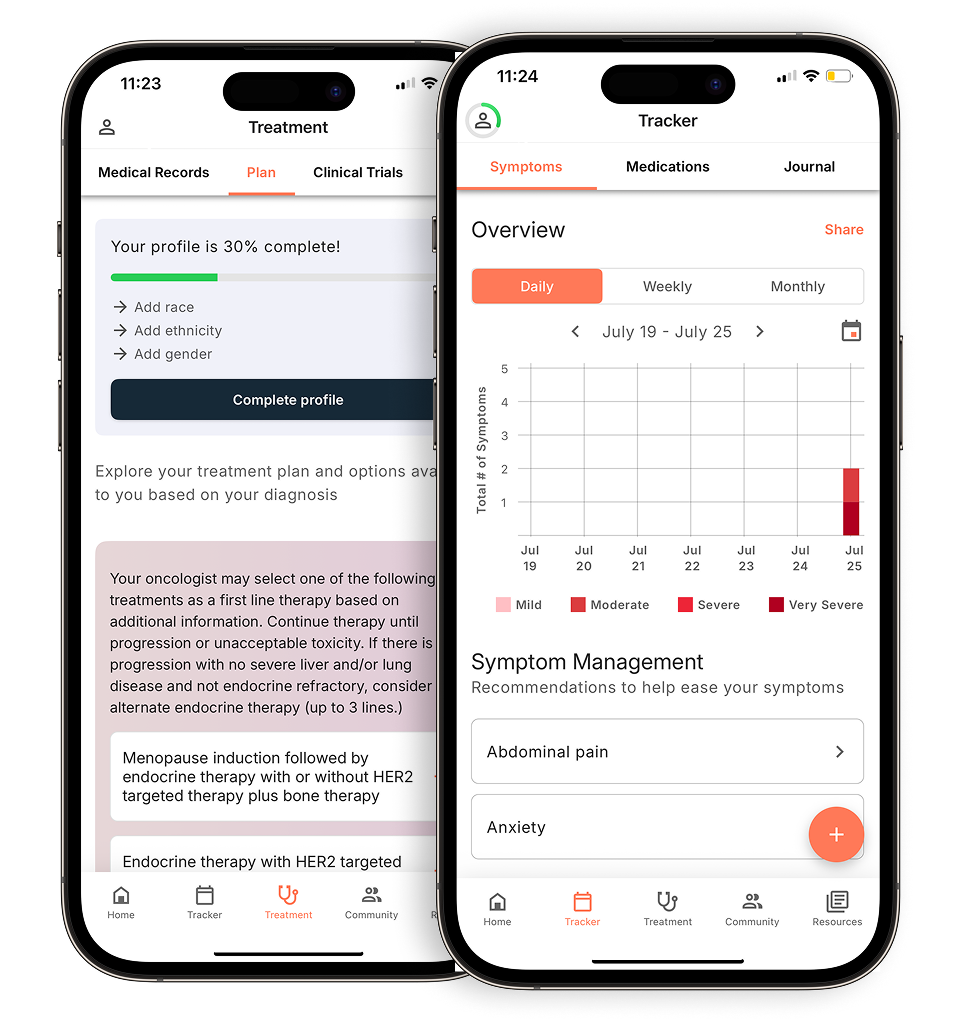
Outcomes4Me is more than just a symptom tracker; it’s a personalized health partner. The app is designed to help you easily log treatment symptoms, manage your medications, and keep all your appointments organized in one place. What makes it stand out is its ability to provide personalized insights based on your specific diagnosis. By securely connecting your health records, the app uses AI to give you information on potential treatment options and clinical trials that align with evidence-based guidelines. This makes it an incredibly powerful tool for understanding your care plan and having more informed conversations with your doctor. It’s a great choice if you want both a top-notch symptom tracker and access to customized health information.
Wave Health
If you’re looking for a holistic view of your health, Wave Health is an excellent option. Tailored for people with cancer or other chronic illnesses, this free app lets you track more than just symptoms. You can log your sleep patterns, daily activities, and medications to see how everything connects. The app then generates personal health insights to help you better understand your body and identify trends you might not have noticed otherwise. Its user-friendly design makes it simple to record your daily experiences and build a comprehensive picture of your well-being. For anyone who wants to see how lifestyle factors influence their health, Wave Health offers a fantastic set of tools to do just that.
My STORI
For those dealing with a brain tumor diagnosis, My STORI offers highly specialized support. This app was developed specifically for brain tumor patients and their caregivers, focusing on the unique challenges they face. It helps you track, organize, and manage not only your symptoms but also your self-care activities, which are crucial for well-being. This focus on self-care makes it a valuable tool for handling the complexities of treatment and daily life. Because it’s so specialized, it can help you and your care team address concerns that are specific to your condition. The National Cancer Institute provides this app as a dedicated resource, making it a trusted choice for patients and families.
Cancer.net Mobile App
From the experts at the American Society of Clinical Oncology (ASCO), the Cancer.net Mobile App is a comprehensive and trusted resource. It serves as a central hub for managing your cancer care, allowing you to track appointments, medications, and symptoms all in one place. One of its most helpful features is the ability to set medication reminders and log any side effects you experience. Beyond tracking, the app provides a wealth of detailed, oncologist-approved information and support tailored to your diagnosis. If you value having an all-in-one tool backed by a leading cancer organization, the Cancer.net Mobile App is a solid choice for staying organized and informed throughout your treatment.
ACS CARES
The American Cancer Society’s free mobile app, ACS CARES, is focused on providing personalized support and information to you and your loved ones. While it’s less of a dedicated symptom tracker, it serves as an invaluable resource for your entire cancer journey. The app connects you with tailored information, support programs, and services for patients, families, and caregivers. Think of it as a guide in your pocket, helping you find the resources you need when you need them most. For anyone looking for reliable information and a direct line to support services from a trusted organization, ACS CARES is an essential tool to have on your phone.
How to Use Your Tracker to Talk to Your Doctor
A symptom tracker is more than just a personal diary; it’s one of the most powerful communication tools you have. Walking into an appointment with clear, organized information can transform your conversation with your doctor. Instead of trying to recall how you felt weeks ago, you can present a detailed picture of your health, making your limited time together more focused and productive. This helps ensure your concerns are heard and your care plan is tailored to your actual experience.
Get Ready for Your Next Appointment
It’s easy to feel put on the spot when your doctor asks, “So, how have you been feeling?” Your mind might go blank, or you might only remember the symptoms from the past few days. Digital health journals help you arrive at appointments better prepared. By logging your symptoms, side effects, and mood as they happen, you create a reliable record. You can walk in with a list of specific points to discuss, complete with dates and details. This preparation helps you lead the conversation, ensuring you don’t forget a crucial question or concern and can make the most of your visit.
Show Your Doctor Long-Term Trends
A single data point isn’t nearly as useful as a pattern. Your tracker allows you to show your doctor exactly how your symptoms change over time, not just tell them. You can illustrate how a new medication affected your sleep for a week or how your fatigue levels fluctuate throughout the day. Presenting this data gives your care team a clearer, more objective view of your health journey beyond what a single check-up can reveal. This long-term perspective helps them understand the full context of your experience and how your body is responding to treatment.
Help Make Informed Treatment Decisions
Sharing detailed symptom reports empowers you and your doctor to make better, more informed decisions together. When your doctor understands the nuances of your side effects, they can adjust dosages, suggest supportive care, or explore different treatment options. Research shows that patients who consistently track their symptoms often have a higher quality of life and better outcomes. By providing this crucial feedback, you become an active partner in your own care, helping to shape a treatment plan that works best for you and your body.
Common Tracking Challenges (and How to Solve Them)
Starting a new habit is never easy, especially when you’re managing your health. It’s completely normal to run into a few bumps in the road as you begin tracking your symptoms. The key is not to get discouraged. Most challenges have simple solutions that can help you stay on track, feel more in control, and make the most out of your app. Let’s walk through some common hurdles and how you can handle them.
When You’re Feeling Forgetful
Between appointments, treatments, and just life, it’s easy for things to slip your mind. If you find yourself forgetting to log your symptoms, you’re not alone. Try tying the new habit to an existing one, like logging your symptoms while you have your morning coffee or right before bed. Many apps also have reminder features. According to one report, these periodic push notifications can be a gentle nudge when you need it, making it easier to stay consistent without having to rely solely on your memory.
When Symptoms Feel Overwhelming
Some days, it can feel like you have too many symptoms to even count, and logging them all feels like a monumental task. On these days, focus on what’s most important. You don’t have to write a novel; just track the one or two symptoms that are bothering you the most. Remember, the goal is to create a useful record for you and your doctor, not to capture every single detail perfectly. Research shows that patients who tracked their side effects often had a better quality of life. Seeing tracking as a tool for your well-being can make it feel less like a chore and more like an act of self-care.
If You’re Not Tech-Savvy or Worried About Privacy
It’s completely valid to feel hesitant about using a new app or sharing your health information. The best symptom tracker apps are designed to be simple and intuitive, even if you don’t consider yourself tech-savvy. Look for an app with a clean layout and clear instructions. When it comes to privacy, always choose an app from a trusted source that is transparent about how it protects your data. Some cancer apps may contain unclear or complicated information, so picking one that is evidence-based and oncologist-approved is crucial for getting reliable guidance.
Sticking With It Every Day
Consistency is what makes symptom tracking so powerful, but building that daily habit can be tough. The key is to start small. Don’t try to track ten different things on your first day. Instead, pick one symptom or feeling—like fatigue or mood—and track only that for a week. Once that feels easy, you can add another. Seeing the data build over time can be incredibly motivating. Apps that help you track your vitals and overall health can make it easier to maintain a consistent routine and see the value in your daily entries.
How to Get the Most Out of Your App
Once you’ve downloaded a symptom tracker, the next step is to weave it into your daily life. Like any new tool, it’s most effective when you use it consistently. Think of it as your personal health log—a place to record the small details and big shifts that happen between doctor’s appointments. Making tracking a regular habit helps you build a clear, comprehensive picture of your health over time. This information is incredibly valuable, not just for you, but for your entire care team. It transforms your feelings and experiences into data that can help guide your treatment plan and improve your overall well-being.
Create a Simple Tracking Routine
The key to successful tracking is consistency, and the key to consistency is a simple routine. Try to log your symptoms at the same time each day. Maybe it’s first thing in the morning with your coffee, during a quiet moment in the afternoon, or right before you go to bed. Setting a daily reminder on your phone can also be a huge help. The goal is to make it a natural part of your day, not another chore. Digital health journals are designed to make this process quick and easy, allowing you to record how you’re feeling in just a few minutes and share that information with your doctor and support circle.
Tips for Tracking Accurately
When you log your symptoms, be as specific and honest as you can. Instead of just noting “fatigue,” try to describe it. Was it a mild tiredness or an exhaustion that kept you in bed? Did it last all day or come and go? Details matter. Research shows that patients who consistently tracked their symptoms often had a better quality of life. While some apps may contain unclear or complicated information, a reliable, evidence-based app gives you a trusted place to record your experiences. Don’t downplay what you’re feeling—accurate information is what helps your care team provide the best support.
Make Tracking Part of Your Care Plan
Your symptom tracker is more than just a personal diary; it’s a powerful communication tool for your healthcare journey. Bring the data you’ve collected to your appointments to show your doctor trends over time. This information can help validate what you’re feeling and lead to more productive conversations about managing side effects. Tracking can also work alongside complementary therapies like mindfulness or yoga, helping you see how different activities affect your well-being. By making the app a central part of your care plan, you take an active role in your treatment and ensure your day-to-day experiences are part of every decision.
Related Articles
- Top 6 Cancer Treatment & Symptom Tracker Apps
- 5 Best Apps for Managing Cancer Symptoms in 2025
- Symptom tracking made for breast cancer – Outcomes4Me
- Top 5 Apps for Breast Cancer Symptom Tracking
View your personalized treatment plan in the Outcomes4Me app
Use your diagnosis to unlock personalized NCCN Guidelines®-aligned recommendations.
Frequently Asked Questions
How often should I log my symptoms to make it useful? The most important thing is consistency, not necessarily tracking multiple times a day. Try to check in once daily, perhaps at a time that’s already part of your routine, like with your morning coffee or before bed. This creates a reliable baseline. Of course, if you experience a new or sudden symptom, it’s always a good idea to log it right when it happens so you don’t forget the details.
Is using an app really better than just writing things down in a notebook? A notebook is a perfectly good place to start, and any tracking is better than none. However, an app offers powerful advantages that paper can’t. It can automatically organize your data into graphs and summaries, helping you see patterns over weeks or months. This makes it much easier to spot trends, like fatigue that peaks two days after treatment, and to share a clear, concise report with your doctor without having to flip through pages.
What should I track besides my main cancer symptoms? Think about the bigger picture of your well-being. Along with your primary symptoms, consider logging your mood, sleep quality, energy levels, and even daily activities like a short walk. This information provides valuable context. It can help you and your doctor see how your overall lifestyle affects how you feel, giving you a more complete understanding of your health.
Will my doctor actually have time to look at all this data? This is a very practical concern. You don’t need to show your doctor every single daily entry. The real power of an app is its ability to create summaries. Before your appointment, look for a feature that generates a report or graph of your symptoms over the past few weeks. This allows you to present the most important information quickly, helping your doctor understand trends and make your time together more focused.
All these apps sound great, but how do I know which one is right for me? Start by thinking about your main goal. Are you primarily looking for a simple tool to log side effects, or do you want something more comprehensive that also offers medication reminders and personalized treatment information? The best approach is to pick one or two that appeal to you, try them out for a week, and see which one feels the most intuitive. The right app is the one that fits easily into your life and you’ll stick with using.