
Going through chemotherapy can sometimes feel like you’re a passenger on a journey you didn’t choose. But there are simple, powerful ways to get back in the driver’s seat. One of the most effective is using a chemotherapy side effect tracker. This tool is more than just a log of symptoms; it’s a way to actively participate in your own care. By consistently noting how you feel, you start to understand your body’s unique responses to treatment. This knowledge empowers you to have more specific, productive conversations with your care team, transforming you from a passive patient into an active partner in managing your health and well-being.
View your personalized treatment plan in the Outcomes4Me app
Use your diagnosis to unlock personalized NCCN Guidelines®-aligned recommendations.
Key Takeaways
- Transform Your Daily Notes into Better Care: A consistent log of your symptoms provides your doctor with the specific details needed to personalize your treatment and improve your quality of life.
- Capture Your Complete Experience: Note your physical, emotional, and cognitive changes—like “chemo brain”—to give your care team a full picture of your well-being and its impact on your daily life.
- Find a Simple Tool and Stick With It: The most effective tracker is one you use consistently, whether it’s an app or a notebook. Don’t worry about perfect detail on tough days; a quick note is enough to be helpful.
What Is a Chemo Side Effect Tracker (and Why Use One)?
Think of a chemo side effect tracker as your personal health diary during treatment. It’s a dedicated tool—whether it’s a physical journal, a printable worksheet, or an app on your phone—where you can log how you’re feeling each day. This isn’t just about jotting down when you feel nauseous or tired. A good tracker helps you record a wide range of information, including specific side effects, pain levels, medications you’ve taken, what you’ve eaten, your mood, and even your appointments.
So, why is this so important? Going through chemotherapy can feel like a blur, and it’s easy to forget the specifics of how you felt last Tuesday versus today. By consistently logging this information, you start to create a clear, detailed picture of your experience. This record is incredibly valuable because it helps you and your care team identify patterns, understand what makes you feel better or worse, and communicate more effectively. Instead of saying, “I’ve been feeling tired,” you can say, “I’ve had debilitating fatigue for the past three days, especially in the afternoons.” This level of detail is a key part of a comprehensive cancer care toolkit that supports your overall well-being.
How Tracking Supports Your Cancer Care
At your appointments, your doctor will ask how you’ve been feeling, but it can be tough to remember every detail on the spot. A side effect tracker bridges that gap. It turns your day-to-day experiences into clear, organized data that gives your doctor a real window into what you’re going through between visits. This information is vital for them to see how your body is responding to treatment.
When your doctor can see specific patterns—like when your symptoms peak or how you’re reacting to a new medication—they can make more informed decisions. This might mean adjusting your treatment schedule, prescribing something to manage a side effect, or suggesting lifestyle changes to help you feel better. Essentially, tracking gives your care team the insights they need to personalize your care plan and make you more comfortable.
Benefits for You and Your Caregivers
Keeping a log of your symptoms does more than just inform your doctor—it puts you back in the driver’s seat of your health journey. It’s an empowering tool that offers several key benefits for both you and the people supporting you. You can start to identify patterns, like noticing that your fatigue lessens when you take short walks. This feeling of control can make a huge difference.
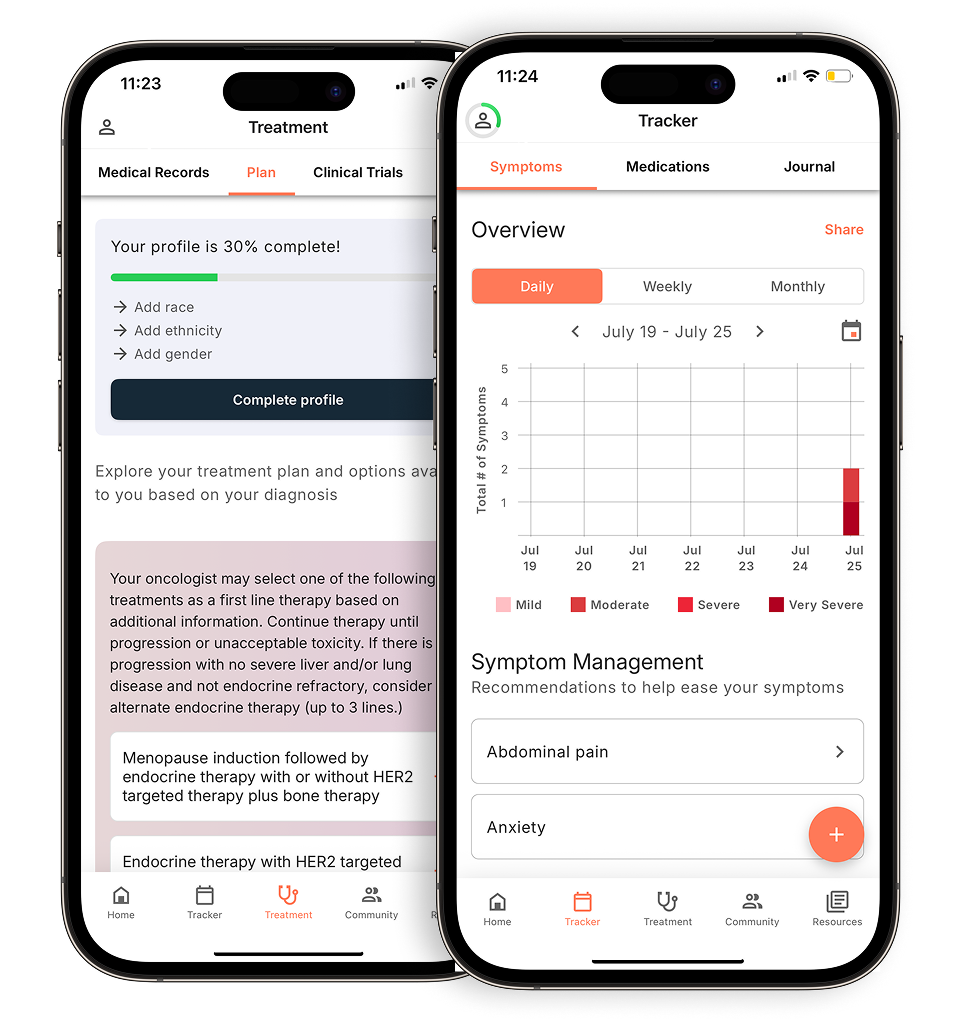
Using a tracker also helps your care team spot potential issues early and respond quickly. For caregivers, it provides a concrete way to help and stay informed. Many people find that using an app for managing chemotherapy side effects makes this process even easier, creating a detailed, real-time log of symptoms, mood, and medications that can be shared with a single tap. It’s a simple practice that can lead to better communication and more proactive care.
What Side Effects Should You Track During Chemo?
Chemotherapy affects your whole body, so your side effect tracker should capture the full picture of how you’re feeling—physically, mentally, and emotionally. While some side effects are well-known, others can be subtle or unexpected. Keeping a detailed log helps you and your care team see patterns, understand how treatment is impacting your daily life, and make informed decisions about your care. Think of it as your personal health diary, a reliable record that speaks for you when finding the right words is tough. The goal isn’t just to list symptoms, but to understand their context and impact.
Physical Symptoms to Monitor
This is often what first comes to mind when you think of side effects. Tracking physical symptoms like nausea, vomiting, fatigue, pain, or changes in appetite is crucial. Note when they occur, how intense they are, and how long they last. For example, nausea and vomiting are common, but your doctor can prescribe anti-nausea medications to help manage them. If you’re experiencing any side effects, it’s important to let your doctor or nurse know. A detailed log makes these conversations more specific and productive, helping your team find the best ways to offer you support and relief.
Emotional and Cognitive Changes
Chemotherapy’s impact isn’t just physical. Many people experience what’s often called “chemo brain,” which can include a lack of concentration, memory lapses, or just feeling mentally foggy. It can be especially challenging for patients who are trying to continue working through treatment. It’s also completely normal to feel anxious or experience shifts in your mood. These changes are just as important to track as any physical symptom. Noting your emotional state or cognitive difficulties gives your care team a complete view of your well-being, allowing them to suggest coping strategies or resources that can help.
Daily Activities and Quality of Life
How is treatment affecting your day-to-day life? This is a key question your tracker can help answer. Log changes in your sleep patterns, energy levels, and ability to perform daily tasks like cooking, working, or socializing. You can also track your mood and medication schedules. Using an app for managing chemotherapy side effects can make this easier by helping you create a detailed, real-time log. This information provides valuable context, showing how specific symptoms impact your overall quality of life and helping you and your doctor identify what matters most to you.
What Kinds of Side Effect Trackers Are Available?
When it comes to tracking your chemotherapy side effects, there’s no one-size-fits-all solution. The best tool is simply the one you’ll use consistently. Some people prefer the convenience of a digital app on their phone, while others find comfort in the simplicity of pen and paper. Your choice depends entirely on your personal preference and what feels most manageable for you. Let’s walk through the most common options available so you can find the perfect fit for your routine.
Digital Apps and Platforms
If you always have your phone with you, a digital tracker might be the most convenient choice. Using an app for managing chemotherapy side effects helps you create a detailed, real-time log of your symptoms, mood, and medications right in the moment. Many apps are designed specifically for cancer patients and include features like medication reminders, symptom severity scales, and the ability to generate reports you can share with your doctor. This makes it easy to keep all your health information organized and accessible for your next appointment, taking the pressure off you to remember every detail.
Printable Worksheets
For those who prefer a more hands-on approach, printable worksheets are a fantastic, low-tech option. They are straightforward, require no technical skills, and can be easily tucked into a folder you bring to your appointments. Organizations like the Cancer Support Community offer free, downloadable worksheets designed to help you track symptoms. You can print as many as you need and fill them out at the end of each day. Having a physical copy can also make it easier to show your care team exactly what you’ve been experiencing between visits.
Journals and Notebooks
A simple notebook or a dedicated journal can be a powerful and flexible tracking tool. This method allows you to record information in whatever way makes the most sense to you, without being limited by an app’s format or a worksheet’s columns. You can combine symptom logging with personal reflections, jot down questions for your doctor as they arise, and note how you’re feeling emotionally. Some companies even create a special logbook for people going through chemotherapy to help track treatment cycles and appointments, which can help you see patterns in how your body reacts over time.
What Makes a Side Effect Tracker Effective?
With so many options available, from simple notebooks to sophisticated apps, how do you choose the right one? A truly effective side effect tracker isn’t just a place to jot down notes; it’s a powerful tool that helps you play an active role in your own care. The best trackers are designed to be comprehensive, collaborative, and incredibly easy to use, especially on days when you have limited energy.
Think of your tracker as a bridge between your daily life and your medical team. It translates your experiences into clear, organized information that can lead to better conversations, more personalized care, and improved quality of life during treatment. When you’re looking for a tracker, focus on these three key areas to make sure it will genuinely support you.
Essential Tracking Features
A great tracker goes beyond just noting “nausea today.” It should give you space to capture the full picture of your health. This means logging daily physical symptoms like fatigue, pain, and appetite changes, but also tracking your medications, food and water intake, mood, and even your appointments. The American Cancer Society highlights that this kind of detailed log helps you and your care team identify patterns. You might notice that your fatigue is worse on certain days or after specific meals, providing valuable clues for managing your side effects more effectively.
Tools to Share Data with Your Doctor
Tracking is personal, but its power is magnified when it’s shared. Your data shouldn’t live in a silo. An effective tracker makes it simple to share your logs with your healthcare providers. This is crucial because, as the Bridge Breast Network points out, this information helps your doctor truly understand what you’re going through. When they can see clear patterns in your symptoms, they can make informed adjustments to your treatment plan to help you feel better. Look for features like printable summaries or secure digital sharing options that turn your personal log into a productive part of your next appointment.
A Simple, User-Friendly Design
The most feature-rich tracker in the world is useless if it’s too complicated to use. On days when you’re dealing with chemo brain or fatigue, you need a tool that’s straightforward and intuitive. A clean, simple design encourages consistent use. This is where an app can be particularly helpful, allowing you to create a detailed, real-time log of your symptoms and mood as they happen, rather than trying to remember everything later. The easier it is to record information, the more likely you are to stick with it, creating a more accurate and complete record of your health.
How to Use a Side Effect Tracker Effectively
A tracker is only as good as the information you put into it. The key is to build a consistent habit and know what details are most helpful for your care team. By turning tracking into a simple part of your routine, you can create a powerful resource that helps you and your doctor make the best decisions for your health. Think of it not as another chore, but as a way to take an active role in your treatment journey.
Best Practices for Daily Logging
The best way to stay on top of tracking is to make it a daily habit. Try to log your symptoms at the same time each day, like in the evening before you go to sleep. It doesn’t have to take long—even a few minutes can make a difference. Keeping this information organized in one place can help you feel less stressed and more prepared for your appointments. If you’re having a tough day, don’t worry about writing a lot. Just jotting down the most significant symptom is better than skipping it entirely. The goal is consistency, not perfection.
How to Record Severity and Timing
When you log a side effect, be specific. Note the time of day it occurred and what you were doing. Did the fatigue hit right after lunch? Did nausea start an hour after your medication? It’s also important to record how bad the symptom is. You can use a simple 1-to-10 scale (where 1 is barely noticeable and 10 is the worst imaginable) or use words like “mild,” “moderate,” or “severe.” This detail gives your doctor a clearer picture of your experience and helps them understand the impact on your daily life.
Turn Your Data into Actionable Insights
Your tracker is more than just a diary; it’s a tool for better care. Before each appointment, review your log to spot any patterns or triggers. This information helps your doctor understand exactly what you’re going through so they can adjust your treatment to help you feel better. Using an app for managing chemotherapy side effects can make this process even easier, helping you create a detailed, real-time log of your symptoms, mood, and medications. Sharing these organized insights allows your care team to personalize your plan and manage side effects more effectively.
How to Overcome Common Tracking Challenges
Let’s be honest: when you’re feeling unwell, the last thing you want to do is fill out a log. Tracking your symptoms can sometimes feel like one more task on an already-full plate. But sticking with it is one of the most powerful things you can do for your health. The good news is that you don’t have to be perfect. A few simple strategies can help you stay on track, even on the toughest days, ensuring the information you gather is both consistent and useful for you and your care team.
Managing “Chemo Brain” and Fatigue
Fatigue and cognitive changes, often called “chemo brain,” can make it hard to remember new tasks. This condition is “marked by lack of concentration, memory or thinking skills,” which can make consistent tracking feel like a challenge. Instead of relying on memory alone, try setting a daily alarm on your phone as a gentle nudge to log your symptoms. Tying this new habit to an existing one—like right after you brush your teeth in the morning or before you go to bed—can also make it easier to remember. Keep your tracker, whether it’s a notebook or an app, in a place you’ll see it often, like on your nightstand.
Staying Consistent on Tough Days
Some days will be harder than others, and on those days, the idea of detailed tracking can feel overwhelming. The goal isn’t perfection; it’s communication. Even a small note about feeling unwell is valuable information. On difficult days, give yourself permission to do the bare minimum. Instead of writing detailed descriptions, just rate your main symptom on a scale of 1 to 10. The most important thing is to let your care team know what you’re going through. As the Fred Hutchinson Cancer Center advises, “If you are experiencing side effects, please make sure to let your doctor or nurse know so they can track your progress and offer ways to help.”
Making Sure Your Data is Accurate
When you wait until the end of the day or week to log your symptoms, it’s easy to forget important details. Did the headache start before or after your medication? Was the nausea mild or severe? Logging your symptoms as they happen provides a much more accurate picture for your care team. This is where digital tools can be incredibly helpful. Using an app for managing chemotherapy side effects can help you create “a detailed, real-time log of your symptoms, mood, and medications.” Many apps timestamp your entries automatically, so you have a precise record without any extra effort. This real-time data helps you and your doctor spot patterns more clearly.
How Tracking Improves Talks with Your Care Team
Consistently tracking your side effects does more than just help you remember how you’re feeling—it transforms the conversation with your care team. Instead of trying to recall symptoms from weeks ago, you can present a clear, detailed picture of your experience. This data empowers you to have more focused, productive discussions, ensuring your doctor understands exactly what you’re going through. It turns your appointments into collaborative sessions where you and your provider can make informed decisions about your care, together.
Prepare for Appointments with Organized Data
Walking into an appointment can feel overwhelming, especially when you’re trying to remember every detail of the past few weeks. A side effect tracker acts as your personal health diary, neatly organizing all the information you need. Keeping track of this information can be hard, but staying organized can help you feel less stressed and more ready to talk with your doctors. You won’t have to guess when a symptom started or how long it lasted. Instead, you can confidently share specific details, making the most of the limited time you have with your oncologist. This level of preparation ensures your concerns are heard and addressed effectively.
Identify Patterns and Symptom Triggers
Sometimes, it’s hard to see the forest for the trees, especially when you’re not feeling your best. Tracking your symptoms day-to-day helps both you and your doctor identify patterns that might otherwise go unnoticed. You might discover that your fatigue is worst on certain days or that a specific food triggers nausea. Using an app helps you create a detailed, real-time log of your symptoms, mood, and medications. This information is invaluable, as it helps your care team understand what you’re going through so they can adjust your treatment to help you feel better.
Help Personalize Your Treatment Plan
Your experience with chemotherapy is unique, and your treatment plan should reflect that. When you track and share your side effects, you provide your care team with the direct feedback they need to personalize your care. Letting your doctor or nurse know about your symptoms allows them to monitor your progress and offer ways to help, whether that means adjusting medication dosages, prescribing something new to manage a side effect, or suggesting lifestyle changes. This makes you an active and essential partner in your own treatment, ensuring your quality of life remains a top priority throughout your cancer journey.
Related Articles
- What Are the Side Effects of Strong Chemo and How Can They Be Managed? | Outcomes4Me Community
- “Is chemotherapy causing major side effects for others?” | Outcomes4Me Community
- Struggling with Chemo Side Effects and Mood Changes | Outcomes4Me Community
- How to Manage TC Chemo Side Effects? | Outcomes4Me Community
- How long before chemo side effects appear after first treatment? | Outcomes4Me Community
View your personalized treatment plan in the Outcomes4Me app
Use your diagnosis to unlock personalized NCCN Guidelines®-aligned recommendations.
Frequently Asked Questions
I’m not very tech-savvy. Do I have to use an app? Not at all. The best tracker is simply the one you will use consistently. While apps are convenient for logging symptoms in the moment, a simple notebook or a printable worksheet works just as well. The goal is to create a reliable record for you and your doctor, and the method you choose is completely up to what feels most comfortable and manageable for you.
What’s the most important thing to track if I only have energy for one thing? On days when you’re feeling completely drained, don’t worry about filling out every detail. Just focus on your most disruptive symptom. Write down what it is, and rate its severity on a simple 1-to-10 scale. This single piece of information is incredibly valuable and gives your care team a clear snapshot of your toughest moments.
How do I share this information with my doctor without sounding like I’m just complaining? That’s a common concern, but it helps to reframe your tracker as a collaborative tool, not a list of complaints. You are providing your doctor with objective data that helps them do their job better. You can start the conversation by saying something like, “I’ve been keeping a log of my symptoms to help us spot any patterns.” This shows you’re an active partner in your own care.
Should I only be tracking my bad days? It’s just as important to track your good days, too. Noting when you feel well provides a crucial baseline for your care team and can help identify what’s working. Maybe a new medication is helping, or a certain activity gives you more energy. This positive information gives a more complete picture of your health and helps your doctor understand what a “good day” truly looks like for you.
I keep forgetting to log my symptoms because of “chemo brain.” Any tips? “Chemo brain” is very real, and it can make it tough to build new habits. Try linking your tracking to something you already do every day, like logging your symptoms right after you brush your teeth at night. You could also set a daily reminder on your phone. The key is to make it as easy as possible and to not worry about perfection. A few notes are always better than none.