
You are the most important member of your own care team. But it’s hard to be an active participant when your health information is scattered across different patient portals and paper files. A digital medical file empowers you by putting all your crucial data in one place. Instead of trying to recall details from memory, you can easily pull up your symptom log or past test results. Using a specialized app like outcomes4me, medical & health helps you ask smarter questions, understand your treatment options, and make confident decisions with your doctors.
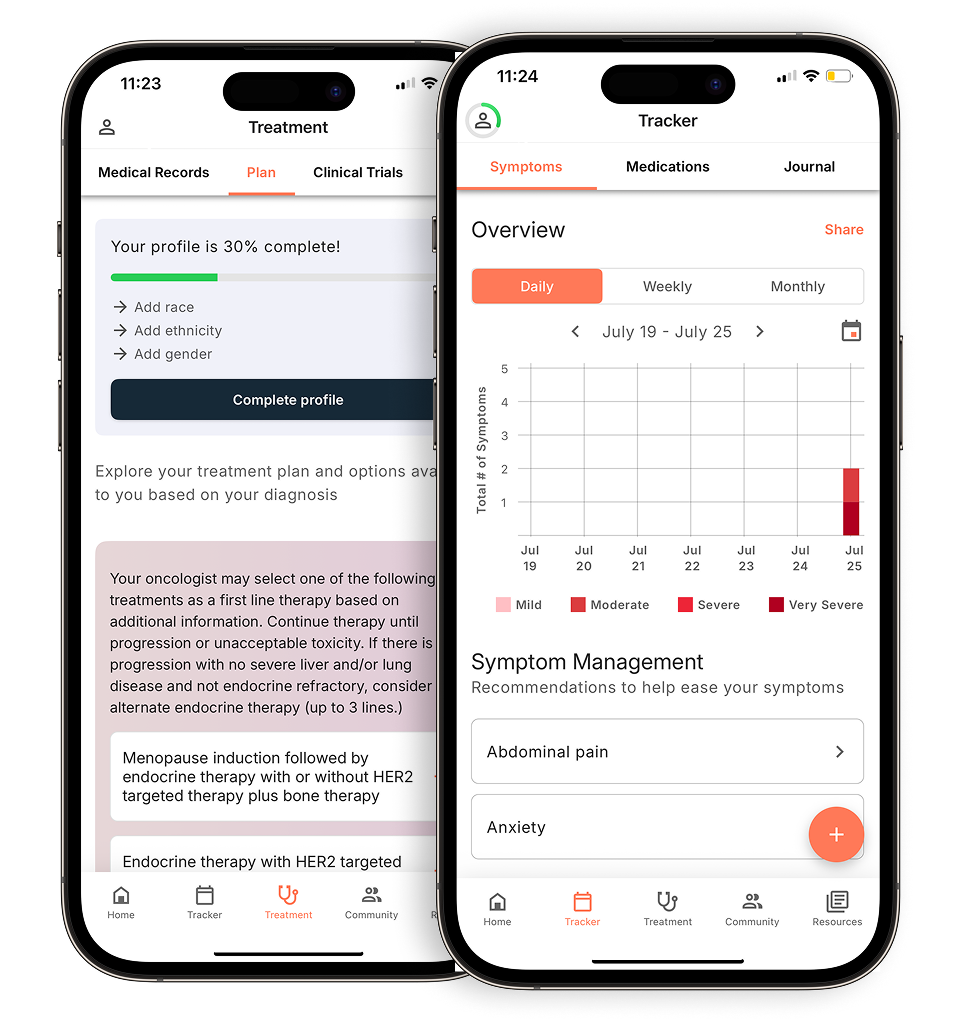
View your personalized treatment plan in the Outcomes4Me app
Use your diagnosis to unlock personalized NCCN Guidelines®-aligned recommendations.
Key Takeaways
- Keep your health information in one place: Using a digital app helps you organize everything from lab results to medication schedules, making you feel more prepared for appointments and enabling clearer conversations with your care team.
- Confirm your personal data is protected: Your health information is sensitive, so look for apps that are HIPAA compliant and have a transparent privacy policy. Features like data encryption and secure login ensure your records stay private.
- Choose a tool that fits your personal needs: The best app is one that simplifies your life. Think about what features you need most—like medication reminders or symptom tracking—and test a few options to find one that feels easy and intuitive to use.
What is a digital medical file?
Think of a digital medical file as the modern version of the thick paper folder your doctor used to carry. It’s a secure, electronic copy of your health information, often called an electronic health record (EHR). Instead of being stored in a filing cabinet, all your important details are kept in one organized digital space.
This file is a comprehensive record of your health journey. It includes your medical history, diagnoses, medications you’re taking, treatment plans, allergies, immunization dates, and the results from lab tests and imaging like X-rays or CT scans. For anyone managing cancer care, this is incredibly helpful because it brings together a lot of information that might otherwise be scattered across different clinics and hospitals.
Having your medical information in a digital file makes it much easier for your entire care team—from your oncologist to your primary care physician—to see the same, up-to-date information. This helps them coordinate your care and make well-informed decisions about your treatment. It also empowers you to take a more active role in your health. You can easily access your test results, review your medical history, and keep track of your treatment progress, all from a computer, tablet, or smartphone. Plus, these digital files are designed with security in mind, following strict privacy rules like HIPAA to ensure your personal health information stays protected and confidential.
Apps to help you manage your medical records
Managing your health information during cancer care can feel like a full-time job. Between appointments, test results, medication schedules, and symptom tracking, there’s a lot to keep organized. Thankfully, several mobile apps are designed to help you keep everything in one secure, accessible place. These digital tools can act as your personal health assistant, simplifying how you manage your medical records and communicate with your care team.
Some apps connect directly to your hospital or clinic’s patient portal, giving you a window into your official records. Others are designed for tracking your day-to-day experience, letting you log symptoms, moods, and medication adherence. There are also apps that provide personalized information and resources based on your specific diagnosis. Using one of these tools can help you feel more in control of your health journey, ensuring you have the right information at your fingertips whenever you need it, whether you’re at home or in your doctor’s office.
Outcomes4Me
The Outcomes4Me app is designed specifically for cancer patients, using artificial intelligence to provide personalized information and support. After you securely provide your medical information, the app helps you make sense of your diagnosis by offering clear, evidence-based guidance. It can help you understand your treatment options, find relevant clinical trials, and track your symptoms over time. Because its information is based on official NCCN Clinical Practice Guidelines in Oncology (NCCN Guidelines®), you can feel confident that you’re receiving credible, up-to-date information to help you have more informed conversations with your care team.
Our story and mission
At its core, Outcomes4Me was created to empower cancer patients. We understand that a cancer diagnosis can be overwhelming, leaving you with more questions than answers. Our mission is to cut through the noise and give you direct access to the information you need most. We believe that by bringing your personalized treatment options, medical records, and relevant clinical trials together into one simple, easy-to-use app, you can regain a sense of control over your health journey. It’s about putting the power of clear, credible information back into your hands, allowing you to have more meaningful conversations with your doctors and be an active partner in your own care.
How it works
Getting started with the app is straightforward. It’s designed specifically for cancer patients, so the process is intuitive. Once you securely provide your health information, the platform begins to organize everything for you. You can view all your medical records in one consolidated place, which means no more logging into multiple patient portals or trying to piece together your history. From there, the app uses your unique diagnosis to find personalized treatment options, helping you understand the path ahead. This makes it much easier to prepare for appointments and have productive, informed conversations with your doctor about what’s next.
Personalized, evidence-based guidance
The information you receive in the app is never generic; it’s tailored specifically to you. We provide treatment guidance that is based on solid evidence and approved by oncologists. Our platform uses artificial intelligence to translate the official NCCN Guidelines®, which are recognized as the standard for clinical policy in cancer care and are used by doctors at 33 of the nation’s leading cancer centers. Our technology makes this complex medical information clear and understandable for everyone. This means the guidance you receive is not only personalized but also highly credible and trustworthy, helping you feel more secure in the decisions you make with your care team.
More than just medical records
While having all your records organized is a huge help, the app is designed to be much more than a digital filing cabinet. It’s a tool that helps you make sense of your diagnosis and actively manage your care. By using your specific medical information, the app provides clear, evidence-based guidance and support tailored to you. It helps you understand the complexities of your situation by turning your health data into actionable insights. For example, you can track your symptoms, find relevant clinical trials, and get information that supports you throughout your entire cancer journey, from diagnosis through treatment and beyond.
Availability and cost
We believe every patient deserves access to the best information and tools to manage their care, without financial barriers. This commitment is at the heart of our mission. That’s why the Outcomes4Me app is completely free to download and use. There are no hidden fees, in-app purchases, or subscription models to worry about. Our goal is to provide a valuable resource that helps ease the burden of managing a cancer diagnosis, not add to it. You can get the app today and start taking a more active role in your health journey without any cost.
MyChart
If your hospital or clinic uses the Epic electronic health record system, you’re likely familiar with MyChart. This app functions as a patient portal, giving you direct and secure access to your official medical records. Through MyChart, you can see your lab results as soon as they’re available, review your doctor’s notes from your last visit, and look at your medical history. It’s also a convenient tool for handling logistics, like requesting prescription refills, paying medical bills, and sending non-urgent messages directly to your healthcare providers. It’s a great way to stay connected to your care team between appointments.
Health Storylines
Health Storylines is a digital tool that helps you create a detailed narrative of your health journey. The app is built around the idea of tracking your daily experiences to see the bigger picture. You can use it to log your symptoms, track your mood, keep a record of your medications, and note any questions you want to ask at your next appointment. Over time, this creates a comprehensive health story that you can easily share with your doctors. This can help your care team better understand what you’re experiencing day-to-day and make more informed decisions about your treatment plan.
ACS CARES
Developed by the American Cancer Society, the ACS CARES app is a free resource designed to support you and your caregivers. The app provides personalized information and connects you to programs and services tailored to your needs. You can find helpful articles, track your symptoms and appointments, and get organized with a digital planner. It also offers features to help you build a support network and find local resources. Think of it as a companion that brings the trusted information and support of the American Cancer Society directly to your phone, helping you through every step of your cancer experience.
Medisafe
Keeping track of medications can be one of the most challenging parts of managing cancer treatment. Medisafe is an app that focuses specifically on medication management to make this process easier. You can set up reminders for each of your prescriptions so you never miss a dose, and the app will track your adherence over time. It also allows you to keep a list of all your medications and dosages in one place, which is incredibly helpful for appointments. One of its key features is the ability to check for potential drug interactions, adding an extra layer of safety to your routine.
Apple Health
If you use an iPhone, the Apple Health app is already built-in and ready to use. It acts as a central hub for all your health and wellness data. You can connect it to your hospital’s patient portal to download and store your official health records, including allergies, conditions, immunizations, and lab results. The app also lets you track medications, log symptoms, and monitor data from other health apps or devices like an Apple Watch. By consolidating everything in one place, it gives you a holistic view of your health that you can easily access and share with your providers.
Google Health
For Android users, Google Health offers a similar function to Apple Health, helping you manage your health information from your phone. It is designed to securely store your medical records, track your medications, and give you access to a wide range of health resources. By connecting to your provider’s patient portal, you can gather your health information in one place, making it easier to review your history and share it with your care team. The platform aims to give you a clearer, more complete picture of your health so you can play a more active role in your care.
What makes a great digital health app
With so many options available, finding the right digital health app can feel like a big task. The best app for you is one that fits your specific needs, is easy to use, and makes you feel more in control of your health information. When you’re exploring different apps, think about which features will make the biggest difference in your day-to-day life. A good app should reduce your stress, not add to it. Consider these key features to help you find a tool that truly supports you and your care.
Does it protect your security and privacy?
Your health information is incredibly personal, so the app you choose must protect it. Before downloading, check to see if the app has a clear privacy policy that explains how your data is used and stored. It’s important to find a tool that follows health privacy regulations like HIPAA, which sets the standard for protecting sensitive patient health information. A trustworthy app will be transparent about its security measures, giving you peace of mind that your private records will stay private.
Is it easy to use?
When you’re managing your health, the last thing you need is a complicated app. The best tools are simple to get around in, with a clean design and text that’s easy to read. You shouldn’t have to spend a lot of time figuring out how to find information or log your symptoms. A good user experience means the app feels intuitive and straightforward from the moment you open it. This allows you to focus on what matters most—managing your care—without any added frustration.
Can it track medications and send reminders?
Keeping track of medications, dosages, and schedules can be one of the most challenging parts of cancer treatment. A helpful app will let you log all your medicines and therapies in one place. Look for a feature that allows you to set reminders for when to take each dose so you don’t miss one. This function can be a simple but powerful way to stay on top of your treatment plan and feel more organized throughout your day.
Does it help with appointments and reminders?
Between oncologist visits, lab work, and imaging scans, your calendar can fill up quickly. An app with a built-in calendar can help you manage all your appointments. You can track dates, times, and locations for every visit with your care team. Many apps also send you reminders before an upcoming appointment, which can be a huge help in making sure you never miss an important check-in with your doctors.
Can you log your symptoms and side effects?
Your doctor relies on you to share how you’re feeling between visits. An app that lets you log your symptoms and side effects can make these conversations much more productive. You can record how you feel each day, note the severity of a symptom, and track when it occurs. This creates a detailed record that you can share with your care team, helping them get a clearer picture of your experience and adjust your care plan if needed.
Can you share information with your care team?
An app becomes even more powerful when it can easily share information with your doctors. Some apps can connect directly with your provider’s electronic health record (EHR) system, which streamlines communication. Even if an app doesn’t link directly, it should offer a simple way to export or share your data. This ensures your care team always has the most up-to-date information on your symptoms, medications, and overall health.
Does it offer personalized treatment guidance?
Every person’s cancer journey is unique, and your digital health tool should reflect that. Some apps use your specific health information to provide personalized guidance. For example, an app might help you understand your treatment options based on your diagnosis and stage or suggest relevant clinical trials. This kind of tailored support can help you feel more informed and empowered as you make important decisions about your care.
How apps protect your health information
When you’re managing your health, the last thing you want to worry about is the security of your personal information. It’s completely normal to feel protective of your medical data. The good news is that reputable health apps take your privacy very seriously and have multiple safeguards in place. Think of it like layers of security designed to keep your information safe and confidential.
Understanding these protections can help you feel more confident when choosing an app to manage your cancer care. Key features to look for include compliance with federal privacy laws, strong data encryption, secure login procedures, and clear, honest privacy policies. When an app has these measures in place, you can trust that your sensitive health information is being handled with the care and respect it deserves. This allows you to focus on what’s most important: your health and well-being.
Checking for HIPAA compliance
You’ve likely heard the term HIPAA at your doctor’s office. The Health Insurance Portability and Accountability Act (HIPAA) is a federal law that sets a national standard for protecting sensitive patient health information. It ensures that your medical records and other personal health details are kept private and secure. When you’re looking at health apps, one of the most important things to check for is whether they are “HIPAA compliant.”
This isn’t just a buzzword; it means the app developer has implemented specific technical, physical, and administrative safeguards required by law. A HIPAA-compliant app will have strict rules about who can access your data and how it’s stored and shared. Always check an app’s website or privacy policy for a statement about its commitment to protecting your sensitive health information according to these standards.
How apps use data encryption and secure storage
Data encryption is a powerful tool that acts like a digital lock on your information. It essentially scrambles your health data into an unreadable code, making it useless to anyone without the specific “key” to unlock it. This protection works whether your data is being sent to your doctor or just sitting in your account. The best apps use encryption to protect your data from unauthorized access.
In addition to encryption, trustworthy apps use secure storage. This means your information is kept on protected servers with robust security measures, similar to what banks use to protect financial data. Together, encryption and secure storage create a safe environment for your medical records, giving you peace of mind that your personal details are shielded from prying eyes.
Why secure login and authentication matter
User authentication is the process of verifying your identity before granting you access to your account. It’s the first line of defense in making sure only you can see your information. You’re already familiar with this from other apps—it’s your password, a PIN, or even biometrics like your fingerprint or Face ID. These features prevent others from simply picking up your phone and opening your health app.
This is a critical feature because you should have full control over who sees your data. A secure app will always require you to log in and may even automatically log you out after a period of inactivity to further protect your account. When setting up your account, always choose a strong, unique password to add another layer of security.
What to look for in a privacy policy
A privacy policy might seem like a long, boring legal document, but it’s worth a look. This is where a company explains exactly how it collects, uses, and protects your information. A trustworthy app will have a clear and easy-to-understand privacy policy that doesn’t hide behind confusing jargon. It should plainly state what data is collected and why.
Look for policies that explain how your information is stored and used. Does the company share your data with third parties? If so, who are they and for what purpose? A transparent policy is a sign of a company that respects its users and is confident in its privacy practices. If you can’t find a privacy policy or don’t understand it, that’s a major red flag.
Understand cookie policies and data sharing
You’ve probably seen pop-ups asking you to “accept cookies” when you visit a new website. These are small files that help a site remember your activity, but it’s wise to understand what you’re agreeing to. When you accept cookies, you may be allowing a website to share information about your browsing habits with other companies for advertising or analytics. When you’re researching sensitive health topics, this kind of online tracking can feel particularly invasive. A transparent privacy policy will explain how a company uses cookies and whether your data is shared with third parties. Taking a moment to understand this helps you make an informed choice about your digital privacy and control how your information is used online.
Why use a digital medical file for your cancer care?
Managing your health during cancer treatment can feel like a full-time job. Between appointments, test results, and medication schedules, there’s a lot of information to keep track of. Using a digital medical file or a health app can bring a sense of order to the chaos. Think of it as a central hub for your health journey, designed to make your life a little easier. By organizing your information, these tools can help you feel more prepared and in control of your care.
Keep all your health information in one place
A digital medical file acts like a personal health organizer, keeping all your important information in one secure spot. Instead of shuffling through papers or trying to remember details from past appointments, you can have everything at your fingertips. This includes your diagnosis, treatment history, lab results, medication lists, and even notes you’ve jotted down. Having a single, reliable source for your health data reduces stress and ensures you can find what you need, exactly when you need it. This level of organization can help you feel more empowered as you manage your cancer care.
Communicate more easily with your care team
Being an active participant in your care means having your health information ready to go. When you can easily pull up your symptom log or a list of questions during an appointment, you can have more productive conversations with your doctors and nurses. These apps help you share a clear and accurate picture of what you’ve been experiencing between visits. This leads to better discussions with your care team, ensuring you and your providers are making decisions together based on the most complete information available.
Stay on top of your medications and treatments
Cancer treatment often involves complex schedules for medications, therapies, and appointments. A digital health app can help you log all your medicines and dosages, and many offer reminders so you don’t miss a dose. You can also use these tools to track any side effects you experience, noting when they happen and how they feel. This creates a detailed record that is incredibly helpful for your care team to see. It allows them to better understand how the treatment is affecting you and make adjustments if needed.
Help coordinate care between your providers
Your cancer care team may include several different specialists, from your oncologist to a radiologist or surgeon. A digital medical file can help ensure everyone has the same up-to-date information. Some apps can link with your doctor’s electronic health record (EHR) system, or they make it simple for you to share your data directly. This helps coordinate care between all your providers, making sure your entire team is on the same page. It reduces the burden on you to be the sole messenger, allowing for more seamless and collaborative care.
How much do these apps cost?
When you’re managing your health, the last thing you need is another bill. The good news is that many digital health apps are designed to be accessible, regardless of your budget. You can find excellent, full-featured apps that are completely free, while others might offer more advanced tools through a subscription. It’s all about finding what works for you, your needs, and your wallet. Let’s walk through the common pricing models you’ll see.
What to know about free app options
You’ll be happy to know that many of the most helpful medical record apps are available at no cost. Developers of these apps believe that everyone deserves access to tools that can help them manage their health information. These free versions aren’t just basic tools; they often provide all the essential features you need to stay organized. You can typically track your symptoms, log medications, keep your health records in one place, and set appointment reminders without ever paying a fee. For many people navigating cancer care, a free app provides more than enough support to make a real difference in their daily routine.
How subscription pricing works
For some apps with more advanced or specialized features, you might find a subscription model. This usually means paying a monthly or yearly fee for access. Often, choosing an annual plan comes with a discount compared to paying month-to-month. This pricing structure allows app developers to offer more complex tools, such as detailed analytics for your care team or integrations with other health devices. If you find an app that has a specific feature you think would be incredibly helpful, a subscription might be worth considering. It gives you the flexibility to pay for a service that meets your unique needs.
How to find discounts and free trials
A great way to explore apps with subscription fees is by taking advantage of free trials. Many developers provide free trials so you can test out all the features before making a financial commitment. This is your chance to see if the app is easy to use and if it truly fits into your life. During a trial, you can try everything from charting symptoms to setting reminders to see if it simplifies your care coordination. Think of it as a no-pressure test drive. It’s a smart way to make sure an app is the right choice for you before you decide to subscribe.
Your checklist for choosing the right app
With a growing number of health apps available, picking the right one can feel like another task on an already long to-do list. Thinking through a few key areas can help you find an app that truly supports you and fits your needs. It’s all about finding a tool that makes your life easier, not more complicated. Consider these factors as your guide to choosing a digital health app with confidence.
Double-check the security and privacy features
Your health information is deeply personal, so making sure it’s protected is a top priority. When you’re looking at different apps, check to see if they follow HIPAA regulations, the federal law that protects sensitive patient health information. A trustworthy app will also have a clear privacy policy that explains exactly how your data is stored, used, and kept safe. Look for features like encryption, which acts like a digital lock to shield your information from anyone who shouldn’t have access to it. Taking a moment to check for these safeguards can give you peace of mind knowing your private information will stay that way.
Confirm the app’s reliability and compliance
When you’re managing your health, you need tools you can count on. A reliable app will often state that it is “HIPAA compliant,” which is a strong signal that it meets national standards for protecting your information. This shows the app developer is committed to keeping your data secure. Even if your doctor’s office doesn’t use the specific app you choose, it can still be an incredibly valuable tool for you personally. Using an app to organize your records, track symptoms, and list your questions helps you prepare for appointments and have more productive conversations with your care team.
Make sure it works with your healthcare system
It’s also helpful to consider how well an app will work with your existing healthcare providers. Some apps can connect directly to your hospital or clinic’s electronic health record (EHR) system, which can be very convenient for automatically pulling in your records. Other apps work independently, giving you a central place to gather all your information and share it with your doctors as needed. An integrated app might save you some data entry, while a standalone app can offer more flexibility. The best choice really depends on what feels most manageable and helpful for you.
How to choose the right app for you
With so many options available, finding the right app can feel like another task on your to-do list. The goal is to find a tool that simplifies your life, not complicates it. The best app for you is one that fits seamlessly into your routine and gives you exactly what you need to feel more in control of your health journey. Think of it as finding the right digital organizer for your care. To help you decide, consider what you need most, how the app protects your information, how easy it is to use, and your own comfort level with technology. Let’s walk through these points together.
Start by assessing your personal needs
Before you start downloading, take a moment to think about what you truly need. Are you looking for a simple tool to remind you to take your medications, or do you want a full command center for your care? Make a list of your must-have features. This could include tracking symptoms and side effects, managing appointments, storing test results, or even getting personalized treatment information. The best app is one that’s easy for you to use and has the features you need most. Exploring lists of the best apps for cancer patients can give you a good idea of what’s available and help you pinpoint which features will make the biggest difference for you.
Take a closer look at the security features
Your health information is incredibly personal, so privacy is a top priority. Always check that an app has strong measures in place to protect your sensitive data. Look for apps that are clear about their security practices and follow health privacy laws like HIPAA. A trustworthy app will use encryption to protect your data and have a transparent privacy policy that explains exactly how your information is stored and used. You should feel confident that your data is safe and that you have full control over who can see it. Don’t hesitate to read the privacy policy before you sign up—it’s worth the peace of mind.
Give the user experience a test run
An app can have amazing features, but if it’s difficult to use, it won’t be very helpful. The app you choose should be simple to understand and get around in. When you’re testing it out, pay attention to the design. Does it have a clean look and easy-to-read text? Can you find what you’re looking for without getting frustrated? Many apps are free to download, so you can try a few to see which one feels most intuitive to you. The right app should feel like a helpful partner, making it easier to keep all your health information organized in one place without adding extra stress.
Be honest about your comfort with technology
It’s important to be honest about your own comfort level with technology. Some people love exploring every feature an app has to offer, while others prefer a more straightforward, no-fuss tool. Pick an app that feels easy for you to use, not one that feels confusing or overwhelming. If you’re not very tech-savvy, a simple app with a few core functions might be the perfect fit. Remember, the point is to find something that supports you. If you ever feel stuck, remember there are also wonderful support programs available that can connect you with people who can help you along your journey.
Related Articles
View your personalized treatment plan in the Outcomes4Me app
Use your diagnosis to unlock personalized NCCN Guidelines®-aligned recommendations.
Frequently Asked Questions
Is it really safe to put my sensitive health information into an app? That’s a completely valid concern, and the short answer is yes, it can be very safe if you choose a reputable app. Trustworthy health apps are built with security as a top priority. They use tools like data encryption, which scrambles your information so it’s unreadable to unauthorized people. They also follow strict federal privacy laws, like HIPAA, which sets the standard for protecting patient data. Always look for an app with a clear, easy-to-read privacy policy so you know exactly how your information is being handled.
What’s the difference between an app connected to my hospital, like MyChart, and a standalone app? Think of it this way: a hospital-connected app like MyChart is a direct window into your official medical file at that specific hospital system. It’s perfect for seeing lab results, viewing doctor’s notes, and managing appointments with that provider. A standalone app acts more like your personal health diary and organizer. It allows you to pull together information from different doctors, track your daily symptoms and moods, and log your medications, giving you a complete picture of your health journey in one place.
Do I need my doctor to recommend or approve an app before I use it? You don’t need your doctor’s permission to use a health app, as it’s a personal tool to help you stay organized. However, it can be a great idea to let your care team know you’re using one. An app can help you track your symptoms and side effects more accurately, which gives your doctor a clearer picture of how you’re doing between visits. It can make your appointments more productive because you’ll have all your questions and notes ready to go.
What if I’m not very comfortable with technology? Will these apps be too complicated? Many developers design their apps with ease of use in mind because they know users are managing health challenges, not looking for a technical puzzle. The best apps are intuitive, with clean layouts and simple instructions. My advice is to start with a free app that focuses on one or two features you need most, like medication reminders. You can test it out without any pressure and see how it feels. The goal is to find a tool that reduces your stress, not adds to it.
How do I get my medical records from my doctor’s office into one of these apps? This process can vary depending on the app and your healthcare provider. Some apps can connect directly to your hospital or clinic’s patient portal and automatically import your records for you, which is incredibly convenient. For other apps, you may need to request a copy of your records from your provider’s office—often a digital file like a PDF—and then manually enter the key information into the app.