
Sticky notes on the fridge, a binder full of papers, a running list of questions for your doctor—managing the logistics of cancer care can feel like a full-time job. A support app is designed to streamline all of that into one secure, easy-to-use place on your phone. It gives you a central hub for tracking appointments, logging symptoms, managing medications, and keeping notes. By bringing all these details together, it helps reduce the mental load and frees you up to focus on your well-being. Before you download a breast cancer support app, it’s worth knowing how this simple tool can bring a sense of calm and order to your daily routine.
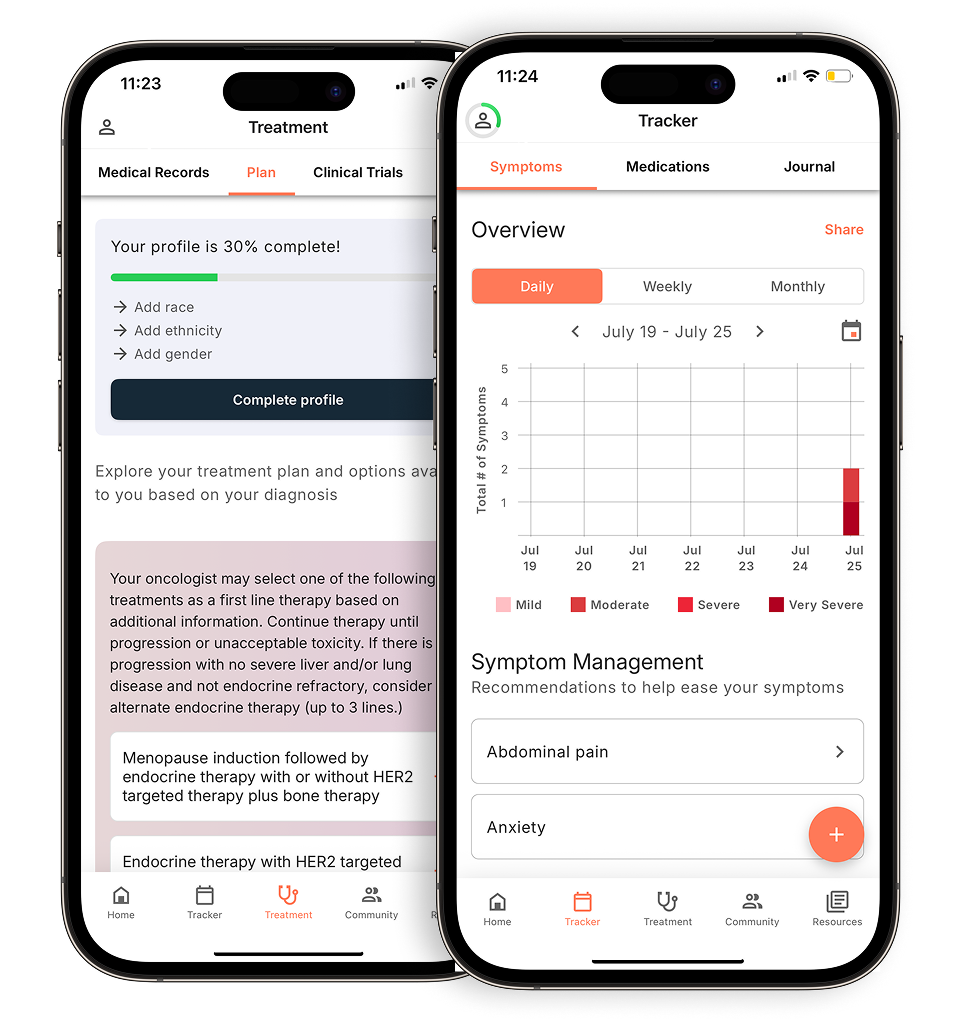
View your personalized treatment plan in the Outcomes4Me app
Use your diagnosis to unlock personalized NCCN Guidelines®-aligned recommendations.
Key Takeaways
- Organize your care in one place: A support app can act as your digital home base, helping you track appointments, manage medications, and log symptoms to make managing your health journey feel more straightforward.
- Choose an app that fits your needs: Look for key features like personalized guidance based on your diagnosis, access to trustworthy health information, and a clear privacy policy to ensure the tool is both helpful and secure.
- Feel more prepared and less alone: Using an app can provide you with reliable information for more confident conversations with your care team and connect you to a community of people who share similar experiences.
How can a breast cancer support app help you?
A breast cancer diagnosis can feel overwhelming. Suddenly, there are appointments to schedule, medications to track, and a whole new vocabulary to learn. It’s a lot to handle on top of processing your emotions and focusing on your health. This is where a support app can make a real difference. Think of it as a digital home base for your cancer journey, designed to bring a sense of order to the chaos and put valuable resources right at your fingertips. These tools are created specifically for people living with cancer, understanding the unique challenges you might face day-to-day.
These apps are built to help you manage your new normal by providing personalized support and information specific to your diagnosis. They can help you organize the practical details of your care, from keeping a log of your symptoms to remembering questions for your next doctor’s visit. Beyond the logistics, they offer a way to access reliable information and connect with others who understand what you’re going through. The goal is to help you feel less alone and more equipped to take an active role in your care, turning a confusing process into a more manageable path forward.
Your partner in managing care
From the moment you’re diagnosed, you’re flooded with information. A support app can act as your personal health organizer, giving you one central place to keep everything straight. You can use it to keep track of your appointments, manage your prescriptions, and jot down notes during conversations with your care team. Having all this information in one secure location on your phone means you don’t have to rely on scattered papers or your memory alone. This kind of organization can help you feel more prepared and less stressed, making it easier to manage your care and focus on your well-being.
Feel more informed and in control
Feeling in control is powerful, and knowledge is a key part of that. Support apps can provide you with personalized resources and information that empower you to be an active participant in your treatment. When you have access to trustworthy information tailored to your situation, you can have more productive conversations with your doctors and make decisions that feel right for you. These apps can also help you track your symptoms and side effects, making it easier to communicate effectively with your healthcare providers. Sharing this information clearly helps them provide the best possible care and gives you a greater sense of agency over your health journey.
What to look for in a breast cancer support app
With so many apps available, it can be tough to know which one is right for you. A great support app should feel like a reliable partner, making your life a little easier, not more complicated. As you explore your options, think about what you need most right now. Are you looking for a way to organize your medical information, find clear answers to your questions, or connect with people who understand what you’re going through? The best apps often combine these features, but knowing your priorities can help you choose. Here are a few key things to look for.
Personalized guidance and tracking
Your cancer journey is unique, and your support app should reflect that. Look for an app that allows you to track how you’re feeling day-to-day. Logging symptoms, side effects, and mood changes can create a clear record that helps you have more productive conversations with your care team. Some apps can even offer personalized information based on your specific diagnosis and the data you enter. This tailored support can help you feel more prepared for appointments and better understand your treatment path. Having a tool that helps you communicate with your doctors effectively is incredibly valuable.
Trustworthy health information
When you have questions about your health, you need answers you can rely on. The best breast cancer support apps provide trustworthy, evidence-based information that has been reviewed by medical experts. Look for apps that clearly state where their information comes from, whether it’s from leading cancer organizations or clinical guidelines. This ensures you’re getting up-to-date and accurate details about treatments, side effects, and wellness. Access to reliable health information can help you make informed decisions and feel more confident as you manage your care. It’s a welcome alternative to searching online and wondering what’s true.
Connect with a supportive community
You don’t have to go through this alone. Many apps offer a community feature where you can connect with others who have similar experiences. This can be a safe space to share stories, ask questions, and find emotional support from people who truly get it. Some apps connect you with trained volunteers or allow you to find others based on your specific diagnosis or background. Finding your people can be a powerful source of comfort and strength. A strong support system is a key part of well-being, and a digital community can be a convenient and accessible way to build one.
Your privacy and data security
Sharing personal health information requires trust. Before you download and start using an app, take a moment to understand how it protects your data. A good app will have a clear and easy-to-find privacy policy. Look for features that keep your information secure, such as storing data directly on your phone instead of a company server. You should have full control over your information. Understanding an app’s approach to privacy and security ensures you can use its features with peace of mind, knowing your sensitive details are kept safe.
Breast cancer support apps to consider
Finding the right app depends on what you need most during your treatment and recovery. Some apps help you organize your medical information, while others offer evidence-based guidance or a connection to a community. Here are a few options to explore, each with its own unique strengths.
Outcomes4Me
If you’re looking for a tool that provides personalized, evidence-based information, Outcomes4Me is a powerful option. The app uses an AI-driven platform to give you guidance based on the latest NCCN Guidelines®, which are the recognized standard for clinical policy in cancer care. After you securely provide your medical information, the app helps you understand your diagnosis and treatment options. It can also help you find relevant clinical trials and learn about potential genetic testing. This makes it easier to have informed, confident conversations with your oncology team about your care plan.
OWise
Think of OWise as your personal digital organizer for your breast cancer journey. This free app gives you a single, secure place to keep track of all your important information, from appointments and prescriptions to your doctor’s notes. One of its most helpful features is the ability to track your symptoms and overall well-being over time. This can create a clearer picture for your care team, helping you communicate how you’re feeling between visits. Developed by medical scientists, OWise is a trusted tool designed to help you feel more in control of your health information.
ACS CARES
Sometimes, you just need to talk to a person who understands. The free ACS CARES app from the American Cancer Society connects you directly with trained cancer specialists, 24/7. It’s a resource for you, your family, and your caregivers. Whether you have questions about your emotional health, need help finding financial assistance, or are looking for transportation to your appointments, the specialists can provide reliable information and support. It’s a direct line to a trusted organization that can help you with the practical and emotional challenges that come with a cancer diagnosis.
The Cancer App
For a straightforward, all-in-one resource, The Cancer App is a helpful and free tool. It’s designed to help you manage the logistics of your care by keeping your appointments, medication schedules, and important contacts organized. The app also serves as an information hub, offering resources for 23 different types of cancer. You can find details about specific treatments and their side effects, along with helpful articles on topics like nutrition, exercise, and emotional well-being. It’s a practical tool for consolidating all your cancer-related information in one easy-to-access place on your phone.
Becca App
The Becca app was created to support people living with or beyond primary breast cancer by providing tips, information, and personal stories. However, it’s important to know that the app is scheduled to close on February 3, 2026. While you may still see it available for a time, its services will be discontinued. The organization behind the app, Breast Cancer Now, remains a valuable resource and continues to offer a wide range of support for anyone affected by breast cancer through its website and other programs.
How to get started with a support app
Once you’ve found an app that seems like a good fit, getting it set up is usually straightforward. Here are a few simple steps to get you started.
How to download the app
Getting started is usually as simple as visiting your phone’s app store. Most breast cancer support apps, including options like ACS CARES, are available for free on both Google Play for Android phones and the Apple App Store for iPhones. This makes them easy to find and install, no matter what kind of device you use. You can simply search for the app by name, tap ‘download’ or ‘install,’ and it will appear on your phone in just a few moments. The process is designed to be quick and stress-free, so you can start benefiting from the support right away.
Setting up your profile
After you’ve downloaded the app, you’ll be prompted to set up a profile. This usually involves answering a few questions about your diagnosis and treatment plan. Taking a few minutes to do this helps the app give you information that’s truly relevant to you. For example, a personalized profile can help you track your appointments, manage medications, and keep important contact information all in one place. Think of it as creating a digital command center for your care, designed just for you.
What to know about cost and privacy
It’s natural to have questions about cost and privacy. The good news is that many high-quality support apps are completely free to download and use. Apps like OWise are free and don’t show you targeted ads, so you can focus on what matters. Your privacy is also a top priority for reputable app developers. Some apps store your personal information only on your device, not on a company server, which means you are the only one with access to it. Always take a moment to review an app’s privacy policy so you feel comfortable and secure.
Related Articles
- Top 5 Apps to Connect with Breast Cancer Patients
- Top 6 Apps to Manage Breast Cancer Treatment
- Is This App for Breast Cancer Patients Only? | Outcomes4Me Community
- Top 5 Apps for Breast Cancer Symptom Tracking
- The 5 Best Oncologist-Approved Cancer Apps
View your personalized treatment plan in the Outcomes4Me app
Use your diagnosis to unlock personalized NCCN Guidelines®-aligned recommendations.
Frequently Asked Questions
Will using a support app replace the advice from my doctor? Not at all. Think of a support app as a tool to help you work more effectively with your healthcare team. It can help you organize your questions, track your symptoms, and understand your treatment options so you can have more informed and productive conversations during your appointments. It’s meant to supplement your medical care, not replace the essential guidance you receive from your oncologist and other providers.
How can I be sure my personal health information is safe? This is a really important question. Reputable apps take your privacy very seriously. Before downloading, it’s always a good idea to look for their privacy policy, which should be easy to find and understand. Many high-quality apps keep your information secure by storing it directly on your phone, giving you full control over who sees it.
With so many options, how do I choose the right app for me? The best app for you really depends on what you need most right now. Take a moment to think about your biggest challenge. Are you struggling to keep track of appointments and medications? Or are you looking for trustworthy information to better understand your diagnosis? Maybe you’re feeling isolated and want to connect with others. Pinpointing your primary need will help you choose an app that feels like the most helpful partner for your journey.
Are these apps difficult to use if I’m not comfortable with technology? Most of these apps are designed with simplicity in mind because the last thing you need is more stress. They often have clear layouts and straightforward features. You don’t have to use every single function at once. You can start by using one feature, like a symptom tracker or appointment calendar, and explore the others as you get more comfortable.
Can my family or caregivers use these apps to help me? While most apps are designed for you to manage your own information, they can be a fantastic tool for keeping your support system in the loop. You can easily share the information you’ve tracked, like a log of your side effects or a list of upcoming appointments, with a caregiver or family member. This helps everyone stay on the same page and allows them to support you more effectively.