
A cancer diagnosis can make you feel like you’ve lost control. With so many new appointments, medications, and decisions to track, it’s easy to feel overwhelmed. But having the right tools can help you feel more in charge. A free cancer patient organizer app acts as your personal health assistant, providing reminders for medication schedules and doctor appointments. It puts all your essential information in one place, helping you stay organized and prepared. This guide covers the best apps for managing your journey and also answers other critical questions, like what counseling or psychiatrists online or apps exist for cancer patients?
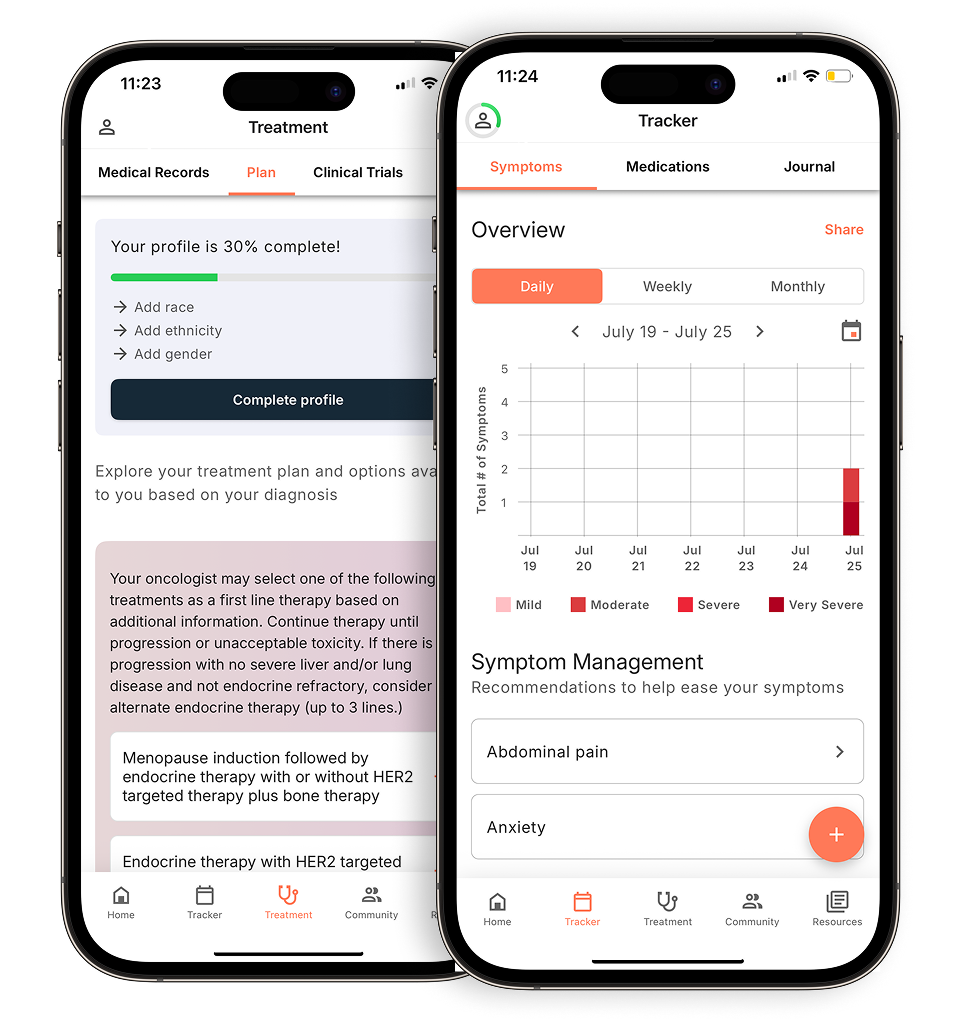
View your personalized treatment plan in the Outcomes4Me app
Use your diagnosis to unlock personalized NCCN Guidelines®-aligned recommendations.
Key Takeaways
- Centralize your health info to feel more in control: Using an app to manage appointments, medications, and notes in one place can significantly reduce stress and make your care journey feel more manageable.
- Improve communication with your care team: Tracking symptoms and side effects creates a detailed health record you can share with your doctor, leading to more productive conversations and better-informed treatment decisions.
- Find the right features for your specific needs: The best app is one that addresses your biggest challenges, whether that’s getting personalized treatment information, staying on top of medications, or connecting with a supportive community.
How can a cancer organizer app help you?
When you’re diagnosed with cancer, it can feel like you suddenly have a second full-time job. Between doctor’s appointments, medication schedules, and tracking how you feel, there’s a lot to manage. A cancer organizer app is a tool on your phone or tablet designed to make this new reality a little easier. Think of it as a digital command center for your health journey.
These apps help you keep all your important information in one secure place. Instead of relying on scattered notebooks or sticky notes, you can use an app to track your medications, log your symptoms, and remember questions for your next appointment. The goal is to bring a sense of order to the complexities of treatment, giving you more mental space to focus on your well-being. Many apps also provide access to reliable health information and connect you with a community of people who understand what you’re going through.
Simplifying your day-to-day tasks
At their core, cancer organizer apps are designed to simplify your daily life. They can help you manage a cancer diagnosis by providing practical tools for tracking medications, keeping up with appointments, and even coordinating support from friends and family. By putting these organizational tasks on autopilot, the apps can help the entire process feel a bit less overwhelming.
Beyond logistics, many apps offer personalized resources to help you feel more informed. For example, an app might provide information about your specific treatment options, share updates on relevant research, or offer tips for managing side effects. This tailored support can help you have more productive conversations with your care team and feel more confident in the decisions you make about your health.
Keeping your care team in the loop
A good organizer app can also serve as a vital link between you and your medical team. By consistently logging your symptoms and side effects, you create a detailed health diary that you can share with your doctor. This record can help them get a clearer picture of how you’re responding to treatment, leading to better and more personalized care.
Some apps even integrate with your hospital or clinic’s patient portal, allowing you to schedule appointments, message your doctors, and see lab results as soon as they’re available. These features streamline communication and help you coordinate your care more effectively. Instead of waiting for a phone call, you have direct access to your health information, empowering you to be a more active participant in your treatment plan.
Is your health information safe in an app?
When it comes to your health, the quality and privacy of information are essential. It’s important to choose an app that you can trust. While many apps are available, they vary in quality and usefulness. Independent evaluations of mHealth applications have found that some provide higher-quality information and more useful features for patients than others.
Look for apps developed by reputable organizations that are transparent about how they protect your data. The best apps are built to be a secure space where you can manage your health information with confidence. They focus on providing reliable self-care tips and evidence-based guidance, ensuring the support you receive is both safe and helpful. This peace of mind allows you to focus on what matters most: your health.
What makes a cancer organizer app truly helpful?
With so many apps available, it helps to know what to look for. The right app for you will depend on your specific needs and what you find most helpful for managing your day-to-day. Think of these features as a checklist to help you find a tool that genuinely makes your life easier. A good organizer app should feel like a supportive partner, helping you keep track of the details so you can focus more of your energy on your well-being.
Stay on top of your medication schedule
Juggling multiple medications, each with its own schedule, can be a challenge. An app with medication tracking can be a huge help. Look for features that let you create a full list of your medicines and dosages. The best apps send you reminders when it’s time to take a dose, so you don’t have to rely on memory alone. Some can even alert you when it’s time to request a refill, preventing any last-minute rushes to the pharmacy. This simple feature can bring peace of mind and help you stay on top of your treatment plan with confidence.
Keep all your appointments in one place
Between oncologist visits, lab work, and imaging scans, your calendar can fill up quickly. An app that helps you manage appointments can centralize everything in one place. Instead of sticky notes and calendar alerts spread across different devices, you can have a single, clear view of your schedule. Many apps also let you store notes and questions for your doctor. This is perfect for jotting down things as you think of them, ensuring you remember to ask your questions during your next visit and can record the answers.
Easily track your symptoms and side effects
Your doctor needs to know how you’re feeling between appointments, but it can be hard to remember the details of a symptom you had last week. A symptom tracker allows you to log how you’re feeling each day. You can often note the severity of a symptom, when it occurred, and what you were doing at the time. This creates a detailed record that you can share with your care team. Having this information helps your doctor get a clearer picture of your experience and make more informed decisions about how to manage side effects.
Make doctor visits more productive
Clear and consistent communication with your medical team is essential. Some apps, especially those connected to your hospital’s patient portal, make this much easier. These tools can give you a secure way to send messages to your doctor’s office, view lab results as soon as they’re available, and even request prescription renewals. This direct line of communication can help you get answers to non-urgent questions without having to play phone tag. It empowers you to be an active participant in your care and collaborate with your healthcare team more effectively.
Find reliable treatment information
Feeling informed can help you feel more in control. Many organizer apps provide access to a library of trusted educational materials. The most helpful apps go a step further by offering personalized information based on your specific diagnosis. This means you get resources about treatment options, clinical trials, and research updates that are relevant to you. Having this tailored information at your fingertips can help you prepare for discussions with your oncologist and make decisions that feel right for your situation.
Find support from people who get it
You don’t have to go through this alone. The emotional journey with cancer is just as significant as the physical one, and connecting with others who understand can make a world of difference. Many apps now include a community feature where you can chat with other patients and caregivers. This provides a safe space to share experiences, ask questions, and find encouragement from people who truly get it. Finding your support system can be a powerful source of strength and comfort.
Look for an app that’s simple to use
The whole point of an organizer app is to reduce stress, not add to it. The technology should be simple and intuitive to use. When you’re exploring options, look for an app with a clean layout and clear instructions. If an app feels complicated or overwhelming from the start, it’s probably not the right fit. A user-friendly design ensures that you’ll actually use the tool consistently, allowing you to get the most out of its features without any added frustration.
How an app can support your cancer journey
Using an app to organize your cancer care can feel like having a personal health assistant right in your pocket. It’s more than just a digital calendar; it’s a tool that can help you feel more in control, communicate more effectively, and stay on top of your treatment plan. By centralizing all the moving parts of your care, these apps can lighten your mental load and empower you to take a more active role in your health journey.
Bring a sense of calm to your routine
A cancer diagnosis comes with a lot of new information to manage, from appointment dates to medication schedules. Trying to keep it all straight can be a major source of stress. An organizer app brings all of this information into one secure place, creating a central hub for your care. Instead of juggling notebooks, calendars, and loose papers, you have a single, reliable source of truth. This can help reduce feelings of being overwhelmed and make the journey feel more manageable.
Feel more confident talking to your doctors
Have you ever left a doctor’s appointment and immediately forgotten a question you meant to ask? An app can help make your conversations more productive. You can use it to jot down questions as they arise and take notes during your visit so you can review them later. Having a record of your symptoms and side effects logged in the app also gives your doctor a clearer picture of what you’re experiencing between visits. This helps you and your care team stay on the same page and make informed decisions together.
Stick to your treatment plan with ease
Your treatment plan is the roadmap for your care, and an app can help you follow it closely. Features like medication reminders ensure you never miss a dose, while symptom trackers help you monitor how you’re feeling day-to-day. By consistently logging symptoms like fatigue or nausea, you can identify patterns and learn strategies for managing them. This information is also incredibly valuable for your care team, as it helps them understand how the treatment is affecting you and make adjustments when needed.
Find information that’s relevant to you
The internet is full of health information, but not all of it applies to your specific situation. Some apps, like Outcomes4Me, are designed to provide information that is personalized to your unique diagnosis. Based on your medical records, the app can offer information on relevant treatment options, clinical trials, and research updates. This saves you from having to sort through confusing or irrelevant articles online and ensures you’re getting guidance that truly matters for your health.
A simple way to keep family in the loop
Coordinating with your support network is crucial, but it can also be exhausting to keep everyone updated. Many organizer apps have features that allow you to share information with trusted family members and friends. You can give them access to your appointment calendar or send updates on how you’re feeling. Some apps even let you ask for help with specific tasks, like a ride to treatment or a hand with meals, making it easier for your loved ones to provide the support you need.
Free organizer apps for your cancer journey
Finding the right tools to help you manage your care can make a world of difference. When you’re dealing with appointments, medications, and a lot of new information, staying organized can feel like a full-time job. The good news is that you don’t have to do it alone. There are many free apps designed to lighten your load, but each one offers something a little different. Some apps focus on providing clear, personalized information about your treatment, while others are built to help you track medications and symptoms. Still others connect you with a community of people who understand exactly what you’re going through.
Think about what would help you the most right now. Is it getting personalized treatment information? Or maybe it’s keeping track of your medications or connecting with people who understand what you’re going through. The goal is to find a tool that fits your life and reduces your stress, not adds to it. To help you get started, here are five of the best free organizer apps for cancer patients, each with its own unique strengths. We’ll walk through what makes each one helpful so you can find the support that feels right for you.
Outcomes4Me: For personalized guidance
If you’re looking for an app that acts like a personal guide, Outcomes4Me is a great place to start. It’s designed to give you information and support that’s tailored specifically to you. After you securely provide your medical information, the app offers clear, evidence-based guidance on your treatment options, potential clinical trials, and symptom management strategies. It helps you understand the latest research updates relevant to your diagnosis, so you can feel more informed and prepared for conversations with your doctor. It’s like having a smart, supportive resource right in your pocket, helping you make sense of complex information.
How Outcomes4Me provides personalized information
Outcomes4Me creates a personalized experience by using the specific details of your diagnosis that you securely share within the app. When you provide information like your cancer type, stage, and biomarker status, the platform cross-references it with the NCCN Clinical Practice Guidelines in Oncology (NCCN Guidelines®). These are the same evidence-based standards your own oncologist uses to make treatment recommendations. The app then translates this complex information into a clear, easy-to-understand format. This means you can explore all the FDA-approved treatment options that align with your diagnosis, find relevant clinical trials, and get updates on research that applies directly to you, helping you feel prepared and confident for your next doctor’s visit.
Cancer.Net Mobile: For reliable cancer information
When you just need clear, reliable information, Cancer.Net Mobile is an excellent resource. This app is produced by the American Society of Clinical Oncology (ASCO), so you can be sure the information is credible and up-to-date. It’s like a comprehensive encyclopedia covering more than 125 types of cancer. The app also has practical tools to help you stay organized. You can use it to track your symptoms and side effects over time, and it has a feature for recording questions and audio-recording your doctor’s answers during appointments. This makes it a fantastic tool for preparing for visits and remembering the details afterward.
CareZone: For all-in-one health organization
If your goal is to have all your health information neatly organized in one spot, CareZone is a powerful tool. This app is designed to be a central hub for you and your family. One of its most popular features is the ability to scan your medication bottles, which automatically creates a detailed list of your medicines, dosages, and schedules. You can also set reminders for taking medicine and manage pharmacy refills. Beyond medications, you can store important contacts, track appointments on a shared calendar, and keep a journal. It simplifies the logistics so you can focus more on your well-being.
MediSafe: For simple medication management
Juggling multiple medications, doses, and schedules can be one of the most stressful parts of treatment. MediSafe is an app that specializes in making medication management simple and safe. You can input all your medications, and the app will send you reminders when it’s time to take each one. It also tracks your adherence, so you can easily see if you’ve taken your dose. One of its most helpful features is the ability to connect your account with a loved one, who can receive an alert if you miss a medication. This provides an extra layer of support and peace of mind for both you and your caregivers.
Belong: For finding your support community
Going through cancer can feel isolating, and sometimes the best support comes from people who truly get it. Belong is the world’s largest social network for cancer patients and their families. The app connects you with support groups based on your specific cancer type, allowing you to share experiences and advice with others on a similar path. What makes Belong unique is that it also gives you a way to chat with oncology professionals, including doctors and researchers, who can answer your questions. It’s a powerful tool for finding emotional support, building community, and accessing expert insights all in one place.
More helpful apps and digital tools
Beyond organizing your medical care, your phone can be a powerful tool for looking after your emotional well-being and getting practical help. The journey with cancer can bring a mix of feelings, and having support is key. From connecting with a therapist online to coordinating help from your community, here are a few ways digital tools can help you find that support when you need it.
For mental and emotional support
Online therapy and mental health counseling
Talking to a professional can make a huge difference, but getting to an in-person appointment isn’t always easy. Online counseling offers a flexible way for people with cancer to get mental health support from the comfort of home. It can be a safe space to work through common feelings like anxiety, distress, or loneliness that can come with a diagnosis. Many platforms connect you with licensed therapists who specialize in supporting people through health challenges, giving you access to professional care that fits your schedule.
Mental health and self-care apps
For day-to-day support, mental health and self-care apps can teach you practical skills for managing difficult emotions. Apps like MindShift, for example, use methods based on Cognitive Behavioral Therapy (CBT) to help you reframe anxious thoughts and build healthier habits. They often include tools like guided meditations, breathing exercises, and thought journals that you can use anytime you feel overwhelmed. Think of them as a self-care toolkit in your pocket, offering simple, actionable ways to find a moment of calm.
For coordinating practical help from your community
Letting friends and family help can be a huge relief, but coordinating everything can feel like another task on your to-do list. Apps designed for community support can make this much easier. For example, some tools let you create a private group where you can share updates with your inner circle all at once, saving you from repeating the same information. You can also use these apps to ask for specific help, like a ride to an appointment or a hand with groceries, allowing your loved ones to offer practical support in a way that’s genuinely helpful.
For managing prescription costs
The cost of medications can add up quickly, creating an extra layer of stress. Thankfully, there are digital tools that can help you find better prices on your prescriptions. Apps like GoodRx search for coupons and discounts at pharmacies near you, potentially lowering your out-of-pocket costs. The process is usually simple: you search for your medication in the app, find the best price, and show the digital coupon to your pharmacist. It’s a straightforward way to manage one of the financial aspects of your care.
For connecting directly with your provider
Staying connected with your care team and feeling informed about your treatment are key to feeling in control. While some apps connect to your hospital’s patient portal, others focus on providing you with personalized, evidence-based information. For example, the free Outcomes4Me app is designed to give you guidance and support that’s tailored to your specific diagnosis. By securely providing your health information, you can receive oncologist-approved information about your treatment options and relevant clinical trials. This helps you prepare for appointments and have more informed conversations with your doctor, making you a confident partner in your own care.
How to choose the right app for you
With so many options available, finding the app that fits seamlessly into your life is key. The best choice for you will depend entirely on your unique situation, your diagnosis, and what you feel you need the most support with right now. Think of it like finding the right planner or calendar system—what works wonders for one person might not be the best fit for another.
Your first step is to consider what aspects of your care feel the most overwhelming. Are you juggling multiple prescriptions and appointment times? Do you want a better way to track your symptoms to discuss with your doctor? Or are you looking for reliable information and a sense of community? Answering these questions will help you zero in on the features that will make the biggest positive impact on your day-to-day life. Choosing an app is a personal decision, and the goal is to find a tool that reduces your stress, not adds to it.
What do you need most from an app?
Everyone’s experience with cancer is different, so your needs for an app will be, too. Take a moment to think about your biggest priorities. For some, the main challenge is keeping track of medications and remembering appointments. For others, it’s about having a simple way to log symptoms and side effects as they happen. You might also be looking for a tool that helps you get support from friends and family or connect with other people who understand what you’re going through. The best app for you depends on what you need and what you’re comfortable using. By identifying your primary goals first, you can look for an app with features that directly address them.
How to spot a reliable health app
When you’re dealing with your health, you need information you can trust. Not all apps are created equal, so it’s important to look for ones that are reliable and provide high-quality, evidence-based information. The best apps often source their content from trusted medical institutions or are built on established clinical guidelines. Before downloading, take a look at the app’s description or “About Us” section to see where its information comes from. Independent research on mHealth applications has shown that some apps score higher than others in terms of both quality and usefulness, which can help you find a tool that is both helpful and credible.
Match the app’s features to your challenges
Many people find that organizer apps are incredibly helpful for managing the practical, day-to-day aspects of treatment. These apps can help you manage symptoms during treatment and coordinate care after it ends. For example, having a dedicated place to log when you experience things like nausea, fatigue, or skin rashes can create a clear record to share with your doctor. This can lead to more productive conversations and better symptom management strategies. An app can also serve as a central hub for all your appointments, contact information for your care team, and important notes, making it easier to keep everything organized in one place.
Tips for getting the most from your app
Once you’ve chosen an app, the goal is to use it in a way that makes you feel more in charge of your cancer care. Think of it as your personal health assistant. You can use it to get clear, understandable information about your specific cancer type and find personalized treatment choices that you can discuss with your oncologist. Some apps can also help you learn about clinical trials you may be eligible for. By actively using these tools, you can become a more informed and confident partner in your own healthcare, ensuring your voice is heard and your needs are met every step of the way.
Related Articles
- 5 Best Apps for Managing Cancer Symptoms in 2025
- The 5 Best Oncologist-Approved Cancer Apps
- 6 Best Cancer Symptom Tracker Apps for 2026
- Top 5 Apps to Connect with Breast Cancer Patients
- Top 6 Cancer Treatment & Symptom Tracker Apps
View your personalized treatment plan in the Outcomes4Me app
Use your diagnosis to unlock personalized NCCN Guidelines®-aligned recommendations.
Frequently Asked Questions
Is my personal health information safe in these apps? This is a completely valid and important question. Reputable apps are built with your privacy as a top priority. Look for apps developed by trusted organizations that are transparent about how they protect your data. They should have a clear privacy policy that explains what information they collect and how it’s used. A good app is designed to be a secure space, giving you the confidence to manage your health details without worry.
With so many options, how do I pick the best app for me? The best way to start is by thinking about your biggest challenge right now. Is it keeping track of multiple medications? Remembering questions for your doctor? Or maybe you’re feeling isolated and want to connect with others? Once you identify your main need, you can look for an app that specializes in that area. The goal is to find a tool that simplifies your life, so choose one that feels intuitive and easy for you to use consistently.
Can my family or caregivers use these apps to help me? Yes, many organizer apps are designed to help your support system stay involved. Some apps allow you to share your appointment calendar, medication schedule, or symptom logs with a trusted family member or friend. This helps everyone stay on the same page without you having to send constant updates. It can be a simple way to coordinate rides to appointments or let loved ones know how you’re feeling.
Will my doctor pay attention to the information I track in an app? Think of your app as a detailed health diary. When you can show your doctor a clear record of your symptoms—noting when they happened, how long they lasted, and how severe they were—it gives them a much more accurate picture of your experience between visits. This data helps you have more productive conversations and allows your care team to make more informed decisions about managing your side effects and adjusting your treatment plan.
What’s the single biggest advantage of using a cancer organizer app? The biggest benefit is reducing your mental load. A cancer diagnosis brings a flood of new information, tasks, and schedules to manage. An app centralizes all of that chaos into one organized, accessible place. By taking care of the logistics, it frees up your mental and emotional energy, allowing you to focus more on your well-being and less on the administrative details of your care.
Use the simple tools already on your phone
Diving into a new app might feel like another task on an already full plate, and that’s completely understandable. The good news is, your smartphone is already equipped with powerful tools to help you get organized. You can start by using your phone’s built-in calendar to keep track of all your appointments. Set alerts for each visit and even add notes with the location or questions you want to ask. For medications, the reminders app can be a lifesaver. You can create recurring alerts for each dose, ensuring you stay on schedule without having to rely on memory alone. Using these familiar tools can be a great first step toward bringing a sense of order to your routine and feeling more in control.
Your phone’s notes app can also become an essential part of your toolkit. Think of it as your personal digital notebook where you can create a running list of questions for your doctor as they pop into your head. You can also use it to create a simple log of your symptoms, noting the date, time, and severity of anything you experience. This creates a detailed record you can easily share with your care team, leading to more productive conversations. While these tools are fantastic for getting started, a dedicated app can eventually bring all these functions together and provide more structured tracking and personalized health information, taking the organizational work off your shoulders.