
Every test result and doctor’s note tells a piece of your unique health story. When you bring them all together, you create a complete picture of your cancer journey. This personal health record is one of the most valuable tools you have. It helps you see your progress, especially when you learn how to track lab results for cancer patients over time. It also helps you share your history with new specialists and feel more prepared for every appointment. This guide offers simple, straightforward tips to help you organize your records and feel confident and informed at every turn.
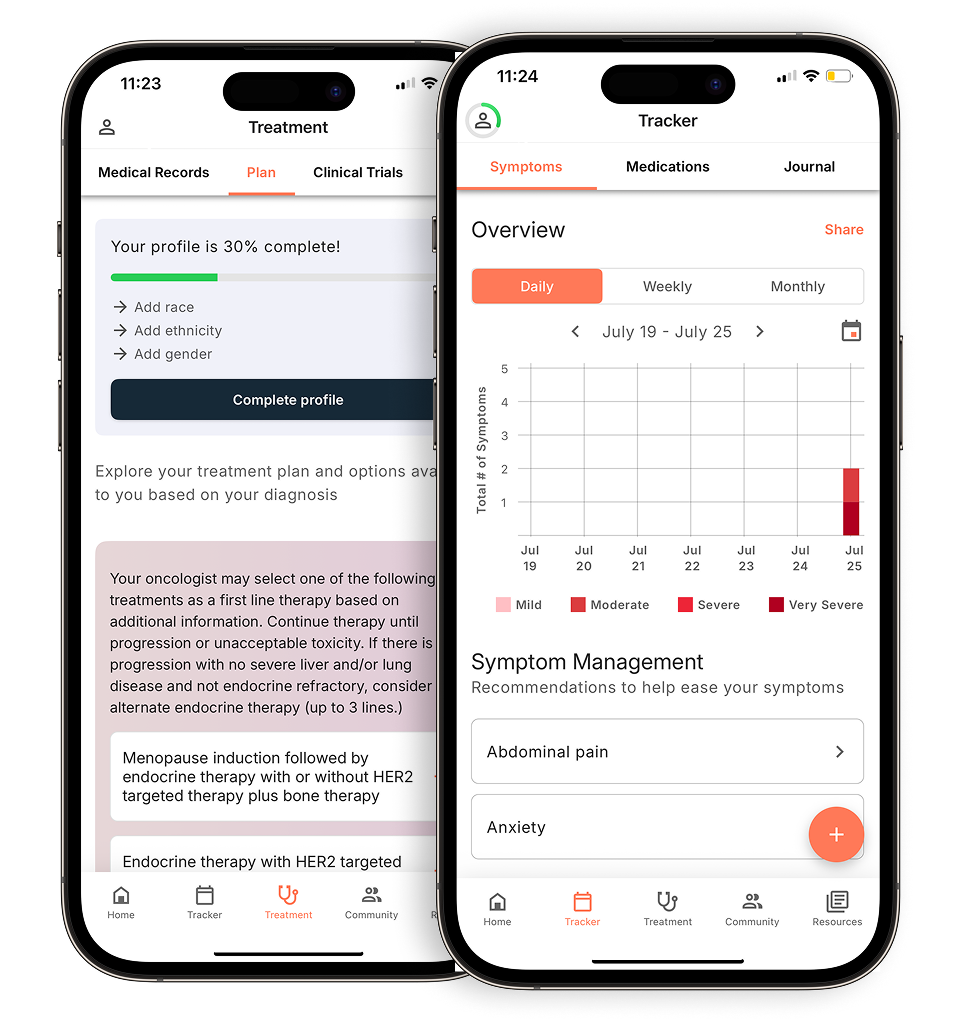
View your personalized treatment plan in the Outcomes4Me app
Use your diagnosis to unlock personalized NCCN Guidelines®-aligned recommendations.
Key takeaways
- Gather your essential health documents: Keep a file with your diagnosis, treatment history, test results, and care team contacts to create a complete and accessible record of your health story.
- Organize your records with a hybrid system: Use a physical binder for easy access at home and create digital backups by scanning documents and using your patient portal. This ensures your information is always safe and available.
- Share information securely to build your support network: Use tools like patient portal proxy access or a shared calendar to keep trusted family and caregivers informed, making it easier for them to provide practical help and advocate for you.
The essential cancer records to keep on hand
When you’re going through cancer treatment, paperwork can feel like the last thing you want to deal with. But getting your medical records organized can make a huge difference. It helps you feel more in control, makes communicating with your care team easier, and ensures you have all the important information in one place. Think of it as creating your personal health story. Here are the key documents to gather and keep.
Start with your diagnosis and medical history
The first and most important piece of your health story is your diagnosis. This is the foundation for every treatment decision you and your care team will make. Be sure to keep a record of the specific type of cancer you have, its stage and grade, and the date you were diagnosed. It’s also helpful to include a summary of your general medical history, such as other health conditions you manage, any allergies you have, and past surgeries. Having a complete picture of your health helps every provider you see give you the best possible care.
Keep a running list of your treatments and medications
Keeping a running list of every treatment and medication is essential for tracking your progress. This log should include all cancer treatments you’ve received, like chemotherapy, radiation, or surgery, along with the dates and dosages. Also, make a list of all your current medications, including prescriptions for managing side effects and any over-the-counter medicines, vitamins, or supplements you take. This detailed record helps your care team understand how you are responding to treatment and helps prevent any negative drug interactions.
Save copies of all your test results and imaging reports
Your test results and imaging reports are the data points that map out your cancer journey. It’s a good idea to request and keep copies of all important documents. This includes pathology reports from biopsies, lab results from blood tests, and reports from imaging scans like CTs, MRIs, or PET scans. These documents provide the objective information about your diagnosis and how your body is responding to treatment. Having your own copies is empowering, especially if you decide to seek a second opinion or need to share your history with a new specialist.
Why tracking your lab results is important
Keeping a consistent record of your lab results is one of the best ways to stay engaged with your care. The main reason to track your results is to find patterns over time that can give your doctor helpful information. When you log your numbers after each test, you create a personal health timeline. This allows you and your care team to spot trends that might otherwise be missed, like a gradual increase or decrease in certain markers. Having this information organized and ready helps you have more productive conversations with your doctor about your treatment plan and overall health, making you a more confident partner in your own care.
A step-by-step guide to tracking your results
Getting started with tracking is simpler than it sounds. First, take time to read your results as soon as you get them. Next, decide how you want to record them. You could use a dedicated notebook, a spreadsheet on your computer, or a health-focused app. The Outcomes4Me app, for example, has tools designed to help you store and monitor your health data all in one place. As you enter your results from each test, you’ll start to see your health story unfold. Look for trends by noting if your numbers are consistently going up or down. This simple practice can turn complex data into clear, actionable insights for you and your care team.
What to know before your lab tests
A little preparation can make your lab tests go more smoothly. Before your appointment, ask your doctor’s office if there are any special instructions, like fasting for a certain number of hours. It’s also a good idea to double-check that your personal information is up-to-date with your provider and in your patient portal to avoid any delays in getting your results. Once the results are in, the most important step is to discuss them with the doctor who ordered the tests. They can explain what the numbers mean in the context of your specific situation and answer any questions you have, ensuring you fully understand the information.
Keep your care team’s contact info in one place
You’ll be interacting with many different people during your treatment, and a central contact list can be a lifesaver. Create a go-to list with the names, roles, and contact information for everyone on your healthcare team. This includes your oncologists, surgeons, nurses, social workers, and even the clinic’s scheduler and billing office contact. When you have a question about a symptom or need to reschedule an appointment, you’ll know exactly who to call without having to search for a number. This simple step can save you a lot of time and stress.
Organize your insurance and financial documents
Managing the financial side of cancer care is a job in itself. Keeping your documents organized can reduce some of that stress. Create a specific file for insurance policies, bills, receipts, and Explanation of Benefits (EOB) statements from your insurer. Tracking these documents helps you stay on top of payments, identify potential billing errors, and prepare for tax time. It’s also helpful for when you’re applying for financial assistance programs, as many require documentation of your medical expenses.
Simple ways to organize your cancer paperwork
Managing the flow of paperwork that comes with a cancer diagnosis can feel like a full-time job. From test results and insurance forms to appointment summaries and bills, the pile can grow quickly. Creating a system to organize these documents can help you feel more in control and ensure you always have the information you need right at your fingertips. It doesn’t have to be a complex system, just one that works for you and makes it easy to find what you’re looking for when you need it most.
Create a single place for everything
A great first step is to keep all your treatment-related papers in one dedicated place. This simple act prevents important documents from getting lost in the shuffle of daily life. You can use a binder with dividers, an accordion folder, or even a simple basket or tray on your desk. The goal is to create a single, reliable spot for every piece of paper you receive. Having one central location for everything, from forms and notes to bills and informational pamphlets, reduces stress and saves you precious time when you or your care team need to reference something quickly.
Try a binder system for physical papers
Once you have a central spot, the next step is to sort your documents. It helps to arrange everything by category and then by date so it’s easy to find. You can create sections for different types of paperwork, such as insurance policies, medical bills, prescription receipts, and lab results. It’s also wise to gather other important records, like employment benefits information and any advance care directives. Using labeled folders or dividers within your binder can make this process straightforward, helping you keep important records accessible and orderly.
Set up a secure digital folder
In addition to physical copies, having a digital backup of your records can be incredibly helpful. You can scan documents with your phone or a scanner and save them to a secure folder on your computer or a cloud service. This creates a safe, searchable copy of your records that you can access from anywhere. Some people also find it useful to type up notes from appointments to store digitally. This approach is a key part of building a personal medical record that you can easily share with family members or new doctors on your care team.
Use your patient portal as a digital hub
Your healthcare provider’s patient portal is one of the most powerful organizational tools you have. These secure online websites give you direct access to your medical records, including test results, appointment summaries, and a list of your current medications. You can often use the portal to communicate with your care team and manage appointments. Take some time to explore your portal’s features. Many allow you to customize the dashboard or create “quick links” to the sections you use most often, making it even easier to find the information you need without having to search for it.
How to keep track of appointments and treatments
Keeping up with medical appointments, treatment sessions, and lab tests can feel overwhelming. When you’re managing a cancer diagnosis, your schedule can fill up quickly, and it’s completely normal to feel like you’re juggling too many dates and details. The good news is that a few simple organizational habits can make a huge difference. By creating a system that works for you, you can reduce stress, feel more prepared for each visit, and make sure your care team has all the information they need. Think of it as building a command center for your care schedule. Below are a few practical, easy-to-implement tips for tracking your appointments and treatments so you can focus more of your energy on your health and well-being.
Find a calendar or scheduling tool you like
The first step to getting organized is to have one central place for all your appointments. Whether you prefer a paper planner you can hold in your hands or a digital calendar on your phone, the key is consistency. You can create a treatment calendar dedicated solely to your health-related events. For each entry, include the date, time, location, the doctor you’re seeing, and the purpose of the visit (e.g., “Chemo session,” “CT scan,” or “Follow-up with Dr. Smith”). Many patient portals, like MyChart, also have built-in calendars that can help you keep track of everything in one place.
Set reminders for every appointment
With so much on your mind, it’s easy for an appointment to slip through the cracks. Setting up reminders is a simple way to make sure you’re always prepared. You can use the calendar on your phone to set alerts for a day or two before an appointment and another one a few hours beforehand. This gives you plenty of time to arrange transportation and gather anything you need to bring. Some phone or tablet apps are designed specifically for this and can also help you store other important health information, like a list of your current medications or recent test results.
Prepare checklists for your appointments
To get the most out of every doctor’s visit, it helps to go in with a plan. Before each appointment, use a notebook or a notes app on your phone to jot down any questions you have, new symptoms you’ve experienced, or concerns you want to discuss. This simple step ensures you don’t forget anything important during your conversation. After the appointment, take a few minutes to write down the key takeaways, any instructions your doctor gave you, and what the next steps are. This creates a clear record you can refer back to later.
Share your schedule with family for extra support
Allowing your loved ones to help can lighten your load, and sharing your schedule is an easy way to keep them in the loop. A shared electronic calendar can let friends and family know when you have appointments without you having to tell everyone individually. This makes it easier for them to offer practical support, like driving you to a treatment session, preparing a meal for you on a long day, or helping with childcare. Some patient portals also allow you to grant proxy access, giving a trusted family member or caregiver the ability to view your schedule and health information.
How to ask for your medical records
Getting a copy of your medical records is a key part of managing your health. It helps you share your history with new doctors, get second opinions, and keep a personal file. The process is usually straightforward, and these steps can help you get the information you need to feel confident and informed about your care.
First, know your rights to your own records
You have a legal right to get a copy of your medical records. As NorthBay Health explains, “You have the right to obtain a copy of your medical records, or request that your records be sent to another treatment facility.” This empowers you to be an active participant in your care, making it easier to coordinate with specialists or seek a second opinion. Understanding your patient rights can give you the confidence to ask for what you need.
Find and complete the necessary authorization forms
To get your records, you’ll need to fill out an authorization form. This is a standard security step to protect your privacy. As one health system notes, “To request copies of your Health Record…please complete the authorization form in its entirety.” You can usually find this form on your provider’s website in a “Medical Records” section. Filling it out completely and accurately helps avoid any delays in processing your request.
Check your patient portal for a request option
Before filling out paperwork, check your patient portal. Many health systems offer portals that give you direct access to your information. According to UCSF Health, “If you use MyChart, you can access most of your medical records there without having to make a special request.” You can often view lab results, visit summaries, and reports right from your computer or phone. Some portals even let you download or send your records, which is often the fastest option.
What to do if you don’t hear back
After submitting your request, ask about the timeline and any potential costs. The U.S. government’s health information site suggests, “When you send in the request for your health record, ask your provider how much it will cost to get your record.” If you don’t hear back in time, a polite follow-up call or message can help. Medical records departments are busy, so a gentle reminder keeps your request on track and ensures you get your information promptly.
How to share medical information with your support team
Managing your health information is a big job, and you don’t have to do it alone. Bringing a trusted family member or friend into the loop can lighten your load and ensure someone else can step in when you need support. Sharing information allows your loved ones to help schedule appointments, understand your treatment plan, and advocate for you. The key is to share this information in a way that feels secure and manageable for everyone involved.
Consider granting proxy access to your patient portal
Most hospitals and clinics offer a patient portal, which is a secure online website that gives you 24-hour access to your personal health information. You can also grant proxy access to a trusted caregiver. This allows them to log in to your portal to view test results, see upcoming appointments, and sometimes even message your care team on your behalf. It’s a practical way to let someone stay updated on your care without you having to relay every detail. To set this up, look for a “proxy access” or “share my record” option within your portal, or ask the registration desk at your provider’s office for the necessary paperwork.
Appoint a healthcare power of attorney
A healthcare power of attorney, also known as a healthcare proxy, is a legal document that lets you name someone you trust to make medical decisions for you if you become unable to make them yourself. This isn’t about giving up control; it’s about making a plan to ensure your wishes are honored. Choose someone who understands your values and with whom you can speak openly about your preferences for medical care. Once you complete the document, give a copy to the person you’ve chosen, your doctors, and your hospital. A healthcare power of attorney provides peace of mind that a trusted advocate will be there to speak for you.
Walk them through your personal record-keeping system
Beyond official medical documents, you have a lot of other important information that keeps your life running, from bills and insurance policies to household contacts. Creating a central guide to this information and sharing it with a loved one can be incredibly helpful. This personal record-keeping system can be a physical binder or a secure digital folder. Include details about your finances, home, legal documents, and key family contacts. If you ever need to focus completely on your health, your designated person can use this guide to help manage your household and make sure nothing falls through the cracks.
Create a plan for emergency access
In an emergency, having immediate access to your medical history can make a significant difference in your care. It’s a good idea to prepare a summary of your most critical health information and give a copy to your primary caregiver or emergency contact. This document should include your diagnosis, current medications and dosages, allergies, and your oncology team’s contact information. Keeping a copy of your medical records with a trusted person ensures they can provide doctors with the information they need, especially if you are unable to communicate clearly. You might also consider carrying a card in your wallet with this essential information.
Which digital tools can help manage your care?
Keeping everything organized on paper can feel overwhelming. Thankfully, there are many digital tools that can help you manage your appointments, records, and overall care plan right from your phone or computer. Using these tools can help you feel more in control and ensure you always have the information you need, right when you need it.
Your hospital’s patient portal and EHR
Most hospitals and clinics offer a secure online patient portal, which is a fantastic resource for managing your care. These portals give you direct access to your electronic health records, allowing you to see test results, view upcoming appointments, and check your medication list. Many portals, like MyChart, let you customize your dashboard to quickly find the features you use most. This makes it easier to review your medical records and stay on top of your health information without having to make a phone call.
Use scanning apps to digitize paper documents
If you receive physical copies of records, bills, or notes, you don’t have to rely on a filing cabinet. You can use your smartphone to create digital copies and keep everything in one place. Many apps allow you to scan documents using your phone’s camera, turning them into high-quality PDFs. You can then save these files in a secure folder on your computer or a cloud storage service. This creates a searchable, portable backup of all your important paperwork, so you can easily find and share information with your care team or family members.
Find tools to track medications and symptoms
Remembering to take medications on time can be a challenge, especially if you have a complex schedule. A simple but effective tool is the alarm or calendar app already on your phone. You can set recurring reminders for each dose so you never miss one. You can also use a digital notebook or app to track any symptoms or side effects you experience. Documenting how you feel each day provides valuable information to share with your doctor, helping them understand how your treatment is affecting you and make any necessary adjustments.
Platforms that offer personalized support
Some digital platforms use technology to provide information that is tailored to your specific health situation. These tools can help you understand your diagnosis and treatment options in a clearer way. Based on the information you provide, they can offer personalized guidance and resources that are relevant to your care journey. Some apps can also send you reminders to take your medicine or help you share health information with family members or caregivers. This kind of support can help you feel more informed and confident as you make decisions with your care team.
Related Articles
- The Ultimate Cancer Patient Medical Binder Guide
- How do I transfer my breast cancer records to a specialized hospital? | Outcomes4Me Community
View your personalized treatment plan in the Outcomes4Me app
Use your diagnosis to unlock personalized NCCN Guidelines®-aligned recommendations.
Frequently asked questions
Why is it so important to keep my own medical records? Keeping your own records helps you become a more active partner in your healthcare. When you have your information organized, you can share your health history accurately with any new doctor, get a second opinion more easily, and track your progress over time. It also prepares you to ask more informed questions during your appointments, which helps you and your care team make decisions together.
I’m feeling overwhelmed by all the paperwork. What’s the first step I should take? It’s completely understandable to feel that way. The best way to start is to keep it simple. Just create one central spot for all new health-related papers, like a dedicated binder or a folder. Don’t worry about organizing everything you already have. Just focus on putting every new document you receive into that one place. Once that becomes a habit, you can start sorting things into categories when you have the energy.
Should I focus on keeping physical paper copies or digital files? Honestly, the best system is the one you’ll consistently use, and for many people, that’s a combination of both. Digital copies are fantastic because they are easy to search, back up, and share with doctors or family members via email. However, having a physical binder with your most important documents, like your diagnosis and current medication list, can be very helpful to bring with you to appointments.
How can I get help from a family member without sharing all my private health details? You can absolutely involve loved ones in a way that respects your privacy. A great way to do this is by sharing your appointment calendar so they can help with rides or meals without needing to know the specifics of the visit. You can also grant a trusted person “proxy access” to your patient portal, which you can often customize to limit what they can see. This lets them help with scheduling while keeping your test results private.
What’s the fastest way to get a copy of my test results or medical records? Your provider’s online patient portal is almost always the quickest route. Most health systems post lab results, imaging reports, and visit summaries to your portal as soon as they are available, sometimes even before your doctor has called you. This gives you instant access and allows you to download or print your records without having to fill out a request form and wait for it to be processed.