
Managing a lung cancer diagnosis is like taking on a new, demanding job—one you never applied for. You become the CEO of your own health, responsible for coordinating specialists, managing prescriptions, and monitoring symptoms. It’s a heavy administrative load on top of the physical and emotional challenges. Think of a specialized app as your personal assistant for this role. A well-designed app to track lung cancer treatment and tests handles the scheduling, note-taking, and record-keeping for you. It organizes the chaos, sends reminders, and keeps all your critical information in one place, freeing up your mental space to focus on recovery.
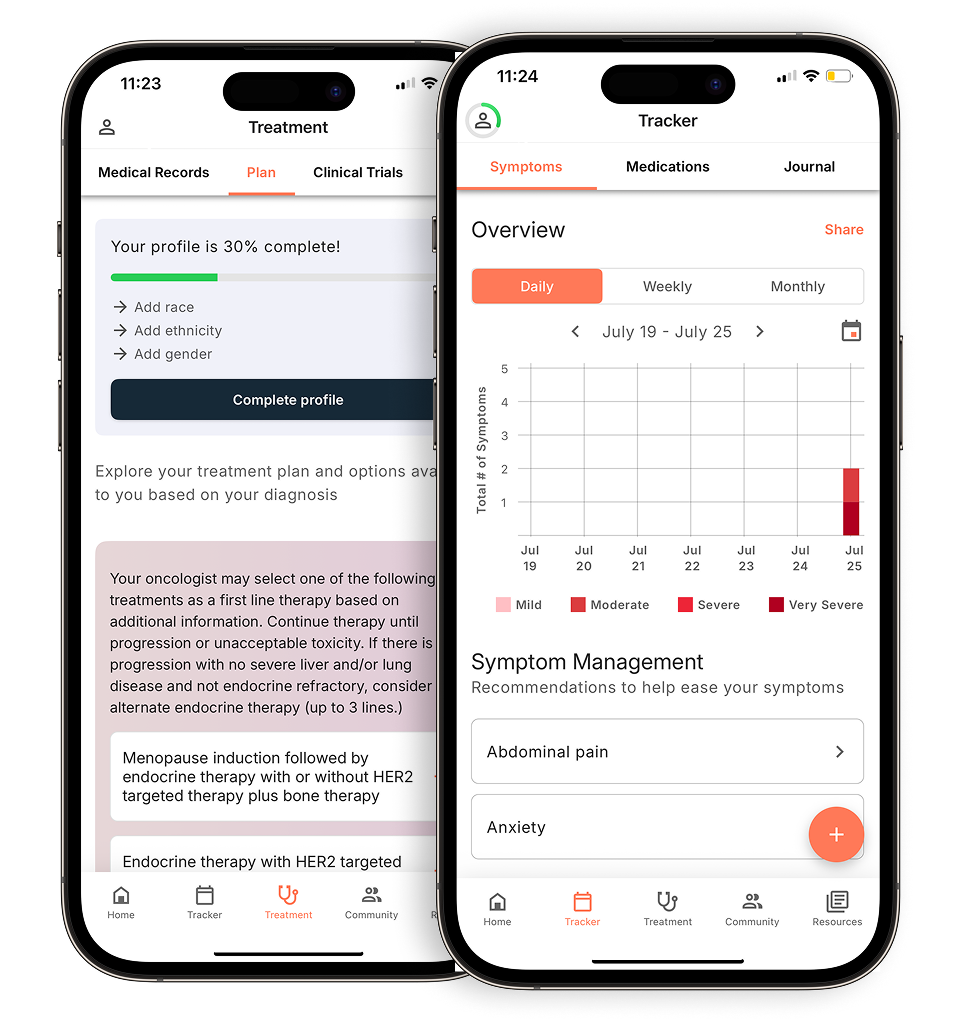
View your personalized treatment plan in the Outcomes4Me app
Use your diagnosis to unlock personalized NCCN Guidelines®-aligned recommendations.
Key Takeaways
- Organize Your Care in One Place: Use a lung cancer app to consolidate your appointments, medication schedules, and symptom logs. This central hub reduces the mental load and helps you feel more in control of your treatment journey.
- Have More Productive Doctor Visits: By consistently tracking your symptoms and side effects, you can provide your doctor with a clear, data-backed picture of your health, leading to better conversations and more personalized care decisions.
- Make Tracking a Simple Daily Habit: To get the most value from an app, integrate it into your daily routine. Link tracking to an existing habit, like your morning coffee, to build a comprehensive health record that truly supports you and your care team.
What Is a Lung Cancer App, and How Can It Help?
A lung cancer app is a digital tool on your smartphone designed to help you and your loved ones manage the day-to-day realities of a diagnosis. Think of it as a central hub for everything related to your health—from tracking symptoms and medications to keeping your appointment schedule straight. When you’re dealing with so much new information, having a tool that simplifies things can make a world of difference.
These apps are built to give you more clarity and control over your care. Instead of juggling notebooks, calendars, and loose papers, you can have all your vital information organized and accessible with just a few taps. This helps you play a more active role in your treatment, communicate clearly with your doctors, and reduce the feeling of being overwhelmed that so often comes with a cancer diagnosis.
Take Control of Your Treatment Journey
A lung cancer diagnosis can feel like it takes away your sense of control, but an app can help you get some of that back. By giving you a simple way to log your symptoms, side effects, and how you’re feeling each day, you create a detailed record of your health. This isn’t just for you—it’s powerful information to bring to your next doctor’s visit. This proactive approach to managing your health helps you become a more confident and active partner in your treatment decisions.
Talk More Effectively with Your Care Team
Clear communication with your doctors and nurses is one of the most important parts of your care. A good app helps you prepare for every appointment. You can jot down questions as they come to you and have your tracked symptom data ready to share. This means you can have more focused, productive conversations about what’s working and what isn’t, leading to a shared decision-making process that truly reflects your needs and preferences.
Stay Organized and Reduce Overwhelm
Appointments, medication schedules, test results—it’s a lot to keep track of. A lung cancer app acts as your personal organizer, consolidating all of this information into one secure place. Instead of feeling scattered, you can see your upcoming schedule, get reminders to take your medicine, and review your treatment history at a glance. By streamlining the logistics, these apps help reduce the stress and mental load, freeing you up to focus on your recovery and well-being.
What Makes a Great Lung Cancer App?
When you’re managing a lung cancer diagnosis, the last thing you need is another source of stress. The right app should feel like a capable, organized assistant—not another complicated task on your to-do list. But with so many options available, how do you know which one will actually make your life easier? The best apps aren’t just digital notebooks; they are comprehensive tools designed to simplify the complexities of your care.
A great lung cancer app centralizes the most critical aspects of your treatment journey. It should help you keep track of how you’re feeling day-to-day, manage a complex schedule of medications and appointments, and access reliable information without having to sift through endless search results. More than just an organizer, it should empower you to have more productive conversations with your doctors and allow your loved ones to support you more effectively. Think of it as your personal health headquarters, a single, secure place for everything related to your care. Below are the key features that separate a truly helpful app from the rest.
Track Symptoms and Side Effects
Managing lung cancer often means managing its symptoms and the side effects of treatment. A great app gives you a simple way to log how you’re feeling each day. Instead of trying to remember if your fatigue was worse last Tuesday or Wednesday, you can record it in the moment. Studies show that cancer apps are valuable tools for just this reason, helping you track everything from pain levels and shortness of breath to nausea and mood. This creates a clear, detailed record that you and your doctor can use to spot patterns, adjust treatments, and manage side effects before they become overwhelming. It turns vague feelings into useful data, giving you more control.
Manage Medications and Get Reminders
Your treatment plan can involve multiple medications, each with its own schedule and specific instructions. It’s a lot to keep track of. An essential feature of any good lung cancer app is a robust medication management tool. This allows you to list all your prescriptions and supplements, set custom reminders for when to take them, and log each dose. This simple function can reduce the mental load of managing your care and help you stay on track with your treatment plan. It provides peace of mind that you’re not missing anything important and creates an accurate log of what you’ve taken and when.
Keep Appointments and Tests in One Place
Between oncologist visits, blood tests, imaging scans, and consultations with specialists, your calendar can get crowded fast. A top-tier app acts as a central hub to organize your care. You can input all your appointments, complete with dates, times, locations, and notes. Many apps also allow you to store important documents, like lab results or scan reports, right alongside the appointment. This means no more digging through folders or emails for information when you’re in the doctor’s office. Everything you need is organized and accessible right from your phone, helping you feel more prepared and less overwhelmed.
Share Information with Your Doctor and Loved Ones
Clear communication is key to getting the best care. The data you track in your app is most powerful when it’s shared. A great app makes it easy to show your doctor your symptom logs, medication history, and any questions you’ve noted. This helps you have more productive conversations during appointments because you can provide a clear, data-backed picture of your experience. Many apps also let you share access with a trusted family member or caregiver. This keeps your support system in the loop, allowing them to understand what you’re going through and offer help where it’s needed most, whether it’s picking up a prescription or just being there for a tough day.
Access Trusted Educational Resources
When you have questions about your diagnosis or treatment, you need answers you can trust. The internet can be a minefield of conflicting and inaccurate information. A standout lung cancer app cuts through the noise by providing a library of vetted, evidence-based educational materials. This means you can find reliable articles, videos, and guides about your specific type of lung cancer, different treatment options, and ways to manage side effects, all within the app. Having this expert-approved information readily available saves you time and worry, ensuring you’re making decisions based on sound medical knowledge.
Get Personalized, AI-Powered Insights
The most advanced apps go beyond just tracking and organizing information. They use smart technology, like artificial intelligence (AI), to offer personalized insights based on your unique health data. After you securely provide your medical history, the app can analyze your information to identify potential treatment options or clinical trials that may be right for you. This transforms the app from a passive record-keeper into an active partner in your care. It helps you and your care team explore all available avenues, ensuring your treatment plan is as comprehensive and tailored to you as possible.
5 Recommended Apps for Tracking Lung Cancer
Finding the right app is a personal choice, but these five options are excellent starting points for anyone living with lung cancer. They are all designed to help you organize your health information, track your progress, and feel more in control of your care plan. Each one offers a unique set of features, so you can find the one that best fits your needs.
Outcomes4Me
Outcomes4Me is a free, AI-powered app that acts as your personal guide. It gives you access to personalized treatment options, clinical trial matches, and the latest medical information based on your specific diagnosis. The app helps you track your symptoms and medications, and it’s the only platform that integrates directly with the NCCN Clinical Practice Guidelines in Oncology (NCCN Guidelines®) and presents them in a way that’s easy to understand. This app truly empowers you to manage your cancer journey by putting evidence-based information right at your fingertips, making it easier to have informed conversations with your care team.
Cancer.Net Mobile
From the American Society of Clinical Oncology (ASCO), Cancer.Net Mobile is a trusted resource created by cancer doctors. The app provides reliable information on over 125 types of cancer, including lung cancer. It’s a fantastic tool for keeping everything organized in one place. You can use it to track your symptoms and side effects, jot down questions for your oncologist, and keep a detailed log of your medications and dosages. Having a tool that provides trusted information from a credible source can give you peace of mind and help you feel more prepared for every appointment.
LUNGevity Lung Cancer Navigator
Specifically designed for the lung cancer community, this app from the LUNGevity Foundation is a comprehensive tool for managing your care. The LUNGevity Lung Cancer Navigator gives you access to the latest medical information tailored to your specific type of lung cancer. It helps you organize your care team’s contact information, track symptoms, and manage your medications. The goal of this app is to help people with lung cancer understand and manage their condition by providing specialized resources and support, connecting you with a community that truly gets it.
Lung Cancer Manager
If you’re looking for a straightforward way to keep a detailed health diary, the Lung Cancer Manager is a great option. This app is designed to help you track and store all your important health information. You can record specific details about your medications, treatments, and any lung-related symptoms or side effects you experience over time. It’s a practical tool for patients who want to maintain a comprehensive record of their health status. Having a detailed log makes it easier to spot patterns and share precise updates with your doctor, ensuring nothing gets overlooked during your check-ins.
ACS CARES
The American Cancer Society’s ACS CARES app is focused on providing personalized support and resources throughout your cancer experience. It connects you with trained community volunteers and offers a supportive network to help you feel less alone. The app delivers tailored information based on your diagnosis and where you are in your treatment. For lung cancer patients seeking guidance and a strong sense of community, this app is an excellent resource. It helps people dealing with cancer by combining practical information with the human connection that is so important during treatment.
Common Questions About Using a Tracking App
Deciding to use an app to manage your health is a big step, and it’s completely normal to have questions. It’s smart to think through the details before you commit to a new tool, especially when it involves your personal health information. Let’s walk through some of the most common concerns so you can feel confident choosing and using an app that’s right for you.
Is My Health Data Safe and Private?
This is one of the most important questions you can ask. Handing over your health information requires trust, and you deserve to know it’s being protected. Reputable health apps use encryption and follow strict security protocols to keep your data safe. However, it’s true that digital health tools come with potential data privacy risks. Before downloading, always read the app’s privacy policy. Look for apps that are HIPAA-compliant, which means they follow federal laws designed to protect sensitive patient health information. Your peace of mind is paramount, so choose an app from a company that is transparent about how it stores and uses your data.
What If I’m Not Tech-Savvy?
You don’t need to be a tech expert to benefit from a lung cancer app. The best ones are designed with you in mind, featuring simple, intuitive layouts that are easy to use. While it’s true that some cancer apps have limitations and might feel complicated, many offer tutorials or customer support to help you get started. My advice? Start small. Pick one feature, like symptom tracking, and get comfortable with it before exploring others. The goal is for the app to reduce your stress, not add to it. If an app feels overwhelming, it’s not the right one for you.
How Do I Stay Consistent with Tracking?
Building a new habit takes time, especially when you’re already managing so much. The key is to make tracking a seamless part of your daily routine. Try linking it to something you already do, like checking your phone when you wake up or while having your morning tea. Set a daily reminder on your phone to prompt you. Remember why you started: studies show that these apps can be incredibly helpful tools for staying informed and managing your care. When you see how the data helps you have more productive conversations with your doctor, staying consistent will feel less like a chore and more like an act of self-care.
How Can I Ensure My Information Is Accurate?
The insights you get from a tracking app are only as good as the information you put in. To ensure accuracy, try to log your symptoms, medication intake, and feelings as they happen, or as soon as possible afterward. This prevents you from forgetting important details. Research shows that even simple self-reported data on your symptoms and daily activities provides a clear picture of your quality of life for your care team. Before each doctor’s appointment, take a few minutes to review your recent entries. This not only helps you spot any errors but also prepares you to discuss your experiences clearly and confidently.
How to Get the Most Out of Your Lung Cancer App
Downloading an app is the first step, but turning it into a reliable tool for your health journey requires a little intention. Think of it as a digital partner—the more you put into it, the more it can support you. Integrating an app into your daily life doesn’t have to be complicated. By building a few simple habits, you can transform it from just another icon on your screen into an essential part of your care plan. These strategies can help you harness the full power of your chosen app, making it easier to manage your treatment, communicate with your team, and feel more in control. The key is to find a rhythm that works for you, ensuring the app serves your needs without adding stress.
Create a Simple Tracking Routine
Consistency is your best friend when it comes to tracking your health. To make it a habit, try linking it to something you already do every day. Maybe you can log your symptoms while you have your morning coffee or enter your medication details right after you take them. The goal is to make tracking feel like a natural part of your day, not a chore. The best apps for people living with cancer are the ones that fit your personal needs and are comfortable for you to use. Set a daily reminder on your phone for the first few weeks until the routine sticks. A few minutes each day can build a comprehensive health record that becomes invaluable over time.
Use Your App to Prepare for Appointments
Walking into a doctor’s appointment with clear, organized information can make a world of difference. Before your next visit, take 15 minutes to review the data in your app. Look for patterns in your symptoms, note any side effects that have been bothering you, and write down questions that come to mind. Some apps even allow you to share your health information directly with your provider, which can lead to more productive conversations. Instead of trying to remember how you felt three weeks ago, you’ll have a detailed log right at your fingertips. This helps you and your doctor make informed decisions together, ensuring your concerns are fully addressed.
Share Access with Caregivers and Family
You don’t have to manage everything on your own. Many health apps include features that let you share access with trusted family members or caregivers. This can be a huge relief, as it allows your support system to stay informed about your appointments, medications, and how you’re feeling without you having to provide constant updates. Using an app makes it easier to keep track of important information and get help from loved ones when you need it most. Granting access can empower your caregivers to assist with scheduling, pick up prescriptions, or simply offer support on a tough day because they have a clearer picture of what’s going on.
Connect with Community and Find Resources
Living with lung cancer can feel isolating, but your app can be a bridge to connection and support. Many platforms offer more than just tracking tools; they provide access to patient communities, educational articles, and local resources. You can find forums to chat with others who understand what you’re going through or use the app to create a private group for sharing updates with your inner circle. Some of the best apps for cancer patients help you find local events and build a sense of community. Tapping into these resources can provide emotional comfort, practical advice, and a powerful reminder that you are not alone.
Related Articles
- Exercise during lung cancer treatment – 4 tips for patients
- 5 Nonprofit Lung Cancer Organizations For Lung Cancer Patients
- Best Lung cancer books for patients | Outcomes4me
- Managing The Side Effects Of Lung Cancer Treatment
- Lung Cancer Diet Tips: Foods To Avoid For Patients
View your personalized treatment plan in the Outcomes4Me app
Use your diagnosis to unlock personalized NCCN Guidelines®-aligned recommendations.
Frequently Asked Questions
Will my doctor actually pay attention to the data I track in an app? This is a great question, and the answer often depends on how you present the information. Most doctors appreciate patients who are engaged in their own care. Instead of just handing them your phone, try using the app to summarize your experience. You could say something like, “I’ve been tracking my fatigue, and I noticed it’s consistently worse on these specific days. Can we look at the pattern together?” The app becomes a tool that helps you provide a clear, concise history, which allows your doctor to get a better picture of your day-to-day life and make more informed recommendations.
How do I choose the best app for my specific needs from the list you provided? The best app for you really comes down to your personal priorities. Before you download anything, ask yourself what you need most right now. If you’re looking for cutting-edge treatment options and clinical trial matches, an AI-powered tool like Outcomes4Me might be the perfect fit. If your main goal is to find a supportive community and connect with others, an app like ACS CARES could be more your speed. Think about your primary goal—whether it’s organization, information, or connection—and let that guide your choice.
Can a lung cancer app give me medical advice or replace my doctor? Absolutely not. It’s so important to remember that an app is a supportive tool, not a substitute for professional medical care. Think of it as your personal health organizer and information library. It can help you track symptoms, manage medications, and learn from trusted sources, but it cannot diagnose conditions or recommend treatments. Always discuss any information or insights you gain from an app with your oncologist or care team before making any decisions about your health.
Are these lung cancer apps free to use? Many high-quality cancer support apps, including all the ones mentioned in this post, are available for free. Companies and foundations create these tools as resources for the patient community. However, it’s always a good idea to double-check before you download. Some apps might offer optional in-app purchases or premium subscription levels for advanced features, but the core functions for tracking and organizing your health information are typically available at no cost.
What’s the best way to get started without feeling overwhelmed? The key is to start small and focus on one thing at a time. Don’t feel pressured to use every single feature on day one. Pick the one task that would make the biggest difference for you right now. For many people, that’s simply tracking one or two key symptoms or logging their medications. Once you feel comfortable with that single feature and it becomes a part of your routine, you can gradually explore other functions, like preparing for appointments or accessing educational resources. The goal is for the app to simplify your life, not complicate it.