
Sometimes, the most important health insights aren’t found in a single moment, but in the patterns that emerge over days and weeks. It’s hard to see these connections when you’re just trying to get through the day. A cancer treatment and symptom tracker app acts as your personal health detective, helping you connect the dots. You might notice that your nausea is worse after a certain food or that your energy levels dip at the same time every day. Identifying these trends allows you to be proactive in managing side effects and gives you specific, valuable information to share with your doctors.
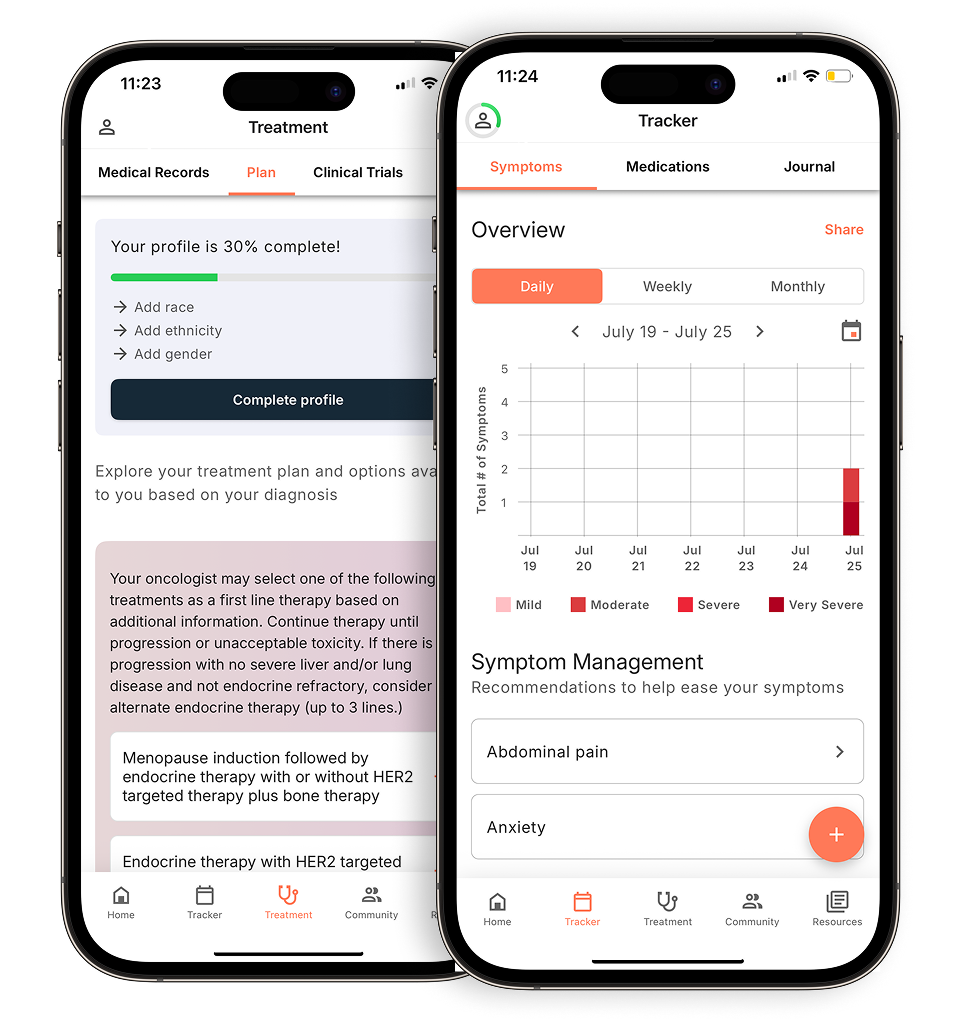
View your personalized treatment plan in the Outcomes4Me app
Use your diagnosis to unlock personalized NCCN Guidelines®-aligned recommendations.
Key Takeaways
- Improve conversations with your care team: Consistently logging your symptoms provides a clear, factual record of your experience between appointments. This data helps you and your doctor identify patterns and make more informed decisions about managing side effects.
- Prioritize features that truly support you: A great app goes beyond basic logging. Look for essential tools like medication reminders, secure data-sharing options, and access to personalized, evidence-based information that is relevant to your specific diagnosis.
- Integrate tracking into your daily routine: To get the most out of an app, make logging your symptoms a consistent habit, like taking your daily medication. Remember that the app is a powerful tool to support your care, but it should never replace direct medical advice from your healthcare provider.
What is a cancer treatment and symptom tracker app?
Think of a cancer treatment and symptom tracker app as a digital health journal designed specifically for your cancer journey. It’s a tool that lives on your phone or tablet, helping you keep all the important details about your health in one organized, accessible place. Instead of relying on scattered notes or memory alone, these apps provide a structured way to log your experiences day by day.
At its core, an app like this helps you record and monitor everything from your daily symptoms and side effects to your medication schedules and upcoming appointments. You can track things like fatigue levels, pain, nausea, mood, and sleep patterns. This information, collected over time, can be incredibly powerful. It helps you and your care team see the bigger picture of your health, notice patterns you might have otherwise missed, and understand how your body is responding to treatment.
The ultimate goal is to make managing your care a little less overwhelming. By keeping a consistent record, you can have more informed and productive conversations with your doctors. Instead of just saying you “felt tired,” you can show them exactly when and how intensely you experienced fatigue. These detailed insights can facilitate communication with your healthcare providers, leading to better-managed side effects and a treatment plan that truly works for you. It’s about giving you a tool to become a more active and empowered partner in your own health journey.
What can a tracking app do for you?
When you’re going through cancer treatment, it can feel like you’re juggling a million different things—appointments, medications, symptoms, and a flood of new information. A tracking app on your phone can be an incredible ally in this process. Think of it as a dedicated digital notebook that helps you organize the details, make sense of your symptoms, and feel more in control of your health journey. By consistently logging how you feel and what you’re experiencing, you create a detailed record of your health over time. This information isn’t just for you; it’s a powerful tool that can help you and your care team make more informed decisions together. Instead of trying to remember how you felt three weeks ago, you’ll have clear, organized data right at your fingertips. This simple habit can transform your conversations with your doctors and help you take a more active role in managing your care.
Improve communication with your healthcare team
Walking into a doctor’s appointment, it can be tough to accurately recall every symptom or side effect you’ve experienced since your last visit. A tracking app solves this problem by capturing your day-to-day experiences in real time. When you can show your doctor a log of your fatigue levels, pain, or nausea, it provides a much clearer picture than memory alone. This data helps your care team understand how treatment is affecting you and make adjustments if needed. Studies show that using mobile apps to monitor these patient-reported outcomes can significantly enhance communication, making your appointments more focused and productive.
Stay on top of medications and appointments
A cancer treatment plan often involves a complex schedule of medications, infusions, scans, and follow-up appointments. It’s a lot to keep track of, and missing a dose or an appointment can be stressful. Many tracking apps have built-in reminders and calendars to help you manage your schedule. You can log every medication you take, including the dosage and time, creating a perfect record for your medical team. This digital organization helps reduce the mental load of managing your treatment, freeing you up to focus on your well-being. Having a single place to keep a log of your medications ensures you and your providers are always on the same page.
Recognize patterns in symptoms and side effects
Sometimes, symptoms that seem random are actually part of a pattern. Consistently tracking how you feel can help you connect the dots. You might notice that your nausea is worse after eating a certain food or that your energy levels dip at the same time every day. Identifying these trends allows you to be proactive in managing side effects. For example, you can adjust your meal times or schedule rest periods when you know you’ll need them most. Some apps even let you track your vitals and mood, giving you a holistic view of your health and helping you pinpoint what makes you feel better or worse.
Access educational resources and support
Beyond tracking, the best apps serve as a reliable source of information and encouragement. Living with cancer comes with a lot of questions, and it’s crucial to get answers from trustworthy sources. Many apps provide access to libraries of medically-vetted articles, videos, and resources tailored to your specific diagnosis. This helps you learn more about your condition and treatment options at your own pace. Some platforms also offer community features, connecting you with other patients who understand what you’re going through. This combination of curated content and community support can make you feel less alone and more empowered on your journey.
What features should you look for in an app?
With so many health apps out there, it can be tough to know which one is right for you. A great cancer tracking app does more than just log data; it becomes a trusted partner in your care. The best apps are designed with your specific needs in mind, helping you feel more organized and in control. When you’re evaluating your options, look for these key features to make sure you’re choosing a tool that will genuinely support you.
Comprehensive symptom and mood tracking
Managing cancer treatment often means managing a wide range of physical and emotional side effects. A solid app will let you track not just symptoms like fatigue or nausea, but also your mood and overall well-being. This creates a detailed record you can look back on to see patterns. More importantly, it gives you concrete information to share with your doctor. Research shows that using apps to monitor patient-reported outcomes can significantly improve communication with your care team, ensuring your concerns are heard and addressed. Having this data at your fingertips turns a vague feeling of “not being well” into a specific conversation about your quality of life.
Medication and appointment reminders
Between doctor’s visits, scans, and medication schedules, it’s easy to feel overwhelmed. A reliable app with built-in reminders can be a lifesaver. Look for a feature that allows you to set up alerts for when to take your medications, when your next appointment is, or even when you need to call for a prescription refill. This simple tool can help you stay on track with your treatment plan and reduce the mental load of managing your care. As one review of helpful apps noted, a good tool helps you keep a log of your medications and appointments, so you have one less thing to worry about.
Secure data sharing with your doctors
Your health information is incredibly personal, so security should be a top priority. Before you start using an app, make sure it has a clear privacy policy and uses secure methods to protect your data. The best apps also make it simple to share your tracked information with your doctors or caregivers. This might be through a printable report or a secure digital dashboard. The ability to share data easily means your healthcare team gets a fuller picture of your experience between visits. As studies point out, the way apps handle data collection raises valid concerns about privacy and security, so choosing a trustworthy platform is essential.
Evidence-based treatment guidance and clinical trial matching
While tracking is useful, some of the most powerful apps go a step further by providing personalized, evidence-based information. Look for apps that can connect you with resources tailored to your specific diagnosis, like information on your treatment options or matching you with relevant clinical trials. The most credible apps base their guidance on established guidelines from trusted oncology organizations. This feature transforms the app from a simple diary into a powerful educational tool. It supports the call from experts for better collaboration between oncologists and app developers to give patients the best information and enhance communication with their providers.
A user-friendly and accessible design
The last thing you need when you’re managing your health is a complicated app that causes more frustration. A well-designed app should be intuitive and easy to use from the moment you open it. The layout should be clean, the text easy to read, and the process of logging your symptoms or medications should take only a minute or two. If an app is clunky or confusing, you’re less likely to use it consistently. Studies have found that major reasons people stop using health apps are usability challenges and the time commitment. A user-friendly design shows that the developers understand and respect your time and energy.
Which cancer tracking apps should you consider?
With so many apps available, finding the right one can feel like another task on your to-do list. To help you get started, I’ve gathered a few of the most recommended apps for tracking symptoms and managing cancer care. Each one offers something a little different, so think about what features matter most to you as you read through the options. Whether you need detailed symptom graphs, personalized treatment information, or a simple way to log your mood, there’s likely an app here that can support you on your journey. Remember, these tools are designed to help you organize information and communicate more effectively with your doctors, not to replace their medical advice.
Outcomes4Me
Outcomes4Me is a powerful tool that goes beyond basic symptom tracking. It’s designed to give you personalized information based on your specific diagnosis and medical records. According to Cancer Therapy Advisor, the app helps you “track their symptoms and treatment outcomes, providing personalized insights based on their specific cancer type.” It stands out by integrating with NCCN Clinical Practice Guidelines in Oncology (NCCN Guidelines®) to help you understand your treatment options, find clinical trials, and manage your care with evidence-based information. This makes it a great choice if you want a comprehensive resource that actively helps you make informed decisions alongside your care team.
Cancer.Net Mobile
If you’re a visual person, Cancer.Net Mobile might be the perfect fit. This app helps you log and understand your symptoms by turning your data into easy-to-read graphs. As one review notes, it “automatically plots the severity, date, and time of your symptoms on an easy-to-read graph, helping patients manage their health more effectively.” This feature makes it much easier to spot patterns over time and share a clear picture of what you’re experiencing with your doctor. Beyond symptom tracking, the app also lets you record questions for your doctor, log medications, and access reliable patient education information from the American Society of Clinical Oncology (ASCO).
Bearable
Bearable was created by someone living with a long-term illness, and that patient-first perspective shines through in its design. It’s an incredibly user-friendly app for tracking not just physical symptoms but also your mood, sleep, energy levels, and daily activities. This holistic approach helps you connect the dots between how you feel and what you do each day. The Association of Oncology Social Work highlights that Bearable helps users “see patterns and set reminders.” If you’re looking for a simple, intuitive way to understand the full picture of your well-being, Bearable is an excellent option.
My Cancer Coach
Understanding your diagnosis is a critical part of feeling in control of your health. My Cancer Coach is an app focused on providing clear, reliable information tailored to you. The National Cancer Institute explains that it “provides personalized treatment information and helps patients understand their cancer diagnosis and treatment options, making it easier to manage their care.” It acts as a digital guide, offering a personalized calendar, a glossary of medical terms, and easy-to-understand articles and videos about your specific cancer type. This app is ideal if your main goal is to get a better handle on your diagnosis and the treatment path ahead.
CatchMyPain
Pain can be a constant and complex part of the cancer experience, and CatchMyPain is designed specifically to address it. This mobile app functions as a digital pain diary, allowing you to create detailed drawings and descriptions of your pain. An evaluation of mobile health applications found that it allows users to “track their pain levels and locations, providing valuable data that can be shared with healthcare providers to improve pain management.” By creating detailed reports, you can give your doctor a much clearer understanding of your pain than you might be able to describe in words alone, leading to more effective management strategies.
ArthritisPower
While not built specifically for cancer, ArthritisPower is a valuable tool for anyone dealing with treatment-related joint pain, a common side effect of chemotherapy and hormone therapy. The app was designed for people with arthritis to monitor symptoms, medications, and overall health. As noted in a review of cancer-focused apps, it’s also “useful for cancer patients managing joint pain.” If joint pain, stiffness, or inflammation are among your primary concerns, this app’s specialized tracking features can provide focused insights that you can share with your oncology team to find relief.
What are the common challenges of using a tracking app?
While a tracking app can be an incredible ally in your cancer care, it’s also fair to acknowledge that they aren’t always a perfect fit right out of the box. Like any new tool, there can be a learning curve and a few hurdles to clear. Knowing what these potential challenges are ahead of time can help you choose the right app and set yourself up for success.
The goal isn’t to find an app that’s flawless, but to find one that fits your life and your needs with the fewest roadblocks. From figuring out the features to building a new daily habit, being realistic about these common challenges is the first step. Think of it less as a list of warnings and more as a guide to help you find a tool that truly supports you without adding extra stress to your plate.
Learning the technology
Let’s be honest: when you’re focused on your health, the last thing you want is to fight with a confusing app. For many people, the biggest barrier to using a health app is simply the technology itself. Some studies have found that usability challenges and a simple lack of time to learn a new program are key reasons people stop using them. If an app isn’t intuitive, it can feel more like a chore than a help. That’s why it’s so important to look for an app with a clean, user-friendly design and clear instructions.
Finding the time to track consistently
Building a new habit takes time, and tracking symptoms every day is no exception. It’s easy to forget a day or two, especially when you’re not feeling your best. Some patients also express concerns about overreporting, worrying they might be bothering their care team with side effects that don’t seem serious. But remember, consistent tracking—even of minor symptoms—is what helps you and your doctor see the bigger picture. To make it easier, try linking your tracking to an existing daily routine, like when you take your morning medications or before you go to bed.
Finding an app specific to cancer
There are thousands of health and wellness apps available, but very few are designed specifically for the cancer journey. While a general symptom tracker might be able to log a headache, it likely won’t have options for more specific side effects like chemo-induced neuropathy, mouth sores, or fatigue. A cancer-specific app is built to understand your unique experience. It can provide more relevant tracking options, connect you with evidence-based treatment information, and offer resources that are actually tailored to what you’re going through.
Keeping your data private and secure
Your health information is deeply personal, so it’s completely normal to be concerned about privacy when using a digital tool. It’s crucial to understand how an app collects, stores, and shares your data. Before you download and start using an app, take a moment to review its privacy policy. Reputable apps will be transparent about their security measures and how they protect your information. Look for apps that are clear about their data privacy practices and give you control over who sees your health data.
How do you choose the right app for you?
With so many options available, picking the right app can feel like one more overwhelming decision. But it doesn’t have to be. The best app for you is the one that fits your specific needs, feels easy to use, and genuinely makes your life a little simpler. Think of it as finding a reliable partner for your health journey. To narrow down the choices, focus on what matters most to you and your care. These four considerations will help you find a tool that supports you without adding to your mental load.
Consider your cancer type and treatment stage
Your diagnosis and where you are in your treatment journey play a huge role in what you’ll need from an app. As the LUNGevity Foundation notes, “You should choose an app that fits what you need and what you’re comfortable using.” Someone with a specific type of lung cancer might need an app that tracks targeted therapy side effects, while a person with breast cancer may want one that focuses on hormonal therapy symptoms. Your needs will also change over time. An app that helps you understand initial treatment options might be perfect at diagnosis, but you may want different features, like long-term wellness tracking, once you move into survivorship.
Think about your comfort level with technology
Let’s be honest: not everyone is a tech wizard, and that’s perfectly okay. The last thing you need is an app that causes more stress. Look for a tool with a clean, intuitive design that you can start using without a steep learning curve. Some patients worry about “overreporting” side effects, so an app that guides you on what to track can be incredibly helpful. Before committing, see if you can watch a demo video or look at screenshots. A good app should feel like a helpful assistant, not a complicated piece of software you have to fight with.
Check if it integrates with your care team
An app becomes truly powerful when it acts as a bridge between you and your doctors. The ability to securely share your tracked data—like symptom severity, medication adherence, and mood fluctuations—can transform your appointments. Instead of trying to recall how you felt three weeks ago, you can show your oncologist clear patterns over time. This supports better patient-provider communication and helps your care team make more informed decisions. As researchers have pointed out, this integration is key to enhancing symptom recognition and improving care.
Remember: An app is a tool, not a doctor
This might be the most important point of all. While these apps provide incredible support and information, they are not a substitute for professional medical advice. As the experts at SERO remind us, “These apps are meant to help, but they do not replace the advice and care from a medical team.” Use your app to get organized, track your experience, and feel more empowered in your conversations with your doctor. But always, always consult your healthcare provider for medical advice, diagnoses, and treatment plans. The app is there to support your care, not to direct it.
How do you get started and make the most of your app?
Once you’ve chosen an app, the next step is to make it a seamless part of your routine. Like any new tool, it takes a little time to get it working for you. Investing a bit of effort upfront will help you get the most accurate insights and support. Think of it as personalizing your new digital health companion. These simple steps will help you integrate the app into your life so it can start making a real difference in your care.
Set up your profile and medical information
The first thing you’ll want to do is fill out your profile with as much detail as you can. This step is crucial because the more information the app has about your specific diagnosis, stage, and treatment history, the more personalized its guidance will be. For apps like ACS CARES, a complete profile is also what connects you with the right support communities. Take a few minutes to enter your medical information accurately. This ensures the resources, treatment options, and clinical trial matches you receive are truly relevant to your unique situation, making the app a powerful tool from day one.
Create a tracking routine that sticks
For a tracking app to be effective, consistency is key. The best way to stay on top of it is to build it into your daily life. Try setting a reminder on your phone for the same time each day, or link the task to an existing habit, like when you take your morning medications. Some people worry about overreporting symptoms that don’t seem serious, but it’s important to log everything. A consistent tracking routine helps you and your care team see the full picture, ensuring that even subtle patterns are captured. Don’t second-guess yourself—if you’re feeling it, log it.
Share your app data with your healthcare team
One of the biggest benefits of using a tracking app is having concrete data to share with your doctors. Instead of trying to remember how you felt three weeks ago, you can show them a clear record of your symptoms, side effects, and mood. This information can lead to more productive conversations and better-informed treatment decisions. Many apps have a feature to export or share your data directly. Using an app can significantly improve patient-provider communication and helps ensure your care plan is tailored to your real-life experiences. Don’t be shy about bringing your phone or a printout to your next appointment.
Get comfortable with the technology
New technology can sometimes feel overwhelming, and it’s okay if there’s a learning curve. Give yourself some time to explore the app without any pressure. Tap on different buttons, check out the settings, and see what each feature does. Some of the most common reasons people stop using an app are because they feel they lack time or face usability challenges. Taking 15 minutes to familiarize yourself with the layout can help you overcome these hurdles. Look for a “Help” or “FAQ” section if you get stuck. The goal is for the app to feel like an intuitive and supportive tool, not another complicated task on your to-do list.
Related Articles
- Tracking breast cancer symptoms matters: why it matters
- Symptom tracking made for breast cancer – Outcomes4Me
- A simpler, easier way to track your cancer medications – Outcomes4Me
- Free Cancer Care Support App (Download) | Outcomes4Me
- Can Decluttering Help Your Cancer Treatment?
View your personalized treatment plan in the Outcomes4Me app
Use your diagnosis to unlock personalized NCCN Guidelines®-aligned recommendations.
Frequently Asked Questions
Are these cancer tracking apps free to use? Most of the reputable apps designed for cancer patients, including the ones mentioned in this post, are free to download and use. Their goal is to provide support and resources without adding a financial burden. Some apps might offer premium features for a fee, but the core functions for tracking symptoms, medications, and appointments are typically available at no cost. It’s always a good idea to check the app’s description in the app store before you download it.
How often should I be logging my symptoms? The most helpful approach is to log your symptoms once a day. This creates a consistent record that makes it easy to spot patterns over time. Try to pick a specific time that works for you, like in the morning or before bed, to make it a regular habit. If you experience a sudden or severe new symptom, it’s a good idea to log it right away. The goal is consistency, not perfection, so don’t worry if you miss a day here and there.
Can my caregiver help me use the app? Absolutely. Many patients find it helpful to have a caregiver, family member, or trusted friend assist with the app. They can help you set up your profile, enter information, and remember to track your symptoms, especially on days when you’re not feeling well. Some apps even have features designed for caregivers to share information securely. It can be a great way to keep everyone on your support team informed and involved in your care.
What happens to my health data when I use one of these apps? Your privacy is a top priority, and trustworthy apps take it very seriously. Before you start, you should always review the app’s privacy policy to understand how your information is protected. Reputable apps use secure methods to store your data and give you full control over who can see it. Your personal health information is not shared without your explicit permission. The data you enter is primarily for you and for you to share with your healthcare team to improve your care.
Why can’t I just use a regular notebook or a generic health app? While a notebook is a good start, a cancer-specific app offers powerful advantages. These apps are designed to track symptoms unique to cancer and its treatments, which a generic app won’t include. They can also organize your data into graphs to help you and your doctor see trends more clearly. Beyond tracking, they often provide personalized, evidence-based resources, like information on your specific diagnosis or potential clinical trials, turning your data into actionable insights for your health journey.